
EASIS Data Recovery is a professional data recovery software designed to retrieve lost, deleted, or inaccessible files from various storage devices, including hard drives, SSDs, USB flash drives, and memory cards. Developed by EASIS, a European company with a focus on data recovery, file repair, and computer forensics, this tool is particularly well-regarded in European markets and offers a multi-tiered approach to suit different user needs, from home users to professional investigators.
Data recovery software is non-destructive and read-only, capable of providing safe and accurate retrieval of data from inaccessible, formatted, corrupted, or undetectable storage media. All data including photos, pictures, videos, audio files, music, documents, emails, archives, and other file types lost due to accidental deletion, virus damage, drive corruption, formatting, partition loss, software failure, or system crash can be effectively recovered from all types of storage devices such as internal/external HDDs, SSDs, USB flash drives, pen drives, thumb drives, SD cards, memory sticks, and digital cameras.
EASIS Data Recovery works with storage devices of all capacities and supports Windows operating systems from Windows 7 through Windows 11, as well as Windows Server editions. The software is known for its clean, straightforward interface and its versatility, offering specific versions for home users, business professionals, and forensic examiners.
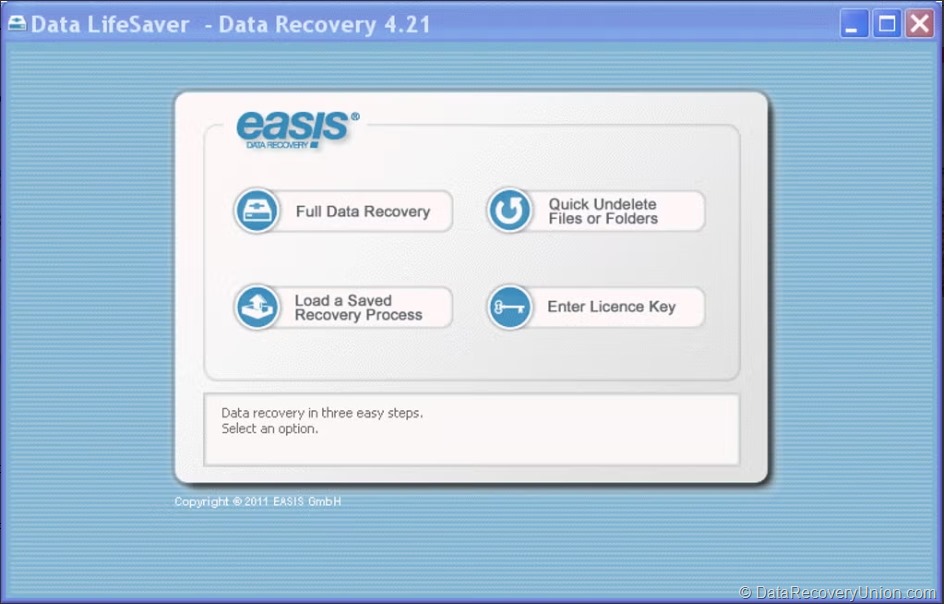
Key Features of EASIS Data Recovery
Comprehensive Device Support
- Standard Storage: Supports HDD, SSD, USB flash drives, and memory cards (SD, microSD, CompactFlash).
- Advanced Storage: Supports dynamic disks, hardware and software RAID 0, 1, 5, and JBOD configurations, as well as BitLocker encrypted drives.
- File Systems: Supports FAT, exFAT, NTFS, ReFS (Windows), HFS+ (Mac, via Professional/Forensic versions), and Ext2/3/4 (Linux).
Multiple Data Loss Scenarios
- Accidental Deletion: Recovers files deleted from the Recycle Bin or using Shift+Delete.
- Formatting Recovery: Retrieves data from drives that have been quick-formatted or fully formatted, including RAW drives.
- Partition Recovery: Restores lost or deleted partitions and rebuilds corrupted partition tables.
- System Crash: Can be run from a bootable environment or by connecting the drive to another PC.
- Email Recovery: Specialized recovery for Outlook PST/OST and other email formats.
Three Versions for Different Needs
EASIS offers specific versions optimized for different user groups:
- EASIS Data Recovery Home: Provides core file recovery functionality for typical home use scenarios like document and photo recovery. Offers a wizards mode for beginners and an expert mode for advanced users.
- EASIS Data Recovery Professional: Adds support for HFS+ (Mac) and Ext2/3/4 (Linux) file systems, advanced RAID reconstruction, and the ability to recover data from virtual machines (VHD, VMDK).
- EASIS Data Recovery Forensic: Aimed at law enforcement and investigators. Features write-protection, hashing (MD5, SHA), advanced filtering, and detailed logging for evidence integrity.
Signature-Based Search (Raw Recovery)
When the file system is severely corrupted or the partition is lost, EASIS can recover files based on their unique internal signatures (headers and footers). This “Raw Recovery” mode scans the drive sector-by-sector, looking for recognizable file patterns, allowing it to recover data even when the drive structure is completely missing.
File Preview & Filtering
Before committing to recovery, EASIS allows users to preview files. The preview supports images, text files, and various document formats, helping users confirm the integrity of the data before saving. It also includes robust filtering options to search for specific file names or types.
Hex Viewer & Disk Editor
For advanced users and forensic professionals, EASIS includes a built-in hex viewer and disk editor. This tool allows for low-level inspection of disk sectors and manual repair of disk structures, providing granular control for complex data loss scenarios.
Supported File Types
EASIS supports all common file types, with specific signatures for many raw formats. Supported types include:
| Category | Supported File Types |
|---|---|
| Documents | DOC, DOCX, XLS, XLSX, PPT, PPTX, PDF, RTF, TXT, HTML, and more. |
| Images & Graphics | JPG, PNG, BMP, GIF, TIFF, PSD, CR2, NEF, RAW, DNG, HEIC, and more. |
| Audio & Video | MP3, WAV, WMA, AAC, FLAC, AVI, MOV, MP4, MKV, WMV, and more. |
| Archives | ZIP, RAR, 7Z, TAR, GZ, CAB. |
| PST, OST, DBX, EML, MSG. |
How to Use EASIS Data Recovery
- Download and Install – Download the appropriate version (Home, Pro, or Forensic) from the official website. Important: Do not install the software on the drive from which you want to recover data, as this may overwrite lost files.
- Select the Recovery Goal – Launch the software. The interface usually offers a wizard mode that asks what you want to do (e.g., “Recover a deleted file” or “Recover a lost partition”) or an expert mode that lists all drives directly.
- Select the Target Drive – Choose the logical drive or physical disk you wish to scan. For lost partitions, you will need to select the physical disk.
- Choose a Scan Method – Select the appropriate scan type:
- Quick Scan: For recently deleted files (recovery of directory structures).
- Full Scan/Deep Scan: For formatted, corrupted, or RAW drives (scans for signatures).
- Review and Recover – Once the scan is complete, browse the file tree. Deleted files are often marked with a different icon. Preview the files, select the ones you need, and click “Recover”. Save the recovered data to a different drive.
Editions and Pricing
EASIS Data Recovery is available in three distinct tiers to match different requirements:
| Edition | Best For | Key Features |
|---|---|---|
| Home Version | Personal / Home use | Core file recovery (photos, documents). Supports FAT, NTFS, exFAT. Wizard mode for ease of use. |
| Professional Version | IT & Business | Adds HFS+ (Mac), Ext2/3/4 (Linux), RAID reconstruction, virtual machine recovery, and email recovery. |
| Forensic Version | Law Enforcement / Audit | Adds write-protection, hashing (MD5/SHA), advanced filtering, and detailed reporting for evidence integrity. |
Note: EASIS is a commercial product, but a free demo/trial is typically available. The demo allows you to scan drives and preview files, confirming that the software can find your lost data before you purchase a license. Pricing varies by version.
Known Limitations
While EASIS Data Recovery is a powerful professional tool, users should be aware of the following limitations:
- No Free Recovery Tier: The demo version allows scanning and previewing only. You must purchase a license to actually recover files, unlike some freemium competitors that offer limited free recovery (e.g., 1GB-2GB).
- Windows-Centric Setup: While the Professional version can read Mac/Linux drives, the software itself runs exclusively on Windows.
- Complexity for Beginners: The “Expert Mode” and advanced settings (like manual RAID parameters) can be intimidating for home users, though the Wizard mode mitigates this.
- Physical Damage Not Covered: Cannot recover data from physically damaged drives (broken connectors, burned circuit boards, water damage). Hardware repair is required first.
- Overwritten Data Cannot Be Recovered: If lost files have been overwritten by new data on the drive, recovery becomes impossible regardless of software quality.
- TRIM on SSDs: On modern SSDs with TRIM enabled, recently deleted files may be permanently erased almost immediately. This affects all data recovery software, including EASIS.
Comparison at a Glance
| Feature | EASIS (Professional) | Typical Competitors |
|---|---|---|
| File Systems | NTFS, FAT, HFS+, Ext, ReFS | Often Windows only (NTFS/FAT) |
| RAID Recovery | ✓ Software & Hardware RAID | Often limited or not available |
| Forensic Features | ✓ (Forensic Version) | Rarely included |
| Email Recovery | ✓ (Professional) | Not typically included |
Final Verdict: Is EASIS Data Recovery Right for You?
EASIS Data Recovery is a versatile and professional-grade recovery suite that bridges the gap between consumer-friendly software and forensic tools. Its tiered pricing model ensures that home users are not paying for enterprise features, while IT professionals have access to advanced RAID and cross-platform file system recovery.
This software is ideal for:
- IT Professionals: The Professional version supports cross-platform file systems (Mac/Linux) and RAID reconstruction, making it suitable for mixed environments.
- Home Users with Lost Partitions: The Home version provides easy access to deep scan and partition recovery without the complexity of professional tools.
- Forensic Examiners: The Forensic version offers write-protection and hashing algorithms essential for maintaining evidence integrity.
- Users Needing Email Recovery: The ability to recover deleted or corrupted Outlook PST/OST files is a specialized feature not found in all recovery tools.
Consider alternatives if:
- You need a free recovery tier – EASIS offers no free file recovery (only scan/preview).
- You are a Mac or Linux user – EASIS runs only on Windows.
- Your drive is physically damaged – professional hardware repair services are required regardless of software.
Pro Tip: After data loss, stop using the affected drive immediately. Do not add new files, run disk repair tools like CHKDSK, or attempt to format the drive. Use EASIS’s demo version first to scan and preview your files – this confirms whether your data can be recovered before you purchase a license. For RAID recovery, the Professional version is essential. Always save recovered files to a different drive than the one you’re recovering from.
Official website: www.easis.com
Disclaimer: Recovery success depends on multiple factors, including how long ago data was lost, whether the drive has been used since the loss, and the extent of corruption or physical damage. No data recovery software can guarantee 100% recovery in all situations. This article is for informational purposes only. All product names, logos, and brands are property of their respective owners.