
Data recovery on vintage hard drives like the Fujitsu MHV2100BH PL starts with identifying the failure type – electronic, firmware, or mechanical. Each requires a different approach, and misdiagnosis can make things worse. Here’s a quick guide to help you assess your situation and decide on the next step.
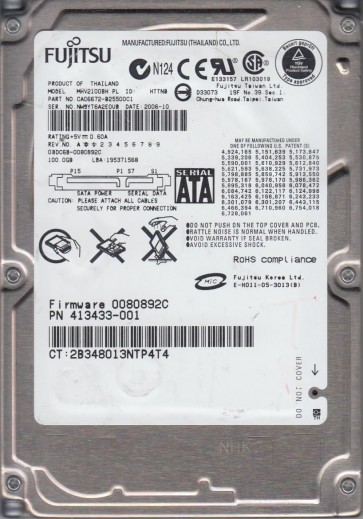
The Fujitsu MHV2100BH PL is a 2.5-inch, 100GB, 5400 RPM PATA (Parallel ATA) hard disk drive. It belongs to the MHV series, known for use in older laptops and portable storage enclosures. This drive features a glass platter design and a fluid dynamic bearing motor. Key identifying marks include the “MHV2100BH PL” label on the top cover. Understanding that this is a legacy PATA drive is crucial, as it requires an older interface (IDE) or a specific IDE-to-USB adapter for modern system connectivity. The “PL” suffix often indicates a specific firmware revision or OEM variant. These drives are susceptible to typical mechanical and electronic failures related to age, including platter degradation and head issues.
Identifying Common Failure Types
1. Mechanical Failure (Head Crash or Stiction)
This is the most serious failure. Symptoms include a clicking, scraping, or grinding noise from the drive. The drive may spin up but immediately shut down or produce a repetitive “click of death”. The heads have made contact with the platter surface, damaging the magnetic coating. Data recovery often requires a cleanroom environment to replace the damaged heads. This drive’s glass platters are brittle; a head crash can shatter the platter, making recovery impossible.
2. Electronic Failure (PCB Issues)
The drive’s printed circuit board (PCB) can fail due to power surges, component age, or physical damage. Symptoms include the drive not spinning up, no activity sound, or the drive being detected as an unknown device (e.g., “0 MB” or not listed in BIOS). Common failures include burnt TVS diodes (over-voltage protection), failed motor controller chips, or damaged preamplifier circuits. The PCB is located on the underside of the drive and is typically green.
3. Logical Failure (Firmware Corruption)
The drive spins up normally, is recognized by the system, but cannot access data. You might see errors like “I/O device error”, “The disk is not formatted”, or “Bad sectors”. The drive’s firmware tables (SA – System Area) may be corrupted. This can happen due to sudden power loss, bad sector growth, or improper handling. The drive may sometimes beep or tick irregularly but not continuously. This is often recoverable with specialized software or by reflashing firmware, but DIY attempts can worsen the problem.
Potential Recovery Paths
Professional Data Recovery Services
Recommended for: Mechanical failures, severe electronic damage, or when data is critically important. Professionals have cleanroom facilities (Class 10 or better), donor drives, and specialized tools (e.g., PC-3000, DeepSpar, Atola) to handle the Fujitsu MHV series. For mechanical issues, they can perform head transplants and platter transfers. For firmware issues, they can rebuild SA modules. Costs range from $300 to $3000+ depending on complexity. Look for a reputable lab with experience in PATA drives.
DIY Recovery (For Logical Issues Only)
Prerequisites: The drive must spin up properly and make no abnormal noises. You need a working PATA interface (internal desktop IDE cable or a reliable IDE-to-USB adapter like an Icy Dock or StarTech). Avoid cheap, unpowered adapters.
Software Options: 1. Use ddrescue (Linux) or HDDSuperClone to create a sector-by-sector image. This bypasses bad sectors and attempts to read the drive’s firmware area. 2. For file recovery from the image, use tools like R-Studio, PhotoRec, or DMDE. Do not write anything back to the original drive. 3. For minor file system corruption, run `chkdsk /f` on the image file (not the source drive) after cloning.
Firmware corruption: This requires advanced tools (e.g., MRT Pro, PC-3000) and is not recommended for typical DIY users. Incorrectly rewriting firmware can brick the drive permanently.
What Not to Do
- NEVER open the drive enclosure. The internal platter chamber is filled with filtered air. Even a single dust particle can destroy the platter surface. The magnetic coating is incredibly fragile.
- DO NOT power cycle the drive repeatedly if it makes clicking or grinding noises. This only causes more head-to-platter damage, erasing data.
- AVOID using software like “chkdsk /r” or “SpinRite” on a mechanically failing drive. These tools force the drive to retry failing sectors, often leading to head wear and complete failure.
- DO NOT apply pressure to the drive case or tap it to “free” a stuck head. This is ineffective and can misalign the heads or shatter the platters.
- NEVER attempt to replace the PCB unless it is confirmed to be a match from an identical donor drive (same model, same firmware revision, same date code). Using a PCB from a different revision can damage the drive’s preamplifier or burn the motor controller.
- DO NOT store the drive in extreme temperatures (freezer or oven). This condensation can cause short circuits and corrosion.
Summary
The Fujitsu MHV2100BH PL is a legacy PATA drive prone to mechanical head crashes, PCB failures, and firmware corruption. For mechanical or electronic issues, professional data recovery is the only safe path. For logical or firmware issues where the drive spins normally, a careful DIY approach using sector-by-sector imaging software (like ddrescue) on a cloned copy is possible, but risky. Never open the drive, never use recovery software on a failing drive, and never apply physical force. Success depends entirely on correct failure identification and immediate action to prevent further damage. Prioritize making a full disk image before attempting any file-level recovery.