
Data recovery on vintage hard drives like the Western Digital WD5000AVDS starts with identifying the failure type – electronic, firmware, or mechanical. Each requires a different approach, and misdiagnosis can make things worse. Here’s a quick guide to help you assess your situation and decide on the next step.
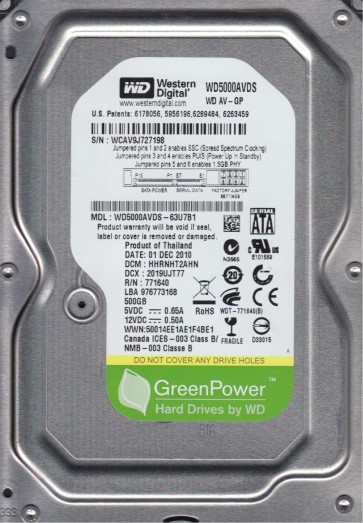
The Western Digital WD5000AVDS is a 500GB 3.5-inch hard drive from the WD AV-GP (Audio/Video General Purpose) series. It is designed for continuous operation in surveillance DVRs, media servers, and other streaming applications. Key features include a 5400 RPM spindle speed, a SATA 3Gb/s interface, and IntelliPower technology for power management. This drive uses a Marvell 88i9045-TFJ2 controller and stores two actuator magnets and voice coil assembly. Its platters are typically high-density, which makes data recovery more challenging than older, lower-density drives. Because it is optimized for low power consumption and noise, it may exhibit distinct failure patterns compared to high-performance desktop drives.
Common Failure Types
1. Bad Heads (Head Crash / Degradation): The WD5000AVDS commonly suffers from head failure due to wear from 24/7 operation or physical shock. Symptoms include clicking sounds (ticking), repetitive scratching, or the drive spinning but being undetected or reporting a very small capacity (e.g., 0GB). The drive may also emit a high-pitched whine. Cause: gradual degradation of the read/write head sliders or a sudden particle impact on the platter surface.
2. Stiction (Motor / Bearing Failure): This drive uses FDB (Fluid Dynamic Bearing) motors. Failure can cause the spindle motor to seize or spin with excessive resistance, resulting in the drive not spinning up or spinning up and then stopping. Symptoms: a faint electronic hum with no platter spin, or a single click followed by silence. Cause: lubricant migration, contamination, or a seized bearing after a long idle period.
3. Firmware Corruption (SA / Translator Issues): The WD5000AVDS relies on a System Area (SA) stored on the platters. Corruption of the firmware modules (e.g., defect lists, translator, SMART modules) can cause the drive to be detected with an incorrect model name, a wrong capacity, or to be completely invisible to the BIOS. Symptoms: drive detected as “WD5000AVDS” but with a capacity of 0MB, or it clicks after being identified. Cause: sudden power loss, degraded SA sectors, or a failing preamp that corrupts firmware reads.
4. SATA Connector / PCB (Printed Circuit Board) Failure: Physical damage to the SATA connector pins, a blown TVS diode, or a damaged controller chip (Marvell 88i9045) is frequent. Symptoms: drive is not detected at all, or detected intermittently. Burning smell or visible damage on the PCB (e.g., a charred diode). Cause: hot-plugging, power surge, or static discharge.
5. Logical Damage (File System Corruption / Bad Sectors): While not a mechanical failure, logical corruption is very common. The file system (NTFS, FAT32, exFAT) can become corrupted due to improper ejection, power loss while writing, or accumulating bad sectors on the platters. Symptoms: drive is recognized but shows as “RAW” or unallocated, prompts to format, takes extremely long to access directories, or displays file/folder corruption.
Potential Recovery Paths
Professional Services (Recommended for Any Mechanical or Firmware Failure): For head crashes, stiction, or firmware corruption, a cleanroom recovery lab is the only safe option. The process involves: (1) diagnosing the exact failure in a cleanroom (Class 10 or better). (2) For head failures: opening the drive, replacing the head stack assembly (HSA) with a matched donor from an identical WD5000AVDS or compatible donor drive, aligning the heads precisely over the platters. (3) For firmware issues: using specialized tools (e.g., PC-3000, MRT, or Data Extractor) to read SA modules via a serial port or via the SATA interface while bypassing the defective firmware. (4) For motor stiction: carefully freeing the motor with a controlled torque or applying a specific voltage to the spindle motor controller to break the stiction. Expect costs from $300 to over $2000 depending on complexity. Labs with a “no data, no fee” policy are preferred.
DIY Methods (Only for Specific Scenarios and at Your Own Risk):
- For Bad Sectors (Logical Damage / Read Errors): If the drive spins up fine but has slow reads or bad sectors, you can attempt a bit-by-bit clone using free tools like ddrescue (Linux) or HDD Raw Copy Tool (Windows). Connect the drive to a secondary SATA port (do not boot from it). Run ddrescue with a logfile to map bad sectors and skip them. This creates an image file that can be scanned with recovery software (e.g., R-Studio, DMDE, GetDataBack). WARNING: This can kill a failing drive quickly if the bad sectors are caused by a degrading head.
- For PCB Failure (TVS Diode / Connector): If the board is physically damaged but the MCU and preamp are intact, you can attempt a PCB swap. You MUST find a donor PCB with an identical model number (WD5000AVDS) and a matching board revision (e.g., 771692-000). However, due to adaptive data stored on the MCU ROM, you will need to transfer the original ROM chip (often an 8-pin serial flash) to the donor board. This requires soldering skills. A direct swap without ROM transfer will brick the drive or cause permanent head damage. Tools: hot air station, fine soldering iron, and a ROM programmer (e.g., CH341A).
- For Firmware Corruption (SA issues): This is extremely advanced. You would need a PC-3000 or similar tool to access the UART terminal of the Marvell controller. Scripts (like those in PC-3000’s utility for WD Marvell) can be used to rebuild the translator, regenerate a defect list, or patch key modules. A single wrong command can destroy the SA permanently. Only attempt if you have factory-level experience.
What Not to Do
1. Do Not Open the Drive Outside a Cleanroom. The internal platter surfaces are extremely sensitive. A single speck of dust can destroy the read/write heads or scratch the platters. Opening the drive in a standard environment makes professional recovery orders of magnitude harder and more expensive. If you already opened it, label and seal the drive in a static-free bag immediately.
2. Do Not Apply Power to a Clicking or Scratching Drive. Every second of operation when a head is scraping the platters or misaligned is destructive. Power it off immediately if you hear scratching or a repetitive click pattern. Continuing to power it on will further damage the platters and reduce the chance of recovery.
3. Do Not Use Data Recovery Software on a Failing Drive. Scanners, chkdsk (check disk), defragmenters, or any write-intensive tool (like ScanDisk or chkdsk /f) can rewrite the file system and corrupt the directory structure, making logical recovery impossible. If the drive has mechanical issues, these tools can also cause head crashes. Always clone the drive first.
4. Do Not Freeze the Drive. The “freezer trick” is an outdated myth that can cause condensation inside the drive, short circuits on the PCB, and permanent bearing damage. It does not fix head stiction or bad sectors and often makes matters worse. Never place a hard drive in a freezer.
5. Do Not Swap the PCB Without Transferring the ROM. As mentioned, the WD5000AVDS stores unique adaptive data (including head map and calibration tables) on an 8-pin serial flash chip on the PCB. Simply bolting on a donor board without swapping this ROM will send incorrect head control signals to the platters, likely causing a head crash. If you are not comfortable with soldering SMD components, do not attempt a PCB swap.
Summary
The Western Digital WD5000AVDS is a robust drive for AV applications but is prone to head degradation, firmware corruption, and PCB issues due to its design and usage patterns. For physical failures (clicking, scratching, not spinning), immediate professional cleanroom intervention is the only safe path. For logical corruption (RAW partition, slow reads) with a healthy mechanical state, DIY cloning with ddrescue followed by file recovery software is feasible. Never open the drive, apply power if it is clicking, or use aggressive repair tools on a failing unit. Successful recovery depends on prompt, careful action and avoiding destructive amateur procedures.