
Data recovery on vintage hard drives like the Fujitsu MHW2080AT starts with identifying the failure type – electronic, firmware, or mechanical. Each requires a different approach, and misdiagnosis can make things worse. Here’s a quick guide to help you assess your situation and decide on the next step.
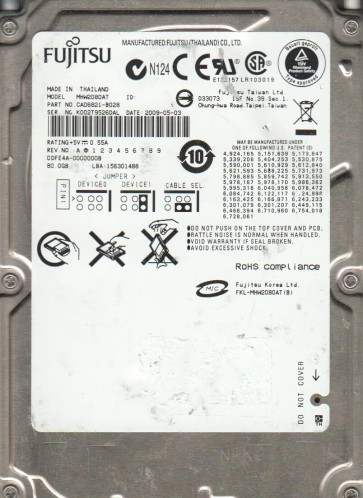
The Fujitsu MHW2080AT is a 2.5-inch, 80GB PATA (Parallel ATA) hard disk drive manufactured by Fujitsu. It features a rotational speed of 4200 RPM and uses a standard IDE interface. This drive was common in early to mid-2000s laptops. Its age and mechanical nature make it susceptible to specific failure modes related to wear, thermal stress, and electronic component degradation. Understanding that this is a physical device with moving parts is crucial for proper recovery planning.
Identifying Common Failure Types
1. Mechanical Failure (Head Crash / Stiction)
Symptoms include loud clicking, grinding, or whirring noises, or the drive being completely silent and not spinning up. The drive may be detected by the BIOS but then fails to read. A head crash occurs when the read/write head physically contacts the platter surface, damaging the magnetic coating. Stiction is when the heads stick to the platter after the drive has been idle for a long time. This is a hardware-level failure. Do not attempt DIY.
2. Firmware Corruption / Media Cache Errors
Symptoms include the drive being recognized with incorrect capacity (e.g., 0GB, or a very small size), being detected but not accessible, or taking an extremely long time to spin up. The drive may make normal spin-up sounds but then fail to communicate. This is often caused by corrupted module files on the service area of the platters. This can be a software-level issue but requires special tools to repair. Professional recovery is often required.
3. Logical File System Corruption
Symptoms include the drive spinning up and being detected by the BIOS, but the operating system reports “Disk not formatted,” “RAW file system,” or “Invalid media type.” You may be able to see the drive in Disk Management but not access its contents. This is typically a software-level issue caused by a corrupted partition table, boot sector, or file system structures (e.g., NTFS Master File Table). This can sometimes be addressed with DIY software, but caution is advised.
Potential Recovery Paths
Professional Data Recovery Services
This is the recommended path for any mechanical failure, firmware corruption, or if the data is critical. Look for a lab with Class 100 cleanroom capabilities and experience with Fujitsu drives. They will have specialized tools like PC-3000 or DeepSpar to handle firmware and hardware repairs. Expect costs to range from $300 to $2000+ depending on severity. A professional can often repair a head crash or replace damaged read/write heads with a donor drive.
DIY Software Recovery (For Logical Failures Only)
WARNING: DIY attempts are risky. Any write activity can permanently overwrite data. Only proceed if you have fully confirmed the failure is logical and you have a full sector-by-sector backup of the drive.
- Step 1: Create a Disk Image. Use a tool like DDRescue (Linux) or HDDSuperClone to create a raw image of the drive to a healthy, larger hard drive. Never work on the original drive.
- Step 2: Scan the Image. Use file recovery software like R-Studio, Recuva, or PhotoRec on the disk image. These tools can recover files by scanning for known file signatures (carving) rather than relying on the damaged file system.
- Step 3: Do not format, chkdsk, or perform any write operations on the original drive.
What Not to Do
- Never open the drive. The internal platters are extremely sensitive to dust and contamination. Even a single dust particle can cause a head crash. Opening it voids any chance of professional recovery and almost certainly destroys the data.
- Do not apply power if you hear clicking. Repeated power cycling can cause a minor head misalignment to become a complete head crash, scraping the platter surface.
- Do not use freezer or shock methods. Freezing a drive can cause condensation, leading to corrosion and short circuits. Tapping or dropping the drive is extremely destructive and will never fix a mechanical problem.
- Do not run chkdsk or any repair utility. For logical errors, these tools can attempt repairs that alter the file system, destroying the very data you are trying to recover. For physical issues, they will cause the drive to work harder, leading to further damage.
- Do not attempt to use a generic USB adapter repeatedly. If the drive is not detected, repeatedly connecting/disconnecting can stress the fragile electronics and the motor controller.
Summary
The Fujitsu MHW2080AT is an aging drive with a high probability of mechanical or firmware failure. The safest and most reliable path for data recovery, especially for critical data, is to send it to a professional recovery service. DIY methods should only be considered for clear logical file system corruption, and only after creating a full disk image. Avoid all physical tampering, repeated power cycling, and any write operations to the original drive. Your best chance of success lies in immediate, careful handling and professional intervention.