
Data recovery on vintage hard drives like the Fujitsu MHZ2160BJ G2 starts with identifying the failure type – electronic, firmware, or mechanical. Each requires a different approach, and misdiagnosis can make things worse. Here’s a quick guide to help you assess your situation and decide on the next step.
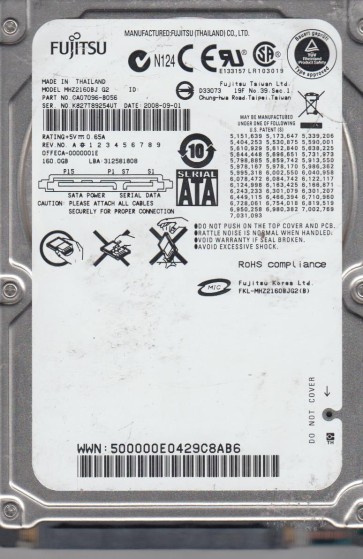
The Fujitsu MHZ2160BJ G2 is a 2.5-inch, 160GB SATA hard disk drive designed for laptops and external storage enclosures from the late 2000s. It features a 5400 RPM spindle speed, an 8MB cache buffer, and uses perpendicular magnetic recording technology. This drive is known for its relatively low power consumption and quiet operation, but it is susceptible to common failure modes found in drives of its generation, particularly related to head stack assembly (HSA) degradation and firmware instability. Understanding that this is a mechanical device with moving parts is critical to any recovery attempt.
Identifying Common Failure Types
1. Mechanical Failure – Head Crash or Stiction
Symptoms include loud clicking, grinding, or scraping noises, or the drive spinning up but immediately stopping (click of death). The drive may be detected by the BIOS but fails to read data. Often caused by physical shock, wear, or contamination. The read/write heads have contacted the platters or are stuck against the platters (stiction).
2. Firmware Corruption
The drive spins up normally (no unusual sounds) but is not detected by the BIOS or operating system, or it is detected with incorrect capacity (e.g., 0GB or 8MB). The drive may also respond with a “Ready” status but fail to access user data. This is often caused by a damaged firmware module on the service area of the platter or a failed system file. The MHZ series is known for weak SA (Service Area) tracks.
3. Bad Sectors / Media Degradation
The drive is detected and accessible, but extremely slow, frequently freezing, or reporting read errors. SMART data may show high reallocated sector counts, pending sectors, or uncorrectable errors. This is due to physical degradation of the magnetic platter surface over time or from a low-level shock event. The drive compensates by reallocating sectors, but this process can fail catastrophically.
4. PCB (Printed Circuit Board) Failure
The drive shows no signs of life – no spin-up, no noise, and is not detected. Often caused by power surges, overheating, or component failure (e.g., damaged TVS diodes, burnt motor controller). The motor may have seized, or the board’s preamp circuit is dead. This is the most straightforward to diagnose but requires matched PCB replacement.
Potential Recovery Paths
Professional Service
For any mechanical failure (head crash, stiction) or complex firmware issues, professional service is strongly recommended. A cleanroom environment (Class 100 or better) is required for opening the drive. A specialist will: (1) Replace the head stack assembly with a perfectly matched donor HSA; (2) Use specialized tools like PC-3000 or DeepSpar to repair firmware tables or bypass them via direct platter imaging; (3) For media degradation, perform a slow, segmented read with error recovery disabled to maximize data extraction. Cost ranges from $500 to $2000+ depending on severity. Always choose a facility with specific Fujitsu experience.
DIY Methods (High Risk – Use at Your Own Risk)
- For PCB failure (no spin): If you are sure the drive is mechanically intact, you can attempt a PCB swap. Obtain a donor PCB with EXACT model number (MHZ2160BJ G2) and firmware version. Transfer the original ROM chip (8-pin SPI Flash) from the faulty PCB to the donor board using a hot-air station or de-soldering tool. Without ROM transfer, the drive will not work. This is delicate and requires soldering.
- For bad sectors / slowness: Use a Linux based tool like ddrescue or GNU ddrescue (on a bootable USB). Issue command: `sudo ddrescue -d -f -r3 /dev/sdX /dev/sdY /mnt/recovery/logfile.log`. The `-d` flag for direct disk access bypasses OS cache. This can take days for large drives. It will halt on recalcitrant sectors but can recover most data if the heads are stable. Never use on a clicking drive.
- For firmware issues (detected incorrectly): Advanced users with a hardware flasher (e.g., USB-TTL adapter) may attempt to load a factory firmware overlay using vendor-specific commands. This is extremely risky as a wrong parameter can brick the drive. There are no simple DIY tools for Fujitsu firmware repair without professional hardware.
What Not to Do
- DO NOT open the drive enclosure. Even a single dust particle can cause a head crash. The platters are sealed in a helium or filtered-air environment.
- DO NOT run chkdsk, fsck, or any file system check utility. These tools will attempt to write to bad sectors, causing further media damage and possibly destroying directory structures.
- DO NOT freeze the drive. This is a myth. Freezing condenses moisture inside the drive, causing lubricant failure and shorting electronic components.
- DO NOT apply power repeatedly to a clicking drive. Each click may be the head damaging the platter surface. Data loss is cumulative.
- DO NOT use recovery software that scans the drive actively (e.g., Recuva, EaseUS) on a failing drive. These programs are designed for deleted files, not physical failure, and will stress the heads.
- DO NOT attempt firmware fixes without proper tools. Using incorrect terminal commands can erase the service area permanently, making recovery impossible even for professionals.
Summary
The Fujitsu MHZ2160BJ G2 is prone to three primary failure categories: mechanical (head crash/stiction), firmware corruption, and media degradation. For any mechanical noise or if the drive is not spinning correctly, professional intervention is mandatory and the only safe path. A clicking drive indicates physical damage that will worsen with each power cycle. For drives that are detected but slow (bad sectors), a careful DIY ddrescue image can recover most data, provided you stop immediately if the process stalls or produces errors. PCB failure is the only scenario where a skilled DIY attempt (with ROM transfer) may be viable, but it requires soldering and a matching donor. The universal rule: if you value the data, stop using the drive and consult a specialist. Never attempt disassembly, freezing, or software writing tools on a drive showing signs of mechanical distress. Data recovery is a process of minimizing further damage, not fixing the hardware.