
Data recovery on vintage hard drives like the Western Digital WD2500LPVT starts with identifying the failure type – electronic, firmware, or mechanical. Each requires a different approach, and misdiagnosis can make things worse. Here’s a quick guide to help you assess your situation and decide on the next step.
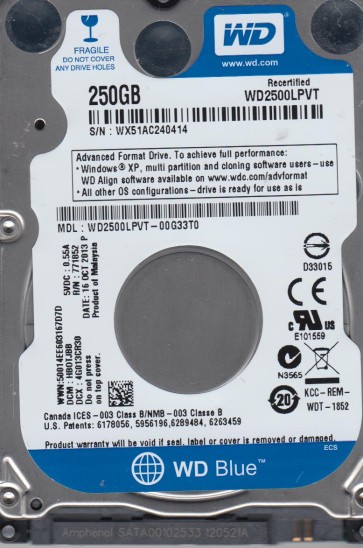
The Western Digital WD2500LPVT is a 2.5-inch, 5400 RPM SATA hard drive typically found in older laptops and external enclosures. It features a single platter with a 250GB capacity and utilizes an internal USB or SATA interface. Known for moderate performance and reliability, failure is often progressive rather than sudden.
Common Failure Types
1. Mechanical Failure (Head Crash / Stiction)
Symptoms: Loud clicking, grinding, or scratching noises. Drive is not detected or spins up and stops repeatedly.
Cause: Physical damage from drops, shock, or wear. The read/write head touches the platter surface, causing data loss.
2. Firmware Corruption (SA / Translator Issues)
Symptoms: Drive is detected but shows an incorrect capacity (e.g., 0GB, 2GB) or is stuck in a “busy” state. Windows asks to initialize it.
Cause: Bad sectors, power surges, or wear on the System Area (SA) corrupting the drive’s internal microcode.
3. Logical Damage (File System Corruption)
Symptoms: Drive is detected and spins normally but shows as RAW or unallocated. File/folder access errors (e.g., “The file or directory is corrupted and unreadable”).
Cause: Improper shutdown, virus attacks, software conflicts, or accidental formatting/deletion.
4. Bad Sectors (Physical Media Degradation)
Symptoms: Slow performance, file read errors, clicking or retry sounds during normal operation. SMART attributes (Reallocated Sectors, Current Pending) show high values.
Cause: Age, manufacturing defects, thermal stress, or head contact with the platter.
5. SATA Connector / PCB Failure
Symptoms: Drive is not detected; power is supplied but no communication. PCB may show visible burn marks or damage.
Cause: Power surges, poor connection, or bent/broken pins on the SATA connector.
Potential Recovery Paths
DIY Methods (For Logical or Non-Critical Cases)
– For RAW/unallocated drives: Use data recovery software like R-Studio or DMDE. Connect the drive as secondary (read-only) to a healthy system. Do not write to the failing drive.
– For file system corruption: Run chkdsk /f on a read-only copy (not the original). Always backup first.
– For simple accidental deletion: Use Recuva or similar tools to scan for deleted files. Act quickly to avoid overwriting.
Professional Services (For Mechanical, Firmware, or Critical Data)
– Clean room services for head swaps (if head crash is diagnosed).
– Firmware repair using specialized tools (PC-3000, MRT).
– PCB replacement with ROM transfer (if PCB is shorted).
– Platter swapping (extremely rare, high risk).
What Not to Do
1. Do not open the drive enclosure (except in a certified clean room). Dust and particles will destroy the platters.
2. Do not run chkdsk /f directly on a physically failing drive. It can cause further head damage and data destruction.
3. Do not apply power to a drive that has visible damage, burning smell, or has been exposed to liquid.
4. Do not use the drive as a secondary device while it is malfunctioning. A head crash can spread debris across the platters.
5. Do not attempt to replace the PCB with an identical model without transferring the original firmware (ROM chip). The drive will not function.
Summary
The WD2500LPVT is prone to mechanical, firmware, and logical failures. For clicking or undetected drives, immediately power off and seek professional clean room recovery. For logical errors, attempt DIY software recovery on a read-only clone. Never run repair tools on the original drive if data is critical. Prioritize preventing further damage over immediate access.