
Data recovery on vintage hard drives like the Fujitsu MHZ2320BJ G2 starts with identifying the failure type – electronic, firmware, or mechanical. Each requires a different approach, and misdiagnosis can make things worse. Here’s a quick guide to help you assess your situation and decide on the next step.
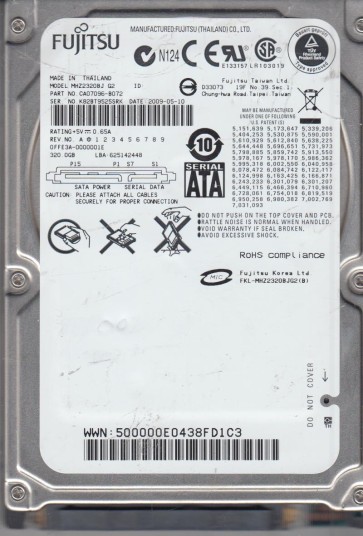
The Fujitsu MHZ2320BJ G2 is a 2.5-inch SATA hard disk drive (HDD) with a 320GB storage capacity and a rotational speed of 7200 RPM. It belongs to Fujitsu’s MHZ2 series, known for its use in older laptops and external enclosures. This drive typically features a single-platter design, which impacts its failure modes and recovery complexity. The G2 revision indicates a specific firmware iteration that may address initial reliability issues but also introduces unique firmware corruption vulnerabilities. The drive uses perpendicular magnetic recording (PMR) technology and has a standard SATA 3.0 Gbps interface. Understanding its physical characteristics is crucial for assessing recovery options.
Identifying Common Failure Types
1. Mechanical Head Crash or Stiction
A common failure in the MHZ2320BJ G2 involves the read/write head assembly. Due to the single platter design, the heads are highly sensitive to physical shock. Symptoms include clicking or grinding noises, the drive not spinning up, or being detected with zero capacity. Physical damage to the platter surface from a head crash often renders data unrecoverable without a cleanroom environment.
2. Firmware Corruption (Media Cache Error)
This drive is particularly prone to firmware corruption, often manifesting as a “Media Cache Error” or “Timeout” during initialization. The drive may spin up correctly but fail to respond to commands, appear as an unknown device, or exhibit very slow access. This is a non-physical failure where the microcode on the system area (SA) of the platters becomes corrupted but the user data area remains intact. This is often triggered by unstable power or improper shutdowns.
3. Bad Sector Degradation (SMART Errors)
Like many HDDs, the MHZ2320BJ G2 experiences bad sector growth over time. SMART data may show high values for Reallocated Sector Count, Current Pending Sector, or Uncorrectable Sector Count. The drive may start to hang, freeze, or produce read errors. This is a progressive failure that can rapidly worsen if the drive is stressed. Mechanical wear on the heads can accelerate sector degradation.
4. PCB (Printed Circuit Board) Failure
The drive’s external circuit board, which contains the SATA controller and motor driver, can fail due to power surges, static discharge, or component aging. Symptoms include the drive having no power (no spin up), a burning smell, or visible damage to components like TVS diodes or the motor controller chip. The drive’s internal mechanics and platters are typically still healthy in this case, making PCB replacement a viable DIY option if the firmware chip is not damaged.
Potential Recovery Paths
Professional Data Recovery Services
For mechanical failures (head crash, stiction) or severe firmware issues beyond simple corruption, professional recovery is strongly recommended. A specialist will use a cleanroom (Class 10 or better) to replace the heads with matched donors. For firmware corruption, they employ specialized tools like PC-3000 or MRT to access the drive’s service area, rebuild the translator, or copy data sector-by-sector. Professional services have a high success rate for this model but can cost between $300 and $2000+ depending on damage.
DIY (User-Initiated) Recovery Attempts
DIY recovery is only viable for specific cases, particularly logical errors or simple PCB failure.
- Logical/Software Issues: If the drive is detected normally but shows corrupt files or a RAW partition, use a read-only data recovery software like R-Studio, DMDE, or EaseUS Data Recovery Wizard. Do not write any data to the drive. Perform a byte-level scan and recover files to a different healthy drive.
- PCB Replacement (Component Level): If the drive has no power and no mechanical damage, you can attempt a PCB swap. You MUST transfer the original firmware ROM (usually a 8-pin serial flash chip) from the old PCB to a donor PCB with an identical model and revision number. Simply swapping PCBs without moving the ROM will result in failure or incorrect data. This requires soldering skills and a programmer (e.g., CH341A).
- Firmware Repair (Advanced): If you have access to a PC-3000 or similar tool and technical expertise, you can attempt to repair media cache errors or rebuild the translator. This is not recommended for beginners as improper modifications can permanently destroy data.
What Not to Do
- Do Not Open the Drive: Opening the HDD enclosure exposes the platters to dust and particles. Even a single speck can cause a permanent head crash and complete data loss. This voids any chance of professional recovery.
- Do Not Run Repair Tools: Avoid using CHKDSK (with /f or /r flag), disk repair utilities, or any tool that writes to the drive. These can overwrite critical file system structures, making recovery far more difficult or impossible.
- Do Not Freeze the Drive: The old “freezer trick” does not work for modern drives like the MHZ2320BJ G2. It can cause condensation, short circuits, and further mechanical damage.
- Do Not Use Vibrations or Tapping: Hitting or shaking the drive to “unstick” the heads is destructive. It can break the heads or damage the platter surface beyond repair.
- Do Not Attempt Risky PCB Swaps: Swapping PCBs without transferring the unique firmware ROM will render the drive inoperative. Always verify the exact PCB revision number.
Summary
The Fujitsu MHZ2320BJ G2 is a sensitive drive with three primary failure modes: mechanical head issues, firmware corruption, and bad sector growth. For any physical noise (clicking/grinding) or detection failure, professional recovery is the safest route. DIY recovery is limited to logical data recovery when the drive is fully detected, or advanced firmware repair if you possess specialized tools. The single most critical rule is to avoid any action that writes to the drive or exposes its internal mechanisms. Prioritize creating a byte-for-byte disk image (if the drive is responsive) before attempting any recovery steps.