
Data recovery on vintage hard drives like the Hitachi HTE725050A9A364 starts with identifying the failure type – electronic, firmware, or mechanical. Each requires a different approach, and misdiagnosis can make things worse. Here’s a quick guide to help you assess your situation and decide on the next step.
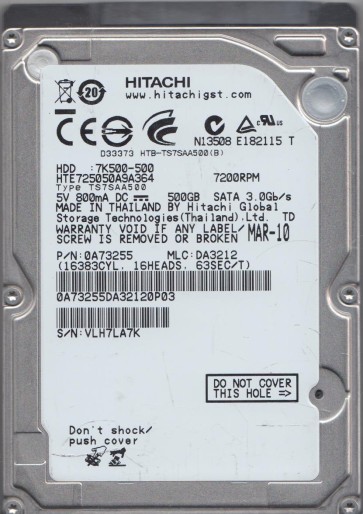
The Hitachi HTE725050A9A364 is a 500GB, 2.5-inch, 7200 RPM SATA hard disk drive from the Travelstar 7K500 series. This drive uses a single 500GB platter and Advanced Format (AF) 4KB sector technology. It is a mature, widely-used model known for reasonable reliability in laptops and external enclosures. Key components include a Marvell main controller, a motor driver IC, a voice coil motor (VCM) for head positioning, and a preamplifier on the head stack assembly. The drive features Hitachi’s ramp load technology, where the heads park off the platters when idle. Understanding this specific architecture is critical, as failure modes often involve specific sub-components like the preamp or VCM.
Identifying Common Failure Types
1. Head Crash / Mechanical Failure
Symptoms: Loud clicking, grinding, or scraping noises. The drive may be detected by the BIOS as a “ZERO” capacity or an unknown device. In severe cases, the drive spins up but emits a rhythmic clicking sound (often 1-5 clicks per second) indicating the heads are unable to read the servo patterns and are retracting repeatedly. Causes: Physical shock, drop damage, manufacturing defect, or age-related wear. The read/write head has physically touched the platter surface, causing media damage or head deformation. This is a classic hardware failure.
2. Firmware / Logical Corruption (Bad Sector Table)
Symptoms: The drive spins up normally, is detected correctly by the BIOS, but the operating system cannot read data, reports “I/O Device Error,” or gets stuck during access. The drive may appear with a RAW file system or an incorrect capacity. Causes: A corrupted Module 02 (Translator module) or a damaged G-List (grown defects list). When the drive encounters too many bad sectors, the firmware can become confused, leading to the drive not reporting its correct capacity or locking up during data reads. This is a software-level problem but originates from physical media degradation.
3. Stiction (Permanent or Dynamic)
Symptoms: The drive does not spin up at all, or spins up briefly and stops. You may hear a single “thunk” sound as the spindle motor tries to move but fails. In some cases, you can hear the motor whine but the platters do not rotate. Causes: The read/write heads are stuck to the platter surface due to excessive lubrication or residue from the parking ramp, or the spindle motor bearings have seized. Dynamic stiction can occur when the drive is powered off and the head parking ramp fails to fully release the heads. This is a pure mechanical failure.
Potential Recovery Paths
Professional Service (Recommended for Hardware Failures)
For Head Crashes or Stiction: This requires a cleanroom (Class 100 or better) environment. The process involves: (1) Disassembling the donor drive (matching exact model and firmware revision). (2) Replacing the failed head stack assembly (HSA) with a compatible one. (3) Using specialized tools like PC-3000 or DeepSpar to force the drive into service mode, read the SA (System Area) and translator, and clone the user data sector-by-sector. The cost ranges from $300 to $2000+ depending on damage. For Firmware Corruption: Professional tools can access the drive’s hidden service area (SA) to repair or rebuild the translator module (Module 02) and clear the bad sector table. This is often possible without hardware donor parts, but still requires deep technical knowledge.
DIY Methods (Only for Simple Software Problems)
Case: Logical corruption where the drive is detected perfectly but data is inaccessible. Use a Linux live CD (e.g., Ubuntu) and the `ddrescue` command. Power the drive via an external USB adapter (not the internal SATA port if possible, to prevent power surge). Run `sudo ddrescue -f /dev/sdb /media/backup/hitachi.img /media/backup/hitachi.log`. This creates a sector-by-sector clone, skipping bad sectors. Do not attempt to write to the failing drive. Never run CHKDSK or fsck on the failing drive, as it will corrupt the file system. Warning: DIY has a success rate below 20% for any physical issue. Attempting to open the drive without a cleanroom will guarantee permanent data loss due to particulate contamination.
What Not to Do
- Do not apply heat or freeze the drive. This is an internet myth. Thermal expansion/contraction can cause the platters to warp or the heads to scrape, leading to catastrophic failure.
- Do not run any data recovery software (like Recuva, EaseUS, Disk Drill) if the drive is making clicking or scratching sounds. Software cannot fix physical damage. Operating the drive in this state will grind the heads further into the platters, reducing the chance of professional recovery.
- Do not open the drive enclosure. The internal environment must be particle-free (a single fingerprint can kill a head). Opening it will void any chance of professional recovery and introduce dust that will destroy the media.
- Do not repeatedly power-cycle the drive. If it clicks, power off immediately. Each start-stop cycle for a failed head assembly can cause additional media damage.
- Do not attempt to swap the PCB (Printed Circuit Board) unless you are a certified engineer. Hitachi drives use adaptive tuning parameters stored in the MCU flash. Swapping a PCB without transferring the original ROM chip will cause the drive to enter a “permanent safe mode” and not spin up.
Summary
The Hitachi HTE725050A9A364 is a robust drive but suffers from specific mechanical and firmware failures. The priority is to immediately stop all use if you hear clicking, grinding, or stiction sounds. For hardware failures (head crash, stiction), the only viable path is a professional cleanroom recovery service, costing several hundred dollars. For logical/firmware issues (RAW file system, no access), a careful DIY clone using `ddrescue` may succeed, but only if the drive is perfectly detected and quiet. The golden rule: if the data is priceless, power off the drive and ship it to a professional. Any DIY attempt on a physically failing drive will likely make the data unrecoverable.