
Data recovery on vintage hard drives like the Hitachi HTS721080G9SA00 starts with identifying the failure type – electronic, firmware, or mechanical. Each requires a different approach, and misdiagnosis can make things worse. Here’s a quick guide to help you assess your situation and decide on the next step.
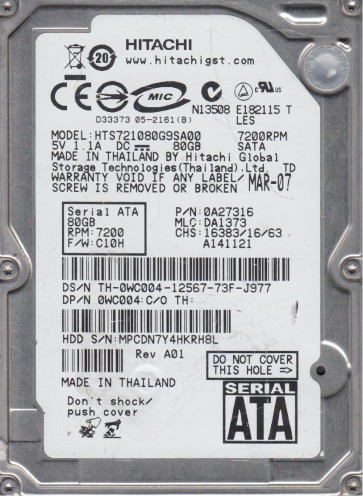
The Hitachi HTS721080G9SA00 is a 2.5-inch SATA hard disk drive (HDD) with a storage capacity of 80GB, a spindle speed of 7200 RPM, and a 9.5mm z-height. It was commonly used in laptops and external enclosures from the mid-2000s. This model utilizes a single-platter design and features a Travelstar 7K100 series controller. It is known for its relatively high reliability for its era, but like all mechanical drives, it is susceptible to specific failure modes. The drive employs a Giant Magnetoresistive (GMR) head technology and a fluid dynamic bearing (FDB) motor, which generally reduces noise but can fail without audible warning.
Identifying Common Failure Types
1. Bad Sectors and Media Errors (Software/Firmware Degradation): The HTS721080G9SA00 is prone to developing reallocated or pending sectors over time. This manifests as slow read/write performance, file corruption, or the operating system freezing when accessing certain files. SMART attributes (e.g., Reallocated Sectors Count, Current Pending Sector Count, Uncorrectable Sector Count) will show elevated values. Often, the drive still spins and identifies correctly in the BIOS, but reading specific LBAs fails. This is often a gradual failure but can accelerate rapidly.
2. Stiction and Motor Failure (Hardware/Mechanical): The FDB motor on this series can sometimes seize after extended idle periods. This is commonly called “stiction” where the head rests on the platter surface and the motor cannot overcome the friction to spin up. A symptom is a complete lack of spin-up noise, or the drive making a faint buzzing or low humming noise but never reaching full operating RPM. The drive will not be detected in the BIOS, and the platters will not spin. This can also be caused by a failed motor driver chip on the PCB (Printed Circuit Board).
3. PCB Board Failure (Hardware/Electronic): Electrical surges, static discharge, or age-related capacitor failure can damage the main controller board. The drive may show no signs of life (no spin, no detection). However, the physical platters and heads are undamaged. A common clue is a burning smell, visible damage to the power connector (TVS diode), or the drive being recognized briefly and then dropping out. The HTS721080G9SA00 has a specific firmware overlay stored on the PCB that is critical for operation.
4. Head Crash or Damage (Hardware/Mechanical): Physical shock (dropping the laptop while the drive is active) can cause the read/write head to contact the platter surface. This produces a distinct scratching or clicking sound. Data on the damaged area becomes unreadable. If the head stack assembly (HSA) is damaged, the drive may click repeatedly as it attempts to calibrate and fail. This is a catastrophic failure requiring a clean room.
Potential Recovery Paths
Professional Data Recovery Services
For hardware failures (head crash, stiction, motor seizure, PCB electronic damage), professional recovery is strongly recommended. A cleanroom (Class 100 or better) is required to open the drive without contaminating platters. For the HTS721080G9SA00, services typically include: (1) PCB repair or replacement with firmware adaptation, (2) head stack replacement using a donor drive of the exact model and firmware revision, (3) imaging the platters using specialized hardware (e.g., PC-3000, DeepSpar) at a low level. Costs range from $300 to $2000+ depending on the severity. Always choose a lab that offers a free diagnostic and no-data, no-fee policy.
DIY Data Recovery (Software/Logical Issues Only)
If the drive is fully functional, detected in BIOS, and makes no unusual noises, DIY is possible for accidental deletion, formatting, or bad sector issues. Use a direct SATA-to-USB adapter (not a cheap enclosure) and connect the drive to a stable computer. Use imaging tools like DDRescue (Linux) or HDDSuperClone to create a sector-by-sector image to a healthy destination drive. This will skip bad sectors and map them. Do NOT attempt to repair or format the source drive. For file recovery from the image, use tools like R-Studio, PhotoRec, or DMDE. Do not attempt to repair the file system directly on the failing drive.
What Not to Do
- DO NOT attempt to open the drive enclosure. The HTS721080G9SA00 has a sealed lid. Exposing the platters to dust, even a single particle, will destroy data when the drive spins up. Professional cleanroom is mandatory.
- DO NOT apply external heat or shock (e.g., freezing the drive, tapping it) to fix stiction or clicking. These methods are ineffective and can cause further platter damage or head damage.
- DO NOT run CHKDSK, fsck, or any disk repair software on a drive with physical issues. This forces the heads to repeatedly read failing areas, causing further damage.
- DO NOT repeatedly attempt to power-cycle a clicking drive. Each attempt risks damaging the read/write heads and platter surfaces.
- DO NOT connect the drive to a motherboard if you suspect PCB damage. Use a known-good USB adapter to avoid damaging the host system.
Summary
Recovering data from a Hitachi HTS721080G9SA00 requires a clear distinction between logical and physical failures. If the drive spins normally and is detected, DIY imaging with a tool like DDRescue is a viable low-cost option for bad sectors or logical corruption. If the drive clicks, fails to spin, smells burnt, or makes grinding noises, stop immediately and seek professional help. The drive’s mechanical design (FDB motor, GMR heads) means that DIY attempts on physical failures almost always worsen the outcome. Always prioritize the safety of the data over the convenience of a quick fix. Back up your data before symptoms appear.