
Data recovery on vintage hard drives like the Samsung HD154UI starts with identifying the failure type – electronic, firmware, or mechanical. Each requires a different approach, and misdiagnosis can make things worse. Here’s a quick guide to help you assess your situation and decide on the next step.
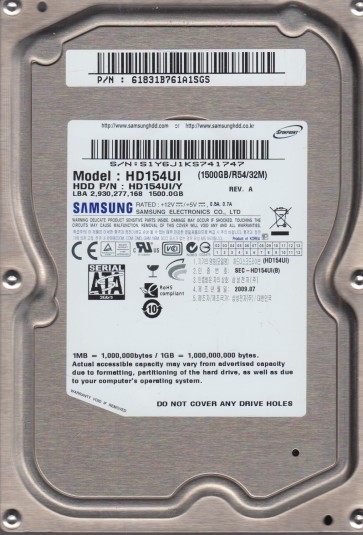
The Samsung HD154UI is a 1.5TB 3.5-inch SATA hard drive from the EcoGreen F2 series, known for its 5400 RPM spindle speed and low power consumption. It employs perpendicular magnetic recording (PMR) technology. This drive is often used in external enclosures and as secondary storage. Key components include the main PCB (printed circuit board) with a Marvell controller, the voice coil actuator for head movement, and the platters coated with a magnetic layer. Understanding its architecture is critical for diagnosis, as failure patterns often relate to its energy-efficient design and high-density platters.
Identifying Common Failure Types
1. Electronic Failure (PCB Issues)
The most common failure on the HD154UI involves the PCB. Symptoms include the drive not spinning up, no recognition in BIOS, or a clicking sound immediately followed by silence. This is often due to a failed TVS diode, a damaged preamplifier chip, or a corrupted firmware chip (typically a 25-series serial flash). Power surges are a primary cause. A key sign: if the drive powers on but the motor does not start, the PCB is likely compromised.
2. Head and Media Failure (Head Crash / Degradation)
Mechanical failures manifest as repetitive clicking (head seeking but failing to read), grinding sounds, or the drive being detected with a very small or incorrect capacity (e.g., 0GB). The HD154UI uses four platters and eight heads. A head crash occurs when a head physically contacts the platter surface, damaging both. Media degradation, where the magnetic layer weakens, leads to slow read times, bad sectors, and file system corruption. This is often a progressive failure.
3. Logical / Firmware Corruption
This type includes file system errors (e.g., RAW partition, “CHKDSK not available”) or inaccessible data without physical symptoms. The Samsung HD154UI is prone to firmware issues where the drive’s operating system (the ‘System Area’) becomes corrupted, often due to bad sectors. The drive may spin, be detected, but remain in a “Busy” state or report an incorrect model number. Software errors like accidental deletion or formatting fall under this category.
Potential Recovery Paths
Professional Data Recovery Services
For electronic failure, a specialist can perform a controlled PCB swap or remount the original firmware chip onto a donor board. For head/media failure, a Class 100 cleanroom is required to replace the damaged heads with a matched donor drive set. Firmware corruption requires advanced tools like PC-3000 or MRT to access the System Area and repair the Module tables. This is the safest option for critical data, with costs typically ranging from $300 to $3000+ depending on complexity. Expect 1-3 weeks turnaround.
DIY Recovery (Warning: High Risk)
For Electronic Failure Only: If the drive is not spinning due to a blown TVS diode, you can attempt a PCB swap using an exact donor board (same model and PCB revision, e.g., REV 0.5). You must transfer the original 8-pin serial flash chip (usually U12) from the faulty board to the donor board using a hot air station. Simply swapping boards without transferring the firmware will not work and may damage the donor board. Do not attempt on clicking drives; this will worsen head damage. Use a screwdriver that fits the Torx screws exactly to avoid stripping them.
For Logical Failure: Use read-only software like R-Studio or GetDataBack. Create a raw disk image (ddrescue on Linux) to an independent healthy drive before any scanning. Do not run CHKDSK (chkdsk /f) on a failing drive as it can cause further data loss. If the drive has bad sectors, a byte-by-byte image in reverse direction may help bypass weak areas.
What Not to Do
- Never open the drive enclosure in a non-cleanroom environment. Dust particles will cause head crashes and destroy platter surfaces permanently.
- Do not apply power repeatedly to a clicking or non-spinning drive. This can burn out the preamplifier or worsen head stiction.
- Avoid using data recovery or “head parking” utilities on a drive with physical symptoms. They ignore hardware signals and can cause irreversible media damage.
- Do not freeze the drive to “fix” it. This myth causes condensation that corrodes the platters and damages the spindle bearing.
- Never try to swap heads yourself without proper training and a clean bench. The alignment tolerances are less than a micron.
Summary
The Samsung HD154UI is a reliable eco-friendly drive but fails via electronic PCB issues, head/media crashes, or firmware corruption. For non-critical data, a DIY approach is feasible only for electronic faults via a chip-transferred PCB swap or logical recovery using imaging software. For any mechanical failure (clicking, grinding) or firmware corruption without proper tools, professional intervention is mandatory. The most important step is to immediately power off the drive upon hearing abnormal sounds and seek a specialized lab. Mishandling can render data permanently unrecoverable.