
Data recovery on vintage hard drives like the Seagate ST980813ASG starts with identifying the failure type – electronic, firmware, or mechanical. Each requires a different approach, and misdiagnosis can make things worse. Here’s a quick guide to help you assess your situation and decide on the next step.
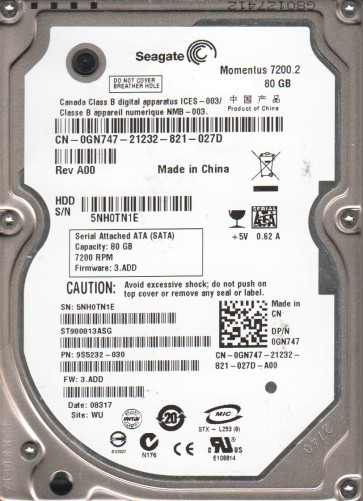
The Seagate ST980813ASG is a 80GB 2.5-inch PATA (IDE) hard disk drive from the Momentus 5400.4 series. It is a legacy drive commonly found in older laptops and external enclosures. It features a spindle speed of 5400 RPM and an 8MB cache. Due to its age, it is prone to specific mechanical and electronic failures, particularly related to the aging of its internal components and the delicate nature of its PATA connector.
Common Failure Types
1. Mechanical Head Crash / Stiction
Symptoms: Loud clicking or scraping noises (often described as a “click of death”), drive not spinning up, or system detecting the drive but failing to access data. Stiction occurs when the read/write heads stick to the platter surface.
Causes: Physical shock, gradual degradation of the head actuator arm bearings, or contamination from internal particles. The drive’s age makes the lubricant on the platters prone to hardening, causing stiction.
2. PCB (Printed Circuit Board) Logic Failure
Symptoms: Drive appears dead with no spin-up, no vibration, and no sound. The drive may also be detected incorrectly by the BIOS as a manufacturer string or unknown device.
Causes: Power surges, failed voltage regulator components on the PCB, damaged preamplifier chip, or corrosion on the PATA connector pins. The TVS (Transient Voltage Suppression) diodes on these older drives are a common failure point.
3. Firmware Corruption / Translator Logic Issues
Symptoms: Drive spins up normally but is not detected, is detected with incorrect capacity (e.g., 0 MB, 16 MB), or is detected but shows “Not Initialized” or “Invalid Media” in Disk Management. The drive may hang the system on boot.
Causes: Bad sectors causing damage to the firmware modules, abrupt power loss during a firmware update (uncommon but possible), or degradation of the SA (Service Area) sectors on the platter. This is a common issue as the drive ages.
4. Read/Write Head Degradation or Crash
Symptoms: The drive produces a continuous, repetitive mechanical sound like a “tick-tick-tick” and is unable to read data. It may be detected but access is extremely slow or fails entirely. The drive may finally stop spinning after repeated attempts.
Causes: Overheating, physical shock to the head assembly, manufacturing defects, or gradual wear of the head element, leading to it physically contacting the platter.
5. Bad Sectors / Surface Damage (Logical vs. Physical)
Symptoms: Operating system errors, file corruption, slow performance, and frequent crashes. The drive may pass a surface scan with many “bad” or “slow” blocks.
Causes: Physical: Scratches or damage to the platter coating, often from head contact. Logical: Corrupt File Allocation Table (FAT) or MFT (Master File Table), often from improper shutdowns or virus attacks. It is critical to differentiate between the two as the recovery path differs vastly.
Potential Recovery Paths
Professional Services
Approach: Cleanroom (Class 100 or better) disassembly of the drive. This is mandatory for mechanical failures. The process involves replacing the read/write heads with a donor set from an identical ST980813ASG drive, or transplanting the entire platter stack into a known-good donor chassis. For PCB failures, a professional may perform PCB swapping with adaptation of the NVRAM chip or logic board repair to replace failed components. Firmware issues require specialized tools (e.g., PC-3000, MRT Pro) to program the SA manually. Cost is typically several hundred to over a thousand dollars.
When to use: If your data is critical, the drive makes any unusual mechanical noise, or you have attempted DIY recovery and failed (which can worsen the situation).
DIY Methods (Low-Risk Situations Only)
1. Logical Recovery (Software): For file deletion, partition loss, or logical file system corruption without physical damage. Use read-only, file-recovery software like Recuva, R-Studio, or TestDisk. Always recover data to a different drive, not the failing one. Do not attempt to format or repair the file system (e.g., chkdsk /f) on a drive you suspect has physical defects.
2. PCB Replacement (High Risk): Only attempt if you are certain it is a pure PCB failure (e.g., no noise, no spin, visual damage to PCB). Source an identical ST980813ASG donor drive with the exact same PCB part number. The most critical step is swapping the firmware ROM (typically a 8-pin serial flash chip) from the original PCB to the donor PCB. Without doing this, the drive will likely not work due to unique adaptive data. This requires fine soldering skills and a hot air rework station.
3. Imaging with Disabled Sectors: If the drive clicks but is still partially recognized, you can attempt to use a hardware imager like a DeepSpar USB Stabilizer or a software tool like ddrescue with a strict skip-and-read strategy in a controlled environment. This attempts to read the drive while avoiding bad areas to prevent further damage. This is highly risky and should only be done if the data is not critical.
What Not to Do
1. Do not open the hard drive enclosure. The platters and heads are extremely sensitive to particulate contamination. Even a single dust particle can ruin the data surface. Opening the drive outside a certified cleanroom will almost certainly make data recovery impossible or prohibitively expensive.
2. Do not apply voltage or power cycle the drive excessively if it is making mechanical noises (clicking, scraping). This can grind the heads into the platters, destroying the data. Disconnect power immediately if you hear abnormal sounds.
3. Do not use disk repair utilities like chkdsk, Disk Utility First Aid, or SpinRite on a mechanically failing drive. These tools issue intense read commands and can cause a head crash, turning a recoverable drive into an unrecoverable one.
4. Do not freeze the hard drive. The “freezer trick” is a dangerous myth that can create condensation inside the drive, leading to catastrophic corrosion and head stiction. It rarely works and almost always makes the situation worse.
5. Do not attempt to swap the PCB without transferring the unique firmware (ROM/NVRAM). Simply replacing the board with a random donor will cause the drive to fail unknown parameters and may lead to a head crash by commanding incorrect servo tracks.
Summary
The Seagate ST980813ASG is a legacy drive with a high probability of mechanical, PCB, or firmware failure. A correct diagnosis is essential: mechanical failures require immediate professional cleanroom intervention, while logical corruption can sometimes be resolved with careful software use. The key to successful recovery is avoiding further damage by not operating the drive when it shows signs of physical distress.