
Data recovery on vintage hard drives like the Samsung HD251HJ starts with identifying the failure type – electronic, firmware, or mechanical. Each requires a different approach, and misdiagnosis can make things worse. Here’s a quick guide to help you assess your situation and decide on the next step.
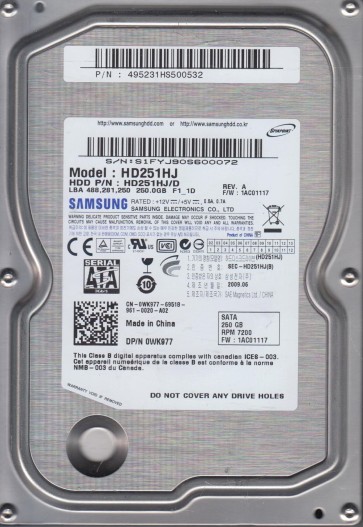
The Samsung HD251HJ is a 250GB 3.5-inch SATA hard disk drive from Samsung’s Spinpoint F3 series. It typically operates at 7200 RPM with a 16MB cache. These drives are known for their relatively quiet operation and decent performance for everyday use. However, like all mechanical hard drives, they are susceptible to failure due to their moving parts. The primary failure mechanisms for this model often involve the read/write heads, spindle motor bearings, and PCB (Printed Circuit Board) electronics. Understanding its older age (commonly found in systems from 2009-2012) means that wear and tear are significant factors in potential failure.
Identifying Common Failure Types
1. Mechanical Head Crash
Symptoms include a repetitive clicking, scraping, or grinding noise. The drive may be detected by the BIOS but will not operate normally, or it may spin up and then immediately stop. This is a physical failure where the read/write heads have collided with the platters, often damaging the magnetic surface. This is a hardware failure and requires cleanroom intervention.
2. Spindle Motor Failure (Stiction or Bearing Seizure)
If the drive does not spin up at all, or you hear a single “thump” and then silence, the spindle motor may have seized. Sometimes the drive can be heard trying to spin but failing to reach full speed. This is often accompanied by a series of soft beeps or chirps from the motor. This is a mechanical hardware failure of the motor bearings or a condition called stiction where the heads stick to the platters.
3. PCB or Electronics Failure (Firmware Corruption)
The drive may spin up normally (quietly) but the computer does not detect it, detects it with incorrect capacity (e.g., 0GB), or detects it as “Unknown Device”. In some cases, the drive may appear to work but is extremely slow or generates SMART errors related to firmware. This can be caused by a damaged controller chip, fuses, or corrupt firmware. This is a hardware/software hybrid issue, though the root cause is often electronic.
4. Bad Sectors and Media Degradation
The drive will likely spin up and be detected, but you will experience read errors, file corruption, slow data access, and operating system freezes. The drive may generate SMART warnings for “Reallocated Sector Count” or “Current Pending Sector”. This is a gradual physical degradation of the magnetic media. While it can sometimes be managed with software, severe cases indicate a dying drive.
Potential Recovery Paths
Professional Data Recovery Services
Recommended For: All mechanical failures (head crash, motor seizure) and complex PCB failures where head-disk alignment or firmware corruption is involved. Process: A cleanroom (Class 100 or better) is required for opening the drive. The technician will perform a donor drive swap (matching the exact model and firmware revision), replace the heads or transplant the platters, and use specialized imaging tools (like PC-3000 or DeepSpar) to create a sector-by-sector image of the patient drive. Cost: Typically ranges from $300 to $2000+ depending on the severity and urgency. This is the only safe option for physical damage.
DIY Recovery (Software-Based)
Recommended For: Minor bad sectors or logical file system corruption, provided the drive is mechanically healthy and no physical damage is suspected. Tools: Use a tool like ddrescue (on Linux) or HDDSuperClone. These tools will attempt to recover data by skipping bad areas and retrying later. Process: Connect the Samsung HD251HJ as a secondary drive (never boot from it). Run ddrescue to create an image file to a healthy target drive. Then, use file recovery software (e.g., PhotoRec, R-Studio) on the image to extract files. Warning: Do not use chkdsk, ScanDisk, or any disk repair tool on a failing drive; these can cause further damage by rewriting data.
What Not to Do
- DO NOT power on a clicking drive repeatedly. Every spin cycle can grind the heads further into the platters, reducing the chance of recovery.
- DO NOT open the drive enclosure. The internal platter chamber is hermetically sealed and requires a dust-free cleanroom environment. Even a single dust particle can destroy the magnetic surfaces.
- DO NOT try to freeze the drive. This is a destructive urban myth. Freezing introduces condensation, which can corrode the heads and platters, causing irreversible damage.
- DO NOT run software like chkdsk /f or disk defragmenter. These utilities try to fix file system errors by rewriting data, which can overwrite corrupt sectors and make recovery impossible.
- DO NOT attempt a PCB swap from a non-matching donor. The firmware on the ROM chip is unique to each drive. Putting a generic board without transferring the original ROM chip will likely not work and can damage the electronics further.
Summary
The Samsung HD251HJ is susceptible to three main failure types: mechanical (head crash/motor seizure), electronic (PCB/firmware), and media degradation (bad sectors). For any mechanical issues or complex electronics problems, professional cleanroom recovery is the only viable and safe option. For logical issues or minor bad sectors, DIY imaging with ddrescue is acceptable, but only if the drive makes no unusual noises. The most critical rule is to stop using the drive immediately upon noticing failure signs, and never attempt risky DIY tricks like freezing or opening the drive. Your best chance at successful data recovery lies in minimizing further damage and consulting a professional when in doubt.