
Data recovery on vintage hard drives like the Samsung HM020GI starts with identifying the failure type – electronic, firmware, or mechanical. Each requires a different approach, and misdiagnosis can make things worse. Here’s a quick guide to help you assess your situation and decide on the next step.
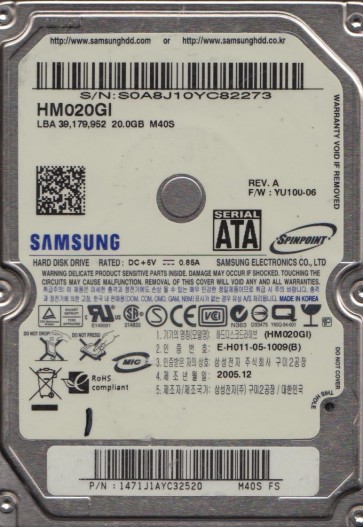
The Samsung HM020GI is a 2.5-inch, 20GB, 4200 RPM PATA (Parallel ATA) hard drive, typically found in older laptops and portable storage devices from the mid-2000s. It utilizes a traditional mechanical design with aluminum platters, a single actuator arm, and a Giant Magnetoresistive (GMR) recording head. As a legacy drive, its controller board uses older chipsets and firmware. Due to its age, common failure points include degradation of the spindle motor bearings, weakening of the magnetic coating on the platters, and failure of the preamplifier circuit on the head stack assembly (HSA). The PATA interface is also more susceptible to pin damage and connectivity issues compared to modern SATA drives. Understanding this specific hardware architecture is critical, as recovery methods for contemporary drives may not apply or could cause irreversible damage.
Identifying Common Failure Types
1. Mechanical Failure: Click of Death or Grinding Noise
This is the most critical failure. If the drive emits a repetitive clicking sound, a scraping noise, or a high-pitched whine, the read-write head has likely crashed or the spindle motor bearings have seized. A clicking sound often indicates the heads are repeatedly parking and attempting to read the servo patterns but failing due to physical damage or contamination. A grinding noise suggests platter surface damage. In either case, the drive should not be powered on again to prevent further data loss.
2. Firmware/Controller (PCB) Failure: Not Detected or Incorrect Capacity
The HM020GI often fails due to a damaged PCB. Symptoms include the drive not being recognized by the BIOS, being detected with a model string of “Samsung HM020GI” but with zero capacity, or showing a completely wrong size like 0GB or 1.8GB. This can result from a failed motor controller chip (often a BGA package), a damaged SMD component (like a blown TVS diode or a burned inductor), or electrical damage from a power surge. The platters and heads may still be pristine, making PCB failure recoverable.
3. Logical/Software Failure: Data Corruption or File System Errors
The drive spins up normally and is detected, but files are inaccessible, folders show garbled names, or the drive prompts for a format. This can be due to bad sectors, corrupted file allocation table (FAT or NTFS), accidental deletion, or a virus. On older drives, weak magnetic domains can cause soft errors that the firmware marks as bad sectors. Unlike mechanical failures, the drive does not make unusual noises and can be safely imaged with proper software.
4. Stiction: Motor Lock
A specific issue with aging drives is stiction, where the read-write head sticks to the platter surface after the drive has been idle for a long period. When powered on, the spindle motor cannot overcome the surface tension, resulting in a single beep or a weak spin attempt followed by silence. The drive may emit a faint whirr but never reach full rotation speed. This requires physical intervention to unlock the heads.
Potential Recovery Paths
DIY Methods (Only for Specific Cases)
For Logical Failures Only: If the drive is detected and makes no unusual sounds, you can attempt software recovery. Use tools like DMDE or ddrescue (Linux) to create a bit-for-bit image of the drive to a healthy disk. Never work directly on the original drive. Scan the image with data recovery software (e.g., R-Studio, PhotoRec) to extract files.
For PCB Failure (If Safe): If you confirm the failure is purely electronic (e.g., a burnt TVS diode), you can attempt a PCB replacement. First, locate an exact model match (same PCB revision number, e.g., REV 0.7). Remove the original PCB. If the donor PCB has a firmware chip, you must transfer the original drive’s firmware chip (typically a 8-pin or 25-series SPI flash) to the donor board using a hot air station. Simply swapping boards without firmware transfer will almost certainly fail due to unique adaptives stored on the chip. Warning: Do not attempt this if you see physical damage around the head amplifier (preamp) area on the PCB, as this indicates a head problem, not a controller problem.
For Stiction: Some advanced users attempt to carefully rotate the platters by hand through the air filter hole or motor shaft using a non-conductive tool. This is extremely risky and can scratch the platters. It is only recommended if the data is worth the gamble and professional help is unavailable.
Professional Services (Highly Recommended)
For any mechanical failure (clicking, grinding), severe bad sectors, or stiction, professional intervention is essential. A cleanroom environment (ISO Class 5 or better) is required to open the drive without contaminating the platters. A professional lab will:
- Diagnose the exact failure using specialized tools (e.g., oscilloscope, PC-3000 data recovery system).
- If mechanical, perform a head stack replacement using a known-good donor drive of the same model and firmware revision. This involves intricate alignment and calibration.
- If PCB-related, perform a direct firmware transplant or fix the original board at a component level.
- Image the drive sector-by-sector using hardware write-blockers and error-handling algorithms, bypassing firmware issues.
- Rebuild the logical structure to provide a file tree.
Expect costs ranging from $300 to $1500+ depending on complexity. Always ask for a “no data, no fee” guarantee.
What Not to Do
- DO NOT power on the drive if you hear any clicking, scraping, or grinding. Each spin can cause permanent platter damage.
- DO NOT attempt to remove the drive’s lid. Even a single dust particle can scratch the platters. The gap between the head and platter is only nanometers.
- DO NOT use “free” data recovery software that writes back to the original drive. This can overwrite the very data you are trying to recover.
- DO NOT shake or tap the drive. Tapping is an old technique used on stuck motors, but on modern drives it can destroy the delicate heads.
- DO NOT freeze the drive. This is a myth that can cause condensation and rust, irreversibly damaging the platters.
Summary
The Samsung HM020GI is a vintage PATA hard drive prone to mechanical failure, PCB damage, and logical corruption. The first step is to identify the failure type by listening to the drive and checking for detection. If it clicks or grinds, immediately stop all DIY attempts and consult a professional data recovery lab. For logical issues where the drive spins cleanly, software imaging is a viable but careful DIY option. PCB swapping is possible only if you can transfer the firmware chip, but carries high risk. Never attempt to open the drive, freeze it, or power it on repeatedly when it fails. The safest path for critical data remains a specialized cleanroom service.