
Data recovery on vintage hard drives like the Samsung HM641JI starts with identifying the failure type – electronic, firmware, or mechanical. Each requires a different approach, and misdiagnosis can make things worse. Here’s a quick guide to help you assess your situation and decide on the next step.
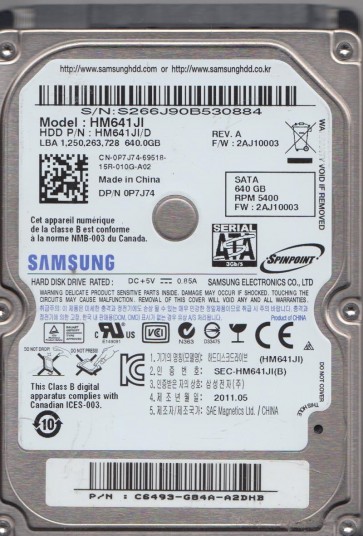
The Samsung HM641JI is a 2.5-inch SATA hard disk drive with a 640GB storage capacity, commonly found in laptops and external enclosures from the late 2000s to early 2010s. It features a 5400 RPM spindle speed, an 8MB cache, and uses perpendicular magnetic recording (PMR) technology. This model is known for its relatively quiet operation but has documented failure tendencies related to head degradation and media surface wear over time. Understanding its internal architecture:including the voice coil motor, read/write heads, platters, and firmware area:is crucial for any data recovery attempt. The drive’s SATA interface supports hot-plugging but offers no inherent data protection against logical corruption.
Identifying Common Failure Types
1. Mechanical Head Failure (Media Damage)
Symptoms include clicking, grinding, or scratching noises, often accompanied by the drive being detected in BIOS but failing to read data. The HM641JI’s heads are prone to wear, especially after prolonged use or physical shock. This is a hardware failure where the read/write head physically contacts the platter surface, causing media damage. The drive may initially read slowly (with bad sectors) before completely seizing. Data recovery requires opening the drive in a cleanroom to replace the head stack assembly.
2. Logical Corruption (File System Damage)
The drive may spin up normally, be detected by the operating system, but show as RAW, unallocated, or require formatting. This is often caused by improper disconnection, power surges, or file system errors (NTFS/FAT32 corruption) without physical damage. In some cases, the drive will respond to simple software tools, but overuse of such tools can worsen the condition if the drive has underlying weak sectors.
3. Firmware/PCB Failure (Electronic Issue)
The drive may spin up but not be recognized by the BIOS, or recognize with incorrect model/capacity. The HM641JI can suffer from corrupted firmware modules (commonly the defect list or translator) or a failed SATA bridge chip on the printed circuit board (PCB). Ripple from a failing voltage regulator can also cause intermittent errors. Replacing the PCB with a matched donor board or performing firmware recovery via specialized tools is required.
4. Stiction (Motor or Bearing Lock)
The drive makes no spinning sound or a single spin-up attempt followed by a whine or beep. Stiction occurs when the lubricant in the spindle motor bearing thickens or dries, or when the heads park on the platter and adhere due to contamination. This is a severe physical failure requiring motor replacement or platter transfer in a cleanroom.
Potential Recovery Paths
DIY (Home User) Options
For logical corruption only (if no physical symptoms):
- Use a read-only disk imaging tool like ddrescue (Linux) or HDDSuperClone. Always clone to a known-good, healthy drive of equal or larger capacity. Do not attempt to repair the source drive directly.
- If the file system is RAW, try recovery software like R-Studio, DMDE, or ReclaiMe on the cloned image. Avoid writing to the source drive.
- Check SATA cables, try a different USB enclosure or SATA port. Ensure power supply is stable.
Important DIY warning: Do not attempt DIY if you hear any clicking, scratching, or buzzing. Do not open the hard drive outside a cleanroom (dust will destroy the platters). Do not freeze the drive (this causes condensation and further damage).
Professional Recovery Services
For mechanical, firmware, or complex electronic failures:
- Cleanroom head replacement: Required for head failure (clicking) or media damage. Cost ranges from $300 to $1,500 for the HM641JI depending on severity.
- PCB replacement and firmware adaptation: A specialist will either hot-swap the original ROM chip onto a donor PCB or reprogram the firmware. Typical costs $100¨C$400.
- Motor or platter extraction: For stiction or bearing issues, the platters must be carefully removed and installed into a donor drive. This is the most expensive method, often $1,000¨C$3,000 or more.
- Service centers like Gillware, Drive Savers, or local labs with Class 10 cleanrooms and PC3000 hardware tools are recommended for this drive model.
What Not to Do
- Never run CHKDSK or fsck on a failing drive. This forces the drive to remap sectors under heavy write stress, often killing it completely.
- Do not open the drive casing. The HM641JI’s platters are extremely sensitive to particles; even a single speck of dust can cause permanent head crash.
- Avoid repeated power cycling. Each spin-up can stress a weakening spindle motor or drive electronics further.
- Do not use “freezer” tricks. This is a myth for modern drives and causes condensation that leads to stiction and corrosion.
- Never attempt to scan or recover data directly from the failing drive with software that writes the recovery output to the same drive:this increases risk of overwriting files.
Summary
The Samsung HM641JI is a classic 2.5-inch hard drive susceptible to head wear, firmware glitches, and logical corruption. Correct diagnosis is critical: listen for grinding (mechanical), check BIOS detection (PCB/firmware), verify OS responses (logical). For any physical symptoms:noise, no spin, or repeated clicking:immediately disconnect power and seek a professional data recovery service with cleanroom capabilities. For purely logical issues, use gentle, read-only imaging tools and clone to a healthy target drive before attempting file recovery. Avoid any action that writes to the source drive, as this model’s media can degrade rapidly under stress. Prioritize professional help for anything beyond simple logical recovery to maximize chances of data retrieval.