
Data recovery on vintage hard drives like the Toshiba MK3018GAS starts with identifying the failure type – electronic, firmware, or mechanical. Each requires a different approach, and misdiagnosis can make things worse. Here’s a quick guide to help you assess your situation and decide on the next step.
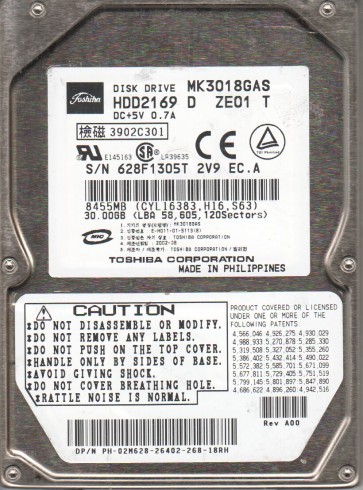
The Toshiba MK3018GAS is a 2.5-inch PATA (Parallel ATA) hard drive with a formatted capacity of 30GB. It features a spindle speed of 4200 RPM and a 2MB buffer. This model was widely used in early 2000s laptops and portable devices. It employs a single-platter design with magnetoresistive (MR) heads. The drive is known for its relatively low power consumption but is susceptible to specific failure modes due to its age and mechanical nature. Understanding its ATA interface and standard 2.5-inch form factor is critical for any recovery attempt, as adapters may be needed for modern systems.
Identifying Common Failure Types
1. Mechanical Head Crash / Stiction
This is a severe physical failure. The drive may produce clicking, grinding, or a repetitive “chirping” sound. The read/write head has either made contact with the platter surface (crash) or the head is stuck to the platter (stiction). The drive often fails to spin up or spins up and then immediately stops. Data recovery is complex and typically requires a cleanroom environment to replace the head assembly. DIY is not recommended as any further movement can cause irreparable platter scarring.
2. Bad Sectors / Media Degradation
The drive is detected by the BIOS but operates very slowly, freezes during file reads, or produces read errors. The drive may reallocate sectors repeatedly, leading to a gradual decrease in usable space. This is often caused by platter surface degradation or weak magnetic domains. The firmware attempts to use spare sectors (G-List) but cannot keep up. If the damage is light, specialized software may be able to extract data by reading the weaker magnetic signal. Deep DIY attempts with standard software can make the condition worse by stressing the drive.
3. Firmware Corruption / PCB Failure
The drive may not spin up, or it spins up but the system does not recognize it (drive not detected by BIOS). You might hear the heads parking normally but no model number appears. This can be caused by a damaged Printed Circuit Board (PCB) or corrupted firmware modules on the platter. A common sign is the drive being detected with a wrong model number or size (e.g., 0GB). Replacing the PCB with an identical donor board is a potential DIY step, but it requires transferring the original NV-RAM chip (containing drive-specific calibration data). Firmware recovery requires specialized tools like PC-3000 or similar.
Potential Recovery Paths
Professional Data Recovery Services
For mechanical failures (clicking, grinding, stiction) or severe firmware corruption, professional services are the only reliable option. They use ISO Class 5 cleanrooms to replace heads (head stack assembly), perform platter transplant, or use specialized hardware (e.g., PC-3000, DeepSpar) to read damaged sectors. For the Toshiba MK3018GAS, a reputable lab will charge between $300 and $1500+ depending on the severity. They can handle complex cases like head stack replacement, which is beyond DIY.
DIY Software Methods (Only for Logical/Non-Mechanical Issues)
If the drive is detected without unusual noises and functions slowly (bad sectors), you can try: 1. Clone with ddrescue: Use a Linux live USB. Run sudo ddrescue -d -f -r3 /dev/sdX /mnt/usb/image.img /mnt/usb/logfile.log. This creates a sector-by-sector clone, skipping bad areas. 2. Use DMDE: A powerful tool for logical reconstruction. It can recover partitions and files from drives with bad sectors. 3. Replace The PCB: If the drive is electrically dead (no spin, no detection) but no mechanical damage, find an exact donor PCB (same model and firmware revision). Desolder the 8-pin serial flash (93C66 or similar) from the old PCB and solder it onto the donor. This preserves the drive’s unique adaptive data.
What Not to Do
- DO NOT open the drive’s sealed enclosure. Exposing the platters to dust or fingerprints will make professional recovery impossible or extremely expensive.
- DO NOT repeatedly power-cycle the drive if it is making clicking noises. This can crash the head further into the platter surface.
- DO NOT run chkdsk /f or fsck on a failing drive. These tools write data to the drive and can overwrite your files or corrupt the filesystem further.
- DO NOT freeze the drive. This outdated myth can cause condensation that will destroy the platters.
- DO NOT use any software that attempts to “repair” bad sectors by writing zeros or formatting. This destroys the original data.
Summary
The Toshiba MK3018GAS is a legacy drive prone to head crashes, bad sector growth, and PCB failure. For any mechanical noise (clicking, grinding), immediately power off the drive and contact a professional data recovery service that handles 2.5-inch PATA drives. If the drive is silent but undetected, a PCB swap with ROM transfer may be attempted by an experienced technician. For logical issues like slow operation or bad sectors, a sector-by-sector clone using ddrescue in a Linux environment is the recommended DIY approach. Always remember that any further writing to the drive (like running standard repair tools) reduces the chance of successful recovery. The key is to assess the sound and detection status accurately before taking any action.