
Data recovery on vintage hard drives like the Samsung SP2004C starts with identifying the failure type – electronic, firmware, or mechanical. Each requires a different approach, and misdiagnosis can make things worse. Here’s a quick guide to help you assess your situation and decide on the next step.
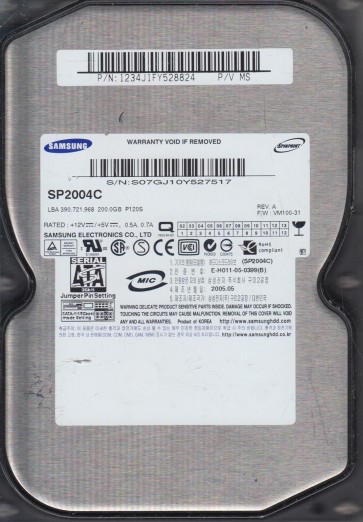
The Samsung SP2004C is a 200GB 3.5-inch SATA hard disk drive from Samsung’s SpinPoint P80 series.Introduced in the mid-2000s,it utilizes a single 200GB platter spinning at 7200 RPM and features an 8MB cache buffer with a SATA 1.5Gb/s interface.While generally reliable for its era,this model is now considered obsolete.Prolonged use,age-related degradation,and specific firmware design choices create distinct failure patterns.Due to its age,many drives may have developed internal wear,such as degraded spindle motor bearings or weakened read/write head actuators,which complicate recovery.The drive’s controller board uses a Marvell 88i6545-TFJ1 motor controller and a Samsung-developed S3C4F41 system-on-chip,which can be susceptible to firmware corruption.
Identifying Common Failure Types
1. Mechanical Head Crash or Stiction
A common physical failure where the read/write head makes contact with the platter surface,destroying the magnetic coating.Symptoms include a loud clicking or grinding noise,repeated spinning up and down,or the drive being completely silent despite power being applied.Stiction occurs when the head parking ramp fails,and the head sticks to the platter,preventing the disk from spinning.
2. Firmware Corruption (BSY/DRD/SC Fault)
This is a prevalent software-level failure specific to Samsung drives of this era.The firmware on the system area fails to load correctly,causing the drive to become stuck in a “Busy”(BSY) state.The drive may spin up normally but is not detected by the BIOS or operating system.In many cases,the drive will appear with a “DRD+SC” output when connected to a professional tool,meaning the drive is ready but stuck calibrating.
3. Bad Sector Corruption & Slow Response
As the drive ages,magnetic domains weaken,leading to weak read signals and physical bad sectors.The drive may be detected but runs extremely slowly,freezes during file access,or produces a high-pitched whine from the actuator repeatedly retrying a failed sector.Over time,this can propagate into a complete “liftoff” error where the firmware cannot finish checking the bad sector list.
4. PCB (Printed Circuit Board) Failure
Electronic component failure,often related to the TVS diodes (Transient Voltage Suppression) or the SMOOTH chip.Most common is the failure of the TVS diode,shorted to ground,which can also blow a fuse.Another is the failure of the preamplifier on the PCB due to a power surge.Symptoms include the drive having no spin,no activity light,or a burning smell.
Potential Recovery Paths
Professional Service (Recommended for Mechanical/Firmware)
For Mechanical Head Crashes or Stiction: This requires a cleanroom environment (ISO Class 5 or better).A professional will open the drive,build a custom donor drive using a matched SP2004C head assembly (matching the exact country code and firmware revision),and perform a head transplant to image the platters.For Firmware Corruption: Professionals use tools like PC-3000 or MRT to service the drive via its serial terminal or directly reprogram the ROM using a hardware programmer.The BSY/DRD fault can often be resolved by a firmware patch in the system area.Cost Expectation: $300 to $1500+ depending on the severity.
DIY Recovery (Limited to Software/PCB Issues)
1. PCB Replacement (with ROM Transfer): For a simple PCB failure (like a blown fuse),you can replace the board.Find a matching donor board (same model and firmware version).Crucially,you must transfer the original 8-pin serial ROM chip from the old board to the new one using a hot air station or a chip programmer.Without this ROM transfer, the drive will not decode data correctly.2. Bad Sector Cloning (with caution): If the drive is detected but slow,use a tool like DDRescue (Linux) or HDD Raw Copy Tool (Windows) in read-only mode.Create an image to a healthy target drive.Do NOT run chkdsk or any repair utilities on the failing drive as this overwrites data.3. Freezing (Experimental and High Risk): For a drive that refuses to spin due to stiction,some users attempt to freeze the drive in a sealed bag for 3-4 hours to contract the spindle.Connect immediately to power. This is a last resort and often works only for a very short window (5-15 minutes).Data integrity is not guaranteed.
What Not to Do
Never open the drive in a non-clean environment. Even one dust particle will destroy the platter surface.Do not apply continuous power to a clicking drive. This only grinds the heads further into the platter.Avoid using chkdsk /scan,ScanDisk, or any disk repair software. These tools attempt to correct “errors” which often overwrite the crucial data you need.Do not spin the drive upside down or shake it. This can dislodge debris or the head assembly.Never swap PCBs without transferring the original ROM chip. A same-model PCB without the correct firmware will cause the drive to behave erratically or lock up.Never apply more than the standard 12V and 5V to the drive. Using an incompatible power supply can instantly destroy the PCB.
Summary
The Samsung SP2004C is a legacy drive prone to three major failure categories: mechanical (head crash/stiction),firmware corruption (BSY/DRD),and PCB failure.For a clicking or silent drive,assume a hardware fault;immediately seek cleanroom professional service.Firmware corruption is the most recoverable with specialized tools and is not a DIY software fix unless you have a hardware programmer.For data recovery on this specific model,the window of opportunity is limited:further DIY attempts often convert a recoverable firmware issue into an unrecoverable platter damage.Always prioritize creating an image of the drive before attempting any repair procedure.