
Data recovery on vintage hard drives like the HGST HUS153073VLS300 starts with identifying the failure type – electronic, firmware, or mechanical. Each requires a different approach, and misdiagnosis can make things worse. Here’s a quick guide to help you assess your situation and decide on the next step.
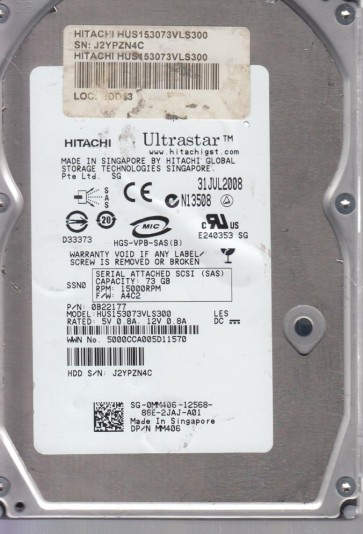
The HGST HUS153073VLS300 is a 3.5-inch, 15,000 RPM Ultra-320 SCSI hard disk drive from HGST (formerly Hitachi Global Storage Technologies). It is part of the Ultrastar 15K300 family, known for high reliability and performance in enterprise server and storage array environments. This drive typically uses a spindle motor with fluid dynamic bearings, a servo-controlled voice coil actuator, and supports a 320 MB/s interface bandwidth. The internal platters are made of glass or aluminum substrates coated with a thin magnetic media layer. The heads are magnetoresistive (MR) or giant magnetoresistive (GMR) type, flying nanometers above the platter surface. Due to its enterprise class, it often features a dual-stage actuator for improved track-following accuracy and a high-speed microprocessor controlling all operations. Understanding its hardware is critical because SCSI drives have a more complex controller firmware than consumer SATA drives, often with bad sector management (P-list and G-list) and a sophisticated error recovery system.
Identifying Common Failure Types
1. Electronic Failure (PCB Failure)
This is identified when the drive is completely silent, no spin-up sound, or the spindle motor does not accelerate to speed. Alternatively, the drive may click once or make a faint buzzing sound. The SCSI bus may not detect the drive. The failure lies in the printed circuit board (PCB) components: the preamplifier chip, the main controller, the motor driver, or the SCSI interface chip. Often, a damaged TVS diode (transient voltage suppression diode) or a shorted capacitor is the culprit. These can be caused by power surges or faulty backplanes. If the PCBA is swapped with an identical donor board, the drive may become accessible, but only if the flash memory (containing firmware calibrations) is not damaged or relocated.
2. Mechanical Failure (Head Crash or Spindle Stiction)
Signs include a repetitive clicking sound (heads attempting to load but failing), a grinding or scraping noise, or the drive failing to spin up at all while the motor whines. This indicates physical damage to the read/write heads, the platter surface, or the spindle bearing system. For the 15K300 series, a head crash often happens due to sudden shock, particle contamination, or degradation of the lubrication on the platters. Stiction (static friction) can occur if the heads have been parked on a contaminated surface for a long time. With a head crash, data recovery is extremely difficult and often requires cleanroom disassembly and head stack replacement.
3. Firmware Corruption
The drive spins up, but the computer does not detect it correctly. It may report with incorrect capacity, show as a “SCSI device” without a disk name, or get stuck in a “busy” state. The firmware resides in a dedicated service area on the platters, often in a reserved cylinder. Corruption can occur from a sudden power loss during a firmware update, drive degradation (weak media causing read errors in the service area), or electrostatic discharge. Symptoms can also include an unrecoverable “SMART error” or the drive continuously retrying to read the module directory. This is a software-logical problem, but requires specialized tools to access the hidden service area and rewrite the damaged firmware modules.
4. Bad Sector Degradation
Gradual data corruption: the drive is detected but read speeds become extremely slow, and you encounter read errors or “cyclic redundancy check” (CRC) errors when copying files. This is due to the magnetic media losing its orientation over time (bit rot), or from overworking the heads. The internal firmware will attempt to reallocate bad sectors to spare area (G-list), but if the number exceeds the drive’s internal capacity, the drive may go into a “calibration” loop or become unstable. This is a hardware-software hybrid failure: media is physically weak, but the drive can still be read if special recovery techniques are used.
Potential Recovery Paths
Professional Data Recovery Services (Recommended for Critical Data)
For enterprise SCSI drives like the HUS153073VLS300, professional recovery is the safest and most reliable option if the data is irreplaceable. Certified laboratories have the necessary equipment: Class 10 or better cleanroom (for hardware failures), specialized SCSI terminal adapters, firmware editing tools (like PC-3000 SCSI or similar), and the ability to perform head stack replacements or platter transplants. Costs typically range from $500 to $3000+ depending on severity. Benefits include near-100% success probability for logical and electronic failures, and high probability for mechanical failures with minimal data loss. A good service will provide a free evaluation and a fixed quote before proceeding. They can also work with half-dead media by using advanced imaging algorithms to skip failing areas and recover data from the remaining sectors using sector-by-sector reading.
Do-it-Yourself (DIY) Methods (Low Risk Only)
If you are confident the failure is purely logical (e.g., bad sectors or file system corruption), proceed with extreme caution. Use a SCSI host adapter (like an Adaptec 29320 or similar) and a known good cable. Do not use a USB-SCSI adapter as they introduce additional layers of errors. Use software tools that support SCSI direct commands, such as ddrescue (Linux) or HDDSuperClone (Linux/Windows via boot CD). These tools can create an image of the drive by skipping bad sectors and retrying them later, without causing additional head damage. Example command: ddrescue -d -r3 /dev/sdX /mnt/recovery/image.img /mnt/recovery/logfile.log. This will attempt direct disk access, and retry slow areas three times. After imaging, use a file system repair tool (like TestDisk or fsck on the image file) to recover logical data. For a failing drive, you must never perform a full format or a file system check (chkdsk) on the original drive itself, as this can cause further damage. If the drive is making clicking noises, do not power it on more than absolutely necessary:each second of operation can destroy more platter surfaces.
What Not to Do
- Do not open the drive. The internal chamber is a precision assembly with sub-micron tolerances. Any dust particle, fingerprint, or hair can scratch the platters, permanently destroying data. Even a factory cleanroom is required for head replacement.
- Do not use disk scanning or recovery software that writes to the failing drive. Programs that “repair” errors, automatically delete bad sectors, or perform a chkdsk /f on the original drive will scramble the data and make professional recovery harder or impossible.
- Do not attempt to swap PCB without verifying the firmware ID. The HUS153073VLS300 has preamplifier and motor calibration data stored in an EEPROM on the PCB. Swapping boards without transferring this data (often via a hot air soldering station or a serial interface) will render the drive inoperative or cause incorrect head positioning, leading to head crash.
- Do not apply electrical power multiple times to a clicking drive. Each spin-up reattempt can introduce head slaps, damaging more media. If the heads are stuck, power cycling rarely helps and always worsens the condition.
- Do not freeze the drive. This is an outdated myth. Thermal contraction can temporarily free a stuck spindle, but condensation will corrode the heads and platters within minutes, destroying data completely.
Summary
The HGST HUS153073VLS300 is a robust enterprise SCSI drive, but it is vulnerable to electronic, mechanical, and firmware failures. The best path to recovery hinges on accurate failure identification: a silent drive suggests PCB failure (possible DIY board swap with firmware adaptation), clicking indicates mechanical failure (professional cleanroom required), and detection issues with spindle spin suggest firmware corruption (specialized tools needed). For critical data, always consult a professional data recovery service. If attempting DIY, strictly limit operations to read-only imaging with tools like ddrescue, never write to the drive, and avoid any mechanical disassembly. Remember: the more you power on a failing drive, the more data you lose. Proper handling ensures the highest chance of restoring your files.