
Data recovery on vintage hard drives like the Seagate ST3160828AS starts with identifying the failure type – electronic, firmware, or mechanical. Each requires a different approach, and misdiagnosis can make things worse. Here’s a quick guide to help you assess your situation and decide on the next step.
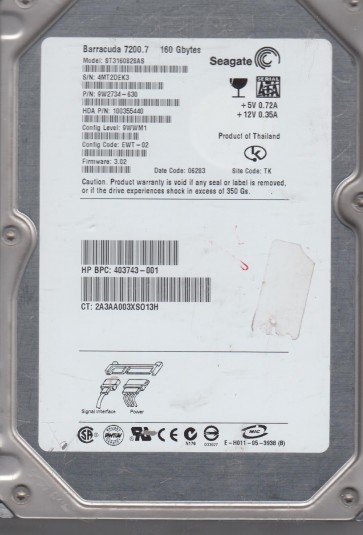
The Seagate ST3160828AS is a 160GB 3.5-inch SATA hard disk drive from the early 2000s era, part of Seagate’s Barracuda 7200.7 series. It operates at 7200 RPM with an 8MB cache and uses a single 160GB platter. This drive employs traditional perpendicular magnetic recording technology and a Marvell or LSI-based controller. Its age means it is susceptible to typical mechanical wear, firmware corruption, and head degradation. Understanding that this is a parallel ATA interface drive (though often used with SATA adapters in some variants, the ST3160828AS is native SATA) is crucial for safe handling.
Identifying Common Failure Types
1. Mechanical Head Failure (Stiction or Clicking)
Symptoms: The drive powers on, spins up briefly, then emits a repeated clicking or ticking sound, often accompanied by the motor stopping and retrying. This indicates the read/write heads are stuck to the platter surface (stiction) or the head actuator mechanism is failing. This is a hardware failure. Data cannot be accessed via software.
2. Bad Sectors and Surface Degradation
Symptoms: The drive spins and is detected by the BIOS but exhibits slow read/write speeds, file corruption, or operating system hangs. S.M.A.R.T. data may show a high Reallocated Sector Count or Current Pending Sector Count. This indicates physical damage to the platter surface, which may progressively worsen. This is a hardware failure at the media level.
3. Firmware or PCB Failure
Symptoms: The drive fails to spin up at all, or spins but is not recognized by the BIOS (spins but no detection). In other cases, it may be detected with incorrect capacity (e.g., 0GB) or make no noise at all. This can be caused by a damaged controller board component (ESD, power surge) or corrupted firmware. This is often a hardware/electronic failure but may sometimes be resolved by replacing the PCB with a compatible donor board or reprogramming the firmware.
4. Logical/File System Corruption
Symptoms: The drive is detected, spins normally, but the operating system reports it as “unallocated” or “not formatted.” Files appear missing or inaccessible. This is a software-level issue, often caused by improper shutdowns, virus attacks, or accidental formatting. The physical hardware is intact.
Potential Recovery Paths
Professional Data Recovery (Recommended for Hardware Failures)
For mechanical clicking or head failure: Professional recovery is required. The drive must be opened in a cleanroom (Class 10 or better). The heads are replaced with a matched donor set from an identical model and firmware revision. The platters may need to be transferred to a new chassis. Cost: $500 – $2000+ USD. Use services like DriveSavers or Gillware.
For bad sectors or surface damage: Specialized equipment like PC-3000 or DeepSpar Disk Imager is used to create a sector-by-sector forensic image. The tool skips damaged areas and reads data from weaker zones. This can be done professionally. Cost: $300 – $1000 USD.
For PCB/firmware issues: Professionals flash firmware to the drive using a programmer (e.g., PC-3000) or swap the PCB with a replacement that has the original firmware ROM desoldered and installed onto the new board. Cost: $150 – $500 USD.
DIY Recovery Methods (For Logical Issues Only)
For file system corruption (logical failure): Do NOT attempt chkdsk or format. Use read-only software like R-Studio, DMDE, or Recuva. Boot from a different healthy system (use a USB-to-SATA adapter). Select the ST3160828AS drive. Perform a full scan (quick scan is insufficient). Recover files to a different healthy drive (never to the same failing drive).
For accidental formatting: Use the same software. The file system metadata (MFT or directory structure) may still be intact. Do not write any new data to the drive.
What Not to Do
- Never open the drive enclosure. Even a single dust particle on the platter can destroy data.
- Do not attempt to freeze the drive. This outdated myth often causes condensation, leading to head crashes.
- Do not run chkdsk /f or scandisk on a clicking or slow drive. This forces additional read/write operations, worsening bad sectors and potentially stripping data.
- Do not use software that claims to fix bad sectors by writing zeros. This permanently destroys data.
- Do not power cycle the drive repeatedly if it is clicking. This can damage the heads further.
- Do not connect a mechanically failing drive to a laptop via USB. The power supply can be insufficient and cause erratic behavior.
Summary
The Seagate ST3160828AS is an aging drive with common failure points: mechanical head collapse, bad sectors, and PCB/firmware issues. For any unusual sounds (clicking, grinding), immediate professional intervention is the only safe path. For silent but unrecognized drives, a PCB swap or firmware recovery may be possible by professionals. DIY recovery is only viable for logical corruption (missing partitions, accidental format) using read-only software. Never attempt hardware repairs outside a cleanroom. Always backup your data before any recovery attempt, and if the data is critical, stop using the drive and consult a specialist immediately. The cost of recovery is high, but the cost of permanent data loss is higher.