
Data recovery on vintage hard drives like the Seagate ST3300631AS starts with identifying the failure type – electronic, firmware, or mechanical. Each requires a different approach, and misdiagnosis can make things worse. Here’s a quick guide to help you assess your situation and decide on the next step.
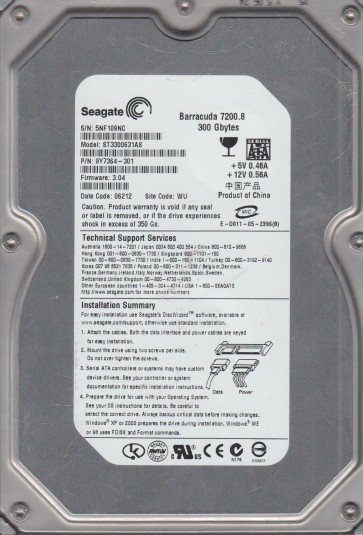
The Seagate ST3300631AS is a 300GB 3.5-inch 7200 RPM SATA hard drive from the 7200.9 family. It utilizes perpendicular magnetic recording technology and features a single platter design. This drive is known for its reliability in desktop applications but is subject to several common failure modes as it ages. The controller board typically uses an Agere or LSI controller chip and a Smooth motor driver. The drive uses a standard SATA interface, making it compatible with most modern data recovery tools and systems. Understanding the specific internal components is crucial for diagnosing and recovering data.
Identifying Common Failure Types
1. Mechanical Failure (Stiction or Spindle Motor Seizure)
Symptoms: The drive does not spin up at all, makes a very faint whirring noise for a second then stops, or emits a high-pitched whine. This is often due to the read/write head parking zone becoming sticky (stiction) or the spindle motor bearing seizing up due to lubricant degradation over time. The platters may be physically stuck. This is a classic hardware failure requiring professional intervention.
2. Firmware Corruption (Head Map or Translator Damage)
Symptoms: The drive spins up normally (you can feel the platters rotating), but the computer fails to detect it, or it is detected with the wrong capacity (e.g., 0GB or a very small size). It might click a few times then go silent, or stay spinning without responding to commands. Corruption of the Service Area (SA) including the head map, module lists, or translator can render data inaccessible without specialist tools.
3. Bad Sectors and Surface Damage
Symptoms: The drive is recognized but very slow to respond, makes clicking or scratching noises during data access, freezes when trying to open files, or reports read errors. This indicates a failing head assembly or physical damage to the platter surface. Continued operation can worsen the damage and permanently ruin data in adjacent sectors.
4. Logical File System Corruption
Symptoms: The drive spins and is detected correctly in BIOS, but the operating system shows it as “unallocated” or prompts to format it. This is often caused by a corrupt partition table, master boot record, or file system structure. Unlike the previous failures, this is a pure software issue and is the safest for DIY recovery.
Potential Recovery Paths
Professional Data Recovery Services
Mandatory for: Mechanical failures (stiction, spindle seizure), serious firmware corruption (SA damage), or any audible clicking/grinding. A professional lab with a cleanroom (Class 100 or better) is required to open the drive. The technician will perform head stack replacements, read/write channel adjustments, or use specialized tools like PC-3000 or DeepSpar to access the SA and repair the firmware. For ST3300631AS drives, competent services can often recover data even with seized spindles by using a donor motor or platter transplant. Cost ranges from $500 to $3000+ depending on complexity.
DIY Approach (For Logical Issues ONLY)
Requirements: A working SATA cable and power supply. A known-good computer. Data recovery software like R-Studio, DMDE, or Recuva.
Steps:
1. Connect the drive as a secondary (not boot) drive to a different computer. Use a SATA-to-USB adapter if needed, but direct internal SATA is more reliable.
2. Run a tool to scan the drive. Do not use CHKDSK. For logical corruption, use recovery software to perform a file system scan. Select “Recover Files” from a formatted or corrupted drive. Most tools can rebuild the file system structure in memory.
3. Save recovered data to a separate healthy hard drive. Never write back to the source drive.
4. If the scan shows many read errors or takes extremely long, abort immediately. This indicates underlying hardware issues beyond software.
Warning: DIY is only suitable for logical failures. Any physical defect makes DIY recovery dangerous and likely destructive.
What Not to Do
1. Do not apply power repeatedly. If the drive does not spin or makes strange noises, unplug it immediately. Repeated power cycling can damage the preamplifier or cause heads to crash.
2. Do not open the drive enclosure. Hard disk platters require a cleanroom environment. Even a single dust particle can destroy the head gap and ruin data.
3. Do not use disk utilities. Avoid CHKDSK, fsck, or any repair utility. These tools write to the drive, potentially overwriting critical data and making recovery impossible.
4. Do not try to spin a seized drive by hand or tap it. This can cause permanent platter damage or break the heads.
5. Do not install the drive in an external USB enclosure for extended use. Vibrations from the enclosure can exacerbate existing mechanical issues.
6. Do not attempt firmware updates. Flashing new firmware on a failing drive is extremely risky and can permanently brick it.
Summary
The Seagate ST3300631AS is a classic drive that suffers from stiction, spindle failure, and firmware corruption as primary failure modes. The user must accurately identify the failure type before any action. If the drive is completely dead (no spin, faint whir, or ticking), or makes any abnormal noises like scratching, the data recovery path is exclusively via a professional service. For drives that are detected but appear empty or ask for a format, DIY software recovery is a safe and viable option using tools like R-Studio. Never write data back to the source drive. Prioritize keeping the drive powered off and unopened until the correct recovery approach is determined. Proper diagnosis is the single most important step to minimize data loss.