
Data recovery on vintage hard drives like the Western Digital WD3200LPVX starts with identifying the failure type – electronic, firmware, or mechanical. Each requires a different approach, and misdiagnosis can make things worse. Here’s a quick guide to help you assess your situation and decide on the next step.
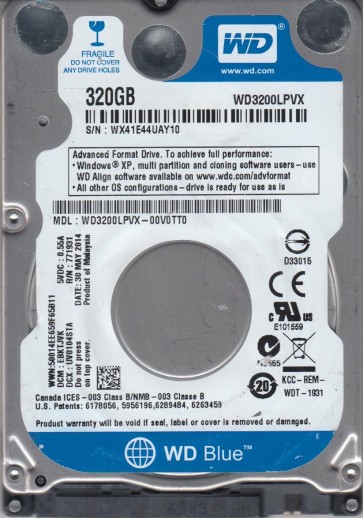
The Western Digital WD3200LPVX is a 320GB 2.5-inch SATA hard disk drive commonly used in laptops and external enclosures. It features a 5400 RPM spindle speed and a SATA 3Gb/s interface. This model is known for its balance of storage capacity and power efficiency, but like all mechanical drives, it is susceptible to failure over time. Understanding its specific failure patterns is critical for successful data recovery.
Common Failure Types
1. Mechanical Head Crash
Symptoms: Loud clicking, scraping, or grinding noises. The drive may be detected but fails to read data or becomes entirely unresponsive. The system may hang when attempting to access the drive.
Cause: Physical contact between the read/write head and the platter surface, often due to shock, dropping the device, or manufacturing defects. This damages the magnetic coating and can cause platter degradation.
2. Firmware Corruption (Media Cache / Translator Issues)
Symptoms: Drive spins up but is not detected by BIOS or operating system, or is detected with incorrect capacity (e.g., 0GB or 1MB). The drive may click a few times and then stop. In some cases, it may enter a “busy” state and not respond to commands.
Cause: Corrupted firmware modules, particularly the media cache or translator (SA region). This can result from sudden power loss, bad sectors in the Service Area, or improper handling.
3. Bad Sectors and Logical Damage
Symptoms: Slow read/write speeds, frequent file read errors, file system corruption (e.g., “The file or directory is corrupted and unreadable”), and system freezes during data access. The drive may show as RAW or require formatting.
Cause: Physical defects on the platter (weak magnetic domains) or logical errors in the file system structure (e.g., damaged MFT, partition table corruption). This can be caused by aging, power surges, or improper shutdowns.
4. Stiction (Head Parking Failure)
Symptoms: Drive does not spin up at all. No audible sound of the platters rotating. In some cases, a faint buzz or whine may be heard but the platters remain stationary.
Cause: The read/write head becomes stuck on the platter surface due to lubrication breakdown or debris. This is common in drives that have been idle for long periods or have been exposed to high temperatures.
Potential Recovery Paths
Professional Data Recovery Services
When to use: For mechanical failures (head crash, stiction), complex firmware issues, or if data is critical and DIY attempts may worsen the situation. Professional cleanrooms (Class 10 or better) are required for internal repairs. Expect high costs but a higher success rate for severe physical damage.
Process: Diagnosis, donor drive acquisition for parts (matching firmware version), head stack replacement, firmware repair using specialized tools (PC-3000, MRT), and raw imaging using hardware write blockers.
DIY Methods (Only for Logical or Simple Issues)
For bad sectors / logical damage: Use software like ddrescue (Linux) or HDDSuperClone to create a raw image of the drive. Direct data extraction is not recommended. Work on a cloned copy. Run CHKDSK /f only on the clone, not the original drive.
For firmware issues (no physical damage): Some advanced users may attempt to reprogram firmware using tools like LDR or Terminal (e.g., via serial port on WD drives). This carries extremely high risk of permanent data loss and is not recommended for non-specialists.
For stiction: Gently rotating the platters by hand inside a cleanroom is a professional-only procedure. Do not attempt at home.
What Not to Do
1. Do not continue using the drive after hearing unusual sounds. Immediate power off is necessary to prevent further physical damage.
2. Do not run CHKDSK or any repair software on a failing drive. This can corrupt the file system and overwrite critical data.
3. Do not open the drive enclosure even to “check” it. Hard drives are assembled in Class 100 cleanrooms. Any particle exposure will ruin the platters.
4. Do not freeze the drive. The old myth of freezing drives for recovery is damaging. Condensation will cause internal corrosion and irreversible platter damage.
5. Do not use disk defragmentation tools on a drive that shows any signs of failure. Defragmentation forces heavy head movement and increases wear on a failing mechanism.
Summary
The Western Digital WD3200LPVX is a reliable drive but prone to head crashes, firmware corruption, bad sectors, and stiction. For physical failures, immediate professional intervention is mandatory. For logical issues, a controlled cloning process using ddrescue is the safest DIY path. Never power on a noisy drive, never open the casing, and never use repair software on the original drive. Prioritize preserving the current state above all else. Success depends on respecting the drive’s fragile mechanics and acting with caution.