
Data recovery on vintage hard drives like the Seagate ST340012A starts with identifying the failure type – electronic, firmware, or mechanical. Each requires a different approach, and misdiagnosis can make things worse. Here’s a quick guide to help you assess your situation and decide on the next step.
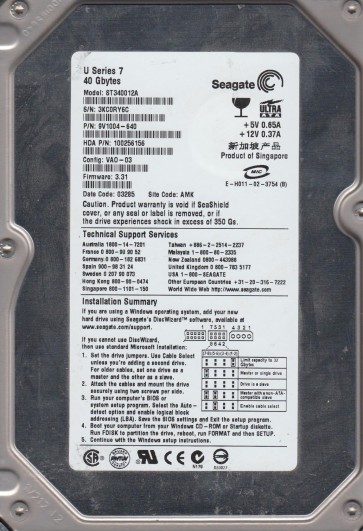
The Seagate ST340012A is a 40GB Parallel ATA (PATA) hard drive from the early 2000s, typical of the 7200.7 series. It utilizes an M22 circuit board (PCB) and is known for its high-density platters. This is a legacy drive with a standard IDE interface. Key components include a Hitachi-made (formerly IBM) head stack assembly and a spindle motor that is prone to stiction. Understanding that this is a mechanical device with a finite lifespan is critical before attempting any recovery. The drive uses a standard CHS (Cylinder-Head-Sector) addressing scheme, making it susceptible to firmware and mechanical issues.
Identifying Common Failure Types
1. Mechanical Failure ¨C Head Crash or Stiction: The most catastrophic failure. Symptoms include a loud clicking sound (heads failing to land on data), a grinding noise, or the drive spinning up and then immediately stopping (spindle motor stiction). This is often caused by physical shock, power surges, or age-related lubricant breakdown. The heads may have gouged the platters, destroying data.
2. Firmware Corruption / Electronics Failure: The drive powers up but is not detected by the BIOS, or is detected with a wrong model/size. In the ST340012A, this often manifests as a ¡°click of death¡± without actual head damage, or a complete failure to spin. Common causes include a failed controller chip (e.g., the LSI Logic chip), damaged preamplifier, or corrupted service tracks (negative cylinders). The board may have visible burn marks or bulging capacitors.
3. PCB (Printed Circuit Board) Failure: The drive may appear dead (no spin, no sound). Symptoms include no response from the drive when power is applied. A common failure is the TVS diode (Transient Voltage Suppressor) shorting due to a power spike, or a failed motor controller chip. In many cases, the platters and heads are undamaged, but the board is dead. A simple PCB swap may work, but careful verification is needed.
Potential Recovery Paths
Professional Service (Recommended for Critical Data): A professional data recovery lab will handle mechanical failures and severe firmware damage. They use cleanroom environments to replace heads, repair preamp failures, and run specialized firmware tools to extract raw data at a sector level. For the ST340012A, this is often the only path for head crashes or platter scratches. Costs can range from $300 to $2000+ depending on severity. Expect a turnaround of 3-10 business days.
DIY Path 1: PCB Swap (For Electronics Failure Only): If the drive is dead but mechanically silent, a PCB swap may work. Obtain a donor PCB with the exact same model (ST340012A) and firmware version (check the number on the chip or the sticker). Use a hot air station to transfer the original drive¡¯s 8-pin serial flash memory chip (usually a 25F or 25P series) from the donor board to the original board. This preserves the unique calibration data. If you simply swap the board without the chip, the drive will not align and may beep or fail. After soldering, reassemble and test the drive on a secondary system. Do not write any data.
DIY Path 2: Known Good Firmware Update (For Firmware Corruption Only): If the drive is recognized but inaccessible and you suspect firmware, use a Seagate tool (like SeaTools for DOS or a terminal connection via a USB-TTL adapter). For the ST340012A, you can send a ¡°F3 T>¡± reset command and attempt to reinitialize the firmware. This is advanced and requires reading the drive¡¯s specific tech ID. Incorrect commands can brick the drive. Do not attempt this if the drive makes unusual sounds.
DIY Path 3: Freezing Method (Temporary for Stiction Only ¨C Last Resort): If the drive has stiction (spindle locked), some users have reported success by placing the drive in a sealed plastic bag into a freezer for 24 hours. Then, immediately power it on for a brief time (5-10 seconds) to try to spin up. This only works if the lubricant has hardened but not failed mechanically. This is highly risky: condensation can short the PCB, and forcing a spin-up can cause a head crash. Use this only for non-critical data you are prepared to lose entirely.
What Not to Do
1. Do not open the drive enclosure. The internal environment is a Class 100 cleanroom. Any dust, hair, or fingerprint will ruin the platters and heads permanently. Even touching the platters with a finger can destroy data.
2. Do not apply physical force. Never tap, drop, or jolt the drive to try to get it to spin. This will worsen head misalignment or cause a full crash.
3. Do not attempt to write data to the drive. If you are trying to recover data, do not format, partition, or use any software that writes to the disk. Write operations can overwrite the deleted or damaged areas, making recovery impossible.
4. Do not use cheap ¡°data recovery¡± software if the drive is clicking. Software cannot repair mechanical failures. Running software on a clicking drive will only cause more head damage and make professional recovery harder.
5. Do not swap the PCB without transferring the firmware chip. As noted, simple PCB swaps on Seagate M22 drives will not work without moving the serial flash. Doing so can send the drive into a ¡°self-test¡± mode that destroys calibration data.
Summary
The Seagate ST340012A is a robust but aging drive with common failure points in its PCB, firmware, and mechanical parts. For a clicking or grinding drive, stop immediately and seek professional help. For a silent dead drive with no spin, a DIY PCB swap (with firmware chip transfer) is a viable option if you are technically skilled. For firmware corruption, a terminal connection can be attempted. Always prioritize data safety over cost savings. If the data is irreplaceable, never attempt DIY methods beyond a simple PCB swap. The risk of permanent data loss outweighs any potential savings. The best path is professional evaluation using specialized tools that can handle the nuances of this legacy Seagate series.