
Data recovery on vintage hard drives like the Western Digital WD5000LPVT starts with identifying the failure type – electronic, firmware, or mechanical. Each requires a different approach, and misdiagnosis can make things worse. Here’s a quick guide to help you assess your situation and decide on the next step.
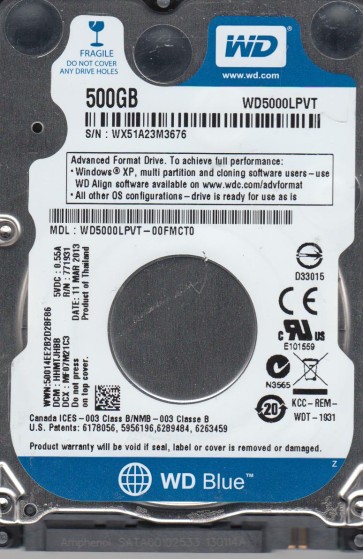
The Western Digital WD5000LPVT is a 2.5-inch 5400 RPM SATA hard drive designed for laptops and portable storage devices. This model features a 500GB capacity, Advanced Format (4K) sectors, and enhanced caching algorithms. Optimized for low power consumption and quiet operation, it commonly serves as a primary or secondary drive in consumer and business notebooks. Reliability is generally good, but like all mechanical drives, it is susceptible to specific failure patterns influenced by usage conditions, age, and manufacturing variances. Understanding these failure modes is critical for successful data recovery.
Common Failure Types
1. Mechanical Head Crash or Stiction: The most severe failure involves the read/write heads contacting the platter surface, causing scratches (head crash) or the heads sticking to the platter (stiction). Symptoms include a clicking or scratching noise, the drive not spinning up, or the computer not detecting the drive. Cause: Physical shock, sudden movement during operation, or manufacturing defects. 90% of physical damage on this model is head-related.
2. Firmware Corruption (SA Region Issues): The WD5000LPVT is known for firmware-related problems, particularly corruption in the System Area (SA) where adaptive parameters are stored. Symptoms: The drive spins up but is not recognized, shows incorrect capacity (e.g., 0MB or 1GB), or produces a clicking sound without a mechanical crash. Cause: Power surges, improper shutdowns, or gradual degradation of NAND flash storing the firmware.
3. Bad Sectors and Logical Corruption: Gradual physical degradation of the platter surface leads to bad sectors. Logical corruption includes file system damage (NTFS/FAT32), accidental deletion, or partition table loss. Symptoms: Slow performance, file access errors, blue screen of death (BSOD) related to disk I/O errors, or the drive asking to be formatted. Cause: Read/write head wear, thermal expansion, file system corruption during write operations, or malware.
4. Electronic Failure (PCB/Controller Board): Failure of the printed circuit board (PCB) due to component burnout or electrical damage. Symptoms: The drive is completely dead (no spin, no sound, not detected). A burning smell may be present. The external TVS diode or internal voltage regulator is often the culprit. Cause: Power supply surge, lightning strike, or reverse voltage.
5. Motor Failure (Spindle Motor Locked): The spindle motor that rotates the platters seizes or fails to start. Symptoms: The drive may make a single click but does not spin up, or produces a high-pitched whine before stopping. Cause: Bearing wear, contamination, or age-related stiction. On this drive model, motor failure is less common than head or firmware issues but does occur.
Potential Recovery Paths
1. DIY Methods (Risk Level: High. Proceed with caution)
– For Logical Corruption (Bad Sectors, Accidental Deletion, Format): Use professional-grade imaging software (e.g., ddrescue, R-Studio, or GetDataBack) in a READ-ONLY mode. Clone the drive sector-by-sector to a healthy disk. Do not use CHKDSK or any repair tool directly on the original drive, as it can worsen the damage. If the drive is making unusual noises, stop immediately. DIY is only viable if the drive is fully recognized and has no physical or firmware symptoms.
– For PCB Failure (Power Surge): If the board has visible damage (burned component), replacing it with a virgin donor board will NOT work due to adaptive data stored on the microcontroller. Advanced hobbyists can attempt to transfer the 8-pin serial flash chip (containing firmware) from the original board to a donor board. This requires micro-soldering skills and a suitable programmer. Without the firmware swap, the replacement board will cause the heads to execute an incorrect firmware load, potentially destroying data.
2. Professional Data Recovery Services (Recommended for physical or complex issues)
– For Head Crash, Stiction, or Scratched Platters: A laboratory is required. The process involves opening the drive in a cleanroom (Class 10 or better), removing the head stack assembly (HSA), and installing a matched donor head assembly. Specialized firmware tools (e.g., PC-3000, MRT) are then used to manipulate the drive’s firmware to read the media at a low level, bypassing bad areas. This is the only safe path for physical damage.
– For Firmware Corruption: Professional tools can access the System Area (SA) via a serial port (UART) or by manipulating the drive’s internal commands. Technicians rebuild or repair the corrupt firmware modules (e.g., Media Cache, Translator, DIR module) to make the platter data accessible. This often requires extracting a donor’s firmware parameters and adapting them to the patient drive, which is model and head number specific.
– For Motor Failure: In rare cases, a cleanroom transplant of the platters into a donor motor/body is performed. This is highly risky and often reserved for premium recovery cases. For seized motors, the data is typically unreadable unless the platters are physically transferred.
What Not to Do
1. Do Not Open the Drive Outside a Cleanroom: Hard drive platters are extremely sensitive to microscopic particles. Opening it outside a certified cleanroom will introduce dust, which will permanently scratch the platters upon spin-up, destroying all data.
2. Do Not Run CHKDSK (chkdsk /f or /r) on a Failing Drive: This command scans and attempts to repair file system errors. If the drive has bad sectors or physical damage, CHKDSK will cause the heads to repeatedly read bad areas, leading to more bad sectors and a potential head crash. It often makes an unrecoverable drive completely unrecoverable.
3. Do Not Apply Power to a Damaged PCB: If you suspect electrical damage (burnt smell, smoke), do not attempt to power the drive again. Doing so can destroy other circuits. Use a multimeter to check the TVS diodes (usually two or three) for shorts. A direct power-on with a shorted diode can burn out the preamplifier on the head assembly, making even professional recovery infeasible.
4. Do Not Freeze the Drive: Despite an old myth, freezing a hard drive does not fix mechanical issues. Condensation forms on the platters, leading to immediate corrosion and head damage. This will permanently destroy data. The drive will fail permanently.
5. Do Not Solder or Replace Components on the PCB without Expertise: Altering components, such as replacing the TVS diode with a wire jumper (to bypass the protection), can pass a large voltage spike directly to the head preamplifier. This will instantly kill the heads. Only a trained micro-soldering technician should perform board-level repairs.
Summary
The Western Digital WD5000LPVT is a reliable but vulnerable drive that primarily fails due to head crashes, firmware corruption, bad sectors, or PCB damage. Critical action steps: 1) Immediately disconnect the drive at the first sign of mechanical noise (clicking, scratching). 2) Do not run CHKDSK. 3) Do not freeze. 4) For logical issues, use read-only imaging software. 5) For physical failure (noise, not spinning, wrong capacity), high-probability recovery requires a professional laboratory using specialized firmware tools and cleanroom head replacement, with costs typically ranging from moderate to high depending on damage severity. The safest path for non-technical users is always professional evaluation before any DIY attempt.