
Data recovery on vintage hard drives like the Seagate ST9808211A starts with identifying the failure type – electronic, firmware, or mechanical. Each requires a different approach, and misdiagnosis can make things worse. Here’s a quick guide to help you assess your situation and decide on the next step.
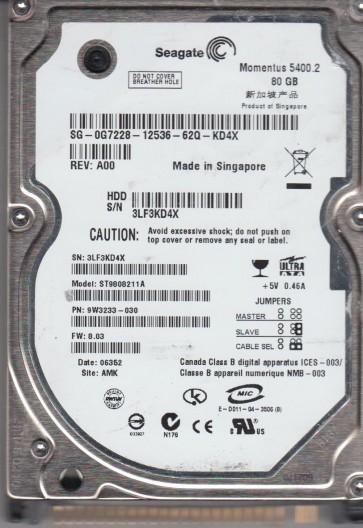
The Seagate ST9808211A is a vintage 2.5-inch PATA (IDE) hard drive with a 40GB formatted capacity, commonly found in laptops circa 2005-2008. It utilizes perpendicular recording technology and features a 5400 RPM spindle speed. Understanding its architecture is crucial for diagnosing failures, as its age predisposes it to power-on hours wear and specific failure modes related to its older controller chips and firmware stack.
Common Failure Types
1. Mechanical Head Crash: Symptoms include loud clicking, grinding, or scraping noises. The drive is detected in BIOS but fails to read. The cause is the headstack colliding with the platter surface due to shock, wear, or contamination. This is often terminal without cleanroom intervention.
2. Firmware/Translator Corruption: Symptoms include the spinning up but not being detected by the BIOS, or reporting a zero-correct capacity. The cause may be a logical corruption in the system area of the platter due to power spikes or failing read/write heads. This is often recoverable with specialized firmware tools.
3. Logical Damage (File System Errors): Symptoms include the drive being detected correctly but showing as unallocated or unformatted in Windows, or producing I/O device errors when accessing files. The causes can be a power surge during write operations, bad blocks, or viruses. This is the most common and generally DIY-friendly.
4. Stiction (Static Friction): Symptoms include the drive failing to spin up, making a zero- or nearly inaudible whir, and the spindle motor is locked. The cause arises from the heads sticking to the platter surface when the drive has been idle for extended periods, common in older drives. Delicate physical intervention may be attempted.
5. Bad Sector Growth: Symptoms include extremely slow performance, frequent freezes, or operating system crashes when reading data. The cause is progressive wear of the media’s magnetic surface. Drive self-monitoring technology (SMART) will show high Reallocated Sector or Pending Sector counts.
Potential Recovery Paths
Professional Service: For physical failures (clicking, head crash, spin off noises), seek a cleanroom (Class 100) lab. Involves headstack replacements, platter transfers, and firmware repairs using tools like PC-3000 or DeepSpar. Cost ranges typically from $500 to $3000 depending on complexity.
DIY Methods: For logical failures, use a hard drive USB dock or sturdy SATA to IDE adapter. Mount the drive in a Linux environment and use dd_rescue or dd with an error handling flag to create a disk image. Use forensic imager tools such as FTK Imager or OSForensics to image bad blocks without stress. Do not use chkdsk or fsck directly on the failing source.
What Not to Do
1. Do not open the drive: Exposing the internals to air will introduce particulates, making recovery nearly impossible and costly beyond cleanroom rates.
2. Do not run chkdsk: This utility will mark bad blocks and may corrupt the filesystem structure. Prefer imaging over direct fixing.
3. Do not apply AC/DC voltage to the electronic board during a troubleshoot. Using a wrong power adapter (like 12V from a desktop) will instantly fry the controller.
4. Do not write to the drive: Writing fresh data will overwrite previous files and potentially destroy partial head-damaged areas forever.
5. Do not freeze the hard drive as described in old guides. The freeze trick temporarily fixes mechanical issues rarely works with modern controllers and often worsens internal condensation damage.
Summary
The Seagate ST9808211A is an aging PATA hard drive with distinct mechanical, firmware, and logical failure risks. Immediate action: Diagnose sounds and SMART data. Perform read-only imaging using ddrescue on a computer not booted from the failing drive. Refrain from self-repair beyond logical tools and leave mechanical or loud failures to a cleanroom professional. Prompt and correct steps maximize the recovery chance for this historical hardware.