
Data recovery on vintage hard drives like the Seagate ST9500325ASG starts with identifying the failure type – electronic, firmware, or mechanical. Each requires a different approach, and misdiagnosis can make things worse. Here’s a quick guide to help you assess your situation and decide on the next step.
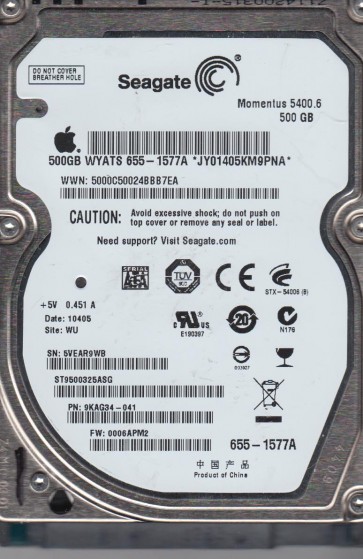
The Seagate ST9500325ASG is a 2.5-inch, 500GB SATA hard disk drive manufactured by Seagate Technology. It is part of the Momentus 5400.6 series, featuring a 5400 RPM spindle speed and an 8MB cache. This drive was widely used in laptops, external enclosures, and some gaming consoles. Understanding its internal architecture is critical: it relies on a single glass platter, a voice coil motor (VCM) actuator, and a Samsung/Seagate hybrid controller board. The drive uses perpendicular magnetic recording (PMR) technology. Common failure points include the SATA connector pins, the preamplifier chip on the head stack assembly (HSA), and the firmware zone on the platter surface. Due to its age and usage in portable devices, physical shock damage is a primary concern.
Identifying Common Failure Types
1. Logical / File System Corruption
This manifests as the drive being detected but showing as uninitialized, RAW, or requiring formatting. The spindle motor spins up normally, and there are no unusual sounds. Causes include improper ejection, power loss during writes, bad sectors in the file system metadata area (MBR, GPT, NTFS Master File Table), or malware. DIY recovery may be feasible with software like TestDisk or R-Studio if the heads are healthy. Professional help is needed if file system damage is severe.
2. Mechanical / Head Crash Damage
Distinct symptoms include clicking, grinding, scratching, or a repetitive ticking sound as the drive attempts to read. The drive may spin up and then stop after a few seconds. This indicates the read/write heads have contacted the platter surface or the actuator arm is stuck. The ST9500325ASG uses a proprietary ramp load/unload mechanism; head crashes often occur from physical shock (dropping the laptop). Data recovery is extremely complex and requires a cleanroom environment to replace the heads with a matching donor drive. DIY recovery is impossible and dangerous.
3. Firmware / Electronics Failure
The drive may fail to spin up, spin up and click without being detected, or be detected with an incorrect model name/capacity. The ST9500325ASG is known for failing SATA connector pins (especially pin 1-3 for power and pin 7 for data) due to repeated plugging/unplugging. Other electronics failures include a shorted TVS diode on the 5V or 12V line, a damaged preamplifier, or corrupted firmware modules (often “slow responding” firmware). If the board is damaged but the platters and heads are healthy, a board swap with matched firmware (ROM transplant) is required. DIY board swap may succeed if the ROM is intact and matched.
4. Bad Sectors / Media Degradation
The drive spins up, is detected, but experiences extreme slowness, freezing, or read errors during access. SMART data often shows high Reallocated Sector Count, Current Pending Sector Count, or Uncorrectable Sector Count. This is caused by gradual degradation of the magnetic coating or minor head damage. For DIY, cloning the drive with tools like ddrescue or HDDSuperClone can recover most data by skipping bad areas. Professional recovery is recommended if the drive becomes completely unresponsive or if the number of bad sectors grows rapidly.
Potential Recovery Paths
Professional Data Recovery Services
For any mechanical, severe firmware, or complex logical failure, professional recovery is the only safe option. Look for a lab with ISO 5 (Class 100) or better cleanroom capabilities, specialized tools (PC-3000, DeepSpar DDI, Atola Insight), and experience with Seagate Momentus drives. The process typically involves: diagnostics, donor drive sourcing for head replacement, firmware repair via a hardware tool, sector-by-sector imaging, and file system reconstruction. Costs range from $300 to $1500+ depending on severity. A reputable service will provide a free evaluation and no-recovery no-fee policy. Ensure the lab provides a secure chain of custody.
DIY Recovery (Only for Logical / Mild Firmware Issues)
Critical Warning: Only attempt DIY if the drive is detected normally and makes no unusual sounds (no clicking, buzzing, or scraping). Any sign of mechanical failure requires immediate shutdown and professional help. Step 1: Connect the drive via a known-good USB-to-SATA adapter or direct SATA port. Step 2: Use a SMART monitoring tool (e.g., CrystalDiskInfo) to check health. Step 3: If SMART looks reasonable, create a full byte-by-byte clone using ddrescue (Linux) or HDDSuperClone. Target a different healthy drive or an image file. Step 4: If the drive shows as unallocated or RAW, use recovery software like R-Studio or DMDE to scan the clone for files. Step 5: To address firmware issues like “slow responding”, a specialized tool like a PC-3000 UDMA is needed (expensive, for professionals only). For simple board swap: locate the exact same model and FW version donor drive, swap the controller board, and transfer the original ROM chip (8-pin serial EEPROM) to the donor board. Do not power the drive without ROM transfer.
What Not to Do
- Do not open the hard drive enclosure. The internal platter chamber is sealed with a filtered breather hole. Even a single dust particle or fingerprint can destroy data. Opening voids any chance of professional recovery.
- Do not apply excessive power or “freeze” the drive. The old trick of freezing a drive to temporarily unstick heads rarely works for modern drives and often causes condensation that destroys platters. Never use a freezer.
- Do not run CHKDSK / chkdsk / fsck on a failing drive. These tools attempt to fix file system errors by writing to the drive, which can corrupt data further or stress failing heads. Only run them on a clone or image.
- Do not continue using the drive for normal operation. Every second of use increases damage. If you hear clicking, turn off the system immediately and leave the drive unpowered.
- Do not attempt a board swap from a different model or firmware version. The ST9500325ASG has highly specific firmware parameters tied to the platter. Using an incompatible board will cause immediate failure or permanent damage.
- Do not ignore backup. Once data is recovered, back it up immediately to multiple locations (cloud, external drive). This drive is a ticking time bomb.
Summary
The Seagate ST9500325ASG is a vulnerable 500GB laptop drive prone to physical shock, connector failures, and firmware corruption. Recovery success depends entirely on accurate diagnosis. Logical file system damage and mild firmware issues can be addressed with careful DIY cloning and file recovery software. Mechanical failures (clicks, grinding) and severe electronics problems require opening the drive in a cleanroom by a professional. Never attempt a freezer trick, never open the drive yourself, and never run repair tools on the original failing drive. The safest path is to power off the drive immediately upon any suspicion of failure, evaluate symptoms (sounds, detection), and choose the appropriate recovery path. For valuable or irreplaceable data, professional recovery is the only reliable solution.