
Data recovery on vintage hard drives like the Seagate ST98823A starts with identifying the failure type – electronic, firmware, or mechanical. Each requires a different approach, and misdiagnosis can make things worse. Here’s a quick guide to help you assess your situation and decide on the next step.
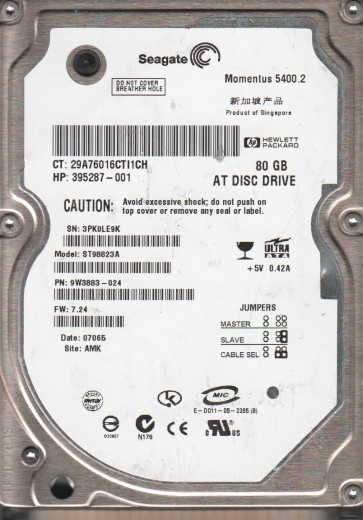
The Seagate ST98823A is a vintage 3.5-inch Parallel ATA (PATA) hard drive with a typical capacity of 8.4GB. It was a popular OEM drive in late 1990s and early 2000s computers. Identifying its failure modes is critical for recovery.
Common Failure Types
1. Mechanical Failure (Failed Heads)
Symptoms: Repeated audible clicking sounds (click of death), drive fails to spin up, drive makes grinding or scraping noises. BIOS does not detect drive.
Cause: Degraded head assembly or parked heads stuck to the disk (stoned).
2. Firmware Corruption (Service Area Damage)
Symptoms: Drive is detected with incorrect model name, capacity is wrong (0GB), drive stuck in ready but no communication. BIOS hangs.
Cause: Corrupted translator, damaged SA modules or bad firmware patch.
3. Logical Damage (File System Corruption)
Symptoms: Drive clicks normally, spins up, is detected but returns errors like Disk Structure Corrupted or Windows needs to format. Data appears missing.
Cause: Accidental format, partition table damage, bad sectors in filesystem tables.
4. Electronic Failure (Controller Board)
Symptoms: No spin power, drive detected but not responsive, burnt smell, visible physical damage to PCB (chips or spikes).
Cause: Voltage peak, burned preamp or logic chip.
5. Bad Sector Clusters (Media Defects)
Symptoms: Extremely slow read/write, constant freezing, copy errors, SMART attributes show reallocated count rapidly increasing.
Cause: Physical damage to platter coating, head touchdown (mechanical damage).
Potential Recovery Paths
DIY Methods (Only for Logical or Minor Bad Sector Cases)
1. Image rescue tool: Use DDRescue or HDDSuperClone to create a sector-by-sector image to a healthy new drive. Avoid scanning the encrypted partition.
2. File carving: If partition is gone but data intact, use PhotoRec or R-Studio for signature-based recovery.
3. Checkdisk (safely): Run chkdsk /f only on cloned drive, never on the failing original.
4. Proper ATA cable: Use an 80-wire cable for PATA/UATA, avoid leaving it unseated.
Professional Recovery (For Mechanical, Firmware or Electrical Failure)
1. Cleanroom head swap: Required for clicking or stoned heads. Drive opened in Class 10 cleanroom.
2. Firmware repair: Using PC-3000 or MRT tools to restore translator modules and deactivate bad firmware patches.
3. PCB swap with ROM transfer: Replace burnt board and swap the 8-pin ROM chip. Contains drive specific adaptives.
4. Media platter reassembly: High cost, needed if platters are intact but assembly is broken.
What Not to Do
1. Do not open the drive in a normal environment. Dust particles will damage heads. Always use a certified cleanroom.
2. Do not run chkdsk or fix on the original drive. Undoable writing worsens head damage.
3. Do not freeze the drive. Freezing causes condensation which can bridge electronics and cause stiction.
4. Do not use any pressure, shock or impact to start the spindle. If the bearing has jammed, force can break heads.
5. Do not perform multiple power on-off cycles. Burned preamp and more corruption can spread.
Summary
Identify mechanical head failure (click) or PCB failure (no spin). For logical errors, image first. For hardware, find specialized data recovery facility. Contains older PATA chipset, ideal for cleanroom head swap.