
Data recovery on vintage hard drives like the Toshiba MK1637GSX starts with identifying the failure type – electronic, firmware, or mechanical. Each requires a different approach, and misdiagnosis can make things worse. Here’s a quick guide to help you assess your situation and decide on the next step.
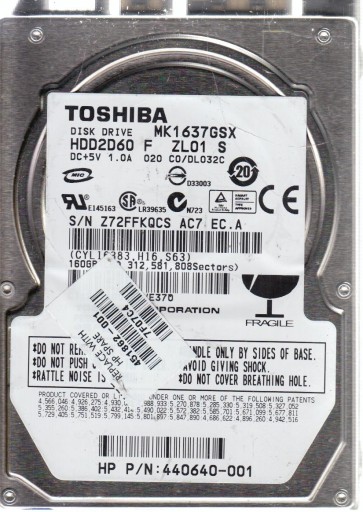
The Toshiba MK1637GSX is a 2.5-inch form factor hard disk drive (HDD) with a 160GB storage capacity, spinning at 5400 RPM. It utilizes a SATA 1.5 Gb/s interface and features a single-platter design with a recording density of approximately 160GB per platter. This model is commonly found in older laptops, external enclosures, and portable media devices from the late 2000s. The drive employs a conventional voice coil motor (VCM) actuator system and a standard fluid dynamic bearing (FDB) motor. Understanding its generation helps in diagnosing failures: as a single-platter drive, head crashes are less common than in multi-platter drives, but the electronic components such as the preamplifier chip and motor controller are susceptible to voltage spikes and physical shock.
Identifying Common Failure Types
1. Mechanical Failure (Head or Motor)
The MK1637GSX can suffer from stuck spindles or seized bearings due to prolonged inactivity or physical shock. Symptoms include a complete lack of spin-up (no sound at all) or a repetitive tick-tick-tick sound as the motor attempts to rotate but fails. A head crash may produce a scratching or grinding noise, often following a drop. This is a hardware-level failure requiring cleanroom intervention. If you hear any metallic scraping, do not power the drive further.
2. Electronic Failure (PCB Malfunction)
Power surges or faulty external adapters can damage the printed circuit board (PCB), particularly the TVS diode, motor controller chip (typically a Smooth or L6234 type), or the preamplifier. Symptoms include no power (drive not detected, no vibrations) or the drive spinning up but the computer not recognizing it. In some cases, a burnt smell or visible scorch marks on the PCB are present. Replacing the PCB with a donor board from an identical model is often possible, but requires transferring the original ROM chip (or its contents) to the new board, as the drive-specific adaptive data is stored there.
3. Firmware Corruption
Software-level issues can appear as the drive being detected but with incorrect capacity (e.g., 0 bytes or 160MB), showing “Uninitialized” in Disk Management, or clicking as it tries to read system tracks. This can result from abrupt power loss, bad sectors in the service area, or head degradation. Unlike mechanical failures, the drive may spin up normally and appear to work in BIOS but fail during OS initialization. Advanced firmware repair tools like PC-3000 or MRT are typically required to rebuild translator modules or fix corrupted service area data. DIY attempts using low-level formatting often fail or worsen the problem.
4. Bad Sectors and Logical Corruption
Surface defects or logical errors can lead to read/write errors, slow performance, or corrupted files. While this is a software-level issue, it can be a precursor to head failure if left unchecked. The drive may make soft “clicking” sounds as it retries reads. If the bad sectors are confined to a small area, data may be recovered by creating a sector-by-sector disk image using tools like ddrescue or HDD Raw Copy Tool, prioritizing stable areas first. Windows CHKDSK or automatic disk repair should be avoided as they can overwrite data during attempted repairs.
Potential Recovery Paths
Professional Data Recovery Services
For mechanical or complex electronic failures, professional recovery is the most reliable path. A cleanroom (Class 10 or better) is required to open the sealed chamber if heads are crashed or the motor is stuck. Typical steps include: 1) Diagnosis and evaluation in a cleanroom environment. 2) Head replacement (donor heads must be from an identical donor drive). 3) Motor unlocking using specialized tools to carefully free the seized spindle. 4) PCB repair or ROM transplant if needed. 5) Firmware repair using professional tools. 6) Disk imaging with head-read tuning to extract data. Average costs range from $500 to $2000+, depending on damage severity. Reputable services offer “no data, no charge” policies but expect basic evaluation fees.
DIY Approach for Electronic Failure
If the PCB is the only issue (no mechanical damage, no head crash), you may attempt a PCB swap. Requirements: 1) Find an exact donor drive (same model MK1637GSX, same PCB revision number). 2) Remove the original PCB from the faulty drive. 3) Locate the ROM chip (usually an 8-pin SPI flash) on the original PCB. 4) Use a hot air station or soldering iron to transfer this chip to the donor PCB. 5) Mount the donor PCB onto the original drive. 6) Power on and check for normal spin-up and detection. Without transferring the ROM, the donor board will likely spin up but not read user data due to mismatched adaptive parameters. This requires soldering skill and a steady hand. Do not attempt if you are not experienced with micro-soldering.
DIY Approach for Logical / Bad Sector Issues
If the drive spins up normally and is detected by BIOS without unusual sounds, logical recovery is possible. Step 1: Use a reliable imaging tool like GNU ddrescue (on Linux) or HDD Raw Copy Tool (Windows) to create a full disk image onto a healthy drive. Always work on the image, not the original drive. Step 2: Use file recovery software such as R-Studio, DMDE, or PhotoRec on the image to extract files. Step 3: If the drive has bad sectors, run ddrescue with the following flags: –retry-passes=2 –no-scrape to avoid head wear. Prioritize reading the file system metadata (first few GB) first. After imaging, verify logical structure with chkdsk /f on the image file only. Never run chkdsk or defragmentation on the failing physical drive.
What Not to Do
- Never open the drive enclosure outside a cleanroom. Even dust particles can cause a head crash or scratch the platters, making professional recovery impossible or significantly more expensive.
- Do not apply hard resets, continuous power cycling, or freeze the drive. Freezing can cause condensation and damage the platters permanently. It is a myth for modern drives with FDB motors.
- Avoid running defragmentation, CHKDSK (without /f and only on images), or any write operations to the failing drive. These can overwrite critical file system data and preemptively fail heads.
- Do not attempt to “tap” or “shake” the drive to unstuck it. This can shatter the recording surface and cause permanent data loss.
- Do not use a standard cable or adapter if the drive is not detected. Damage may be electrical, and a quick test with a known-good power supply is acceptable, but do not plug it into multiple computers.
Summary
The Toshiba MK1637GSX is a single-platter 160GB hard drive susceptible to three primary failure categories: mechanical (stuck motor, head crash), electronic (PCB damage from power surges), and logical (firmware corruption, bad sectors). For mechanical issues or head crashes, professional cleanroom recovery is the only safe option due to the risk of platter damage. Electronic failures can sometimes be resolved with a ROM-transplant PCB swap if you have soldering experience. Logical problems with bad sectors are best addressed through sector-by-sector imaging using ddrescue, never by running system repair tools directly on the drive. The most critical rule: power off the drive at the first sign of unusual noise or non-detection to preserve data integrity. A proactive backup strategy remains the most effective recovery method for any hard drive.

