
Data recovery on vintage hard drives like the Western Digital WD10EVVS starts with identifying the failure type – electronic, firmware, or mechanical. Each requires a different approach, and misdiagnosis can make things worse. Here’s a quick guide to help you assess your situation and decide on the next step.
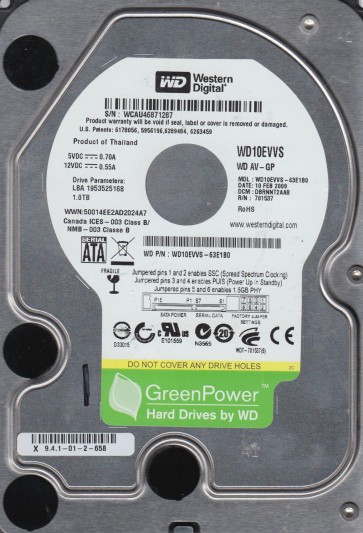
The Western Digital WD10EVVS is a 1TB, 5400 RPM, SATA 3.0Gb/s hard drive from the WD AV-GP family. Designed for audio-visual and surveillance applications, it features IntelliSeek and IntelliPark technologies to optimize power consumption and thermal output, making it suitable for 24/7 streaming environments like DVRs and NVRs. Operating at 5400 RPM, it prioritizes low noise and low power over raw performance. The drive utilizes Perpendicular Magnetic Recording (PMR) technology and has a 64MB cache. Understanding its intended workload is critical, as failure patterns often differ from desktop-class drives.
Common Failure Types
1. Mechanical Failures (Head/Puck/Spindle Stiction)
Symptoms: Physical clicking or scratching sounds (click of death), drive not spinning up, BIOS detection failure, or immediate system freeze when power is applied. The drive may emit a high-pitched whine if the spindle motor bearing seizes.
Cause: Over time, the heads contacting the platters due to shock, a sudden power loss during head parking, or age-related degradation of the fluid dynamic bearing. The IntelliPark feature, while power-saving, can contribute to head/platter contact if the drive is overly cycled (frequent park/unpark events).
2. Firmware Corruption (Translator / SA Module Failure)
Symptoms: Drive detected in BIOS but shows incorrect capacity (e.g., 0GB or 2TB), reports a generic model number, or locks up during initialization. The system may hang on the Windows logo during boot. The drive may appear as at risk or not initialized in Disk Management.
Cause: This drive is susceptible to firmware bugs related to its AV-optimized logging and thermal recalibration routines. Sudden power loss while updating the firmware table or writing to the System Area (SA) can corrupt translator modules, leading to stuck behavior.
3. Bad Sectors (Media Degradation / Logical Corruption)
Symptoms: The system freezes when reading specific files, file copy operations fail or take extremely long, S.M.A.R.T. data shows increasing Reallocated, Current Pending, or Uncorrectable Sector counts. Chkdsk reports errors.
Cause: Media degradation can occur physically (e.g., a head crash creating visible damage) or logically (e.g., weak magnetic domains causing read errors). A sudden power loss during a write operation often results in logical bad sectors (pending sectors) that can sometimes be resolved with a rewrite.
4. Controller Board Electrical Failure
Symptoms: Drive shows no sign of life (no spin, no detect), emits a smell of burnt electronics (e.g., from a TVS diode or controller chip), or the circuit board shows visible damage (bulging capacitors, scorch marks).
Cause: A power surge (e.g., from a faulty power supply or lightning strike) can short components on the PCB. The TVS (Transient Voltage Suppression) diode is the first to fail, protecting the drive. A failed preamplifier chip on the head stack assembly (HSA) can also be misdiagnosed as a PCB failure.
5. Read/Write Head Failure (HSA Degradation)
Symptoms: The drive spins up but makes a repeating chirping or scratching sound every few seconds as it attempts to recalibrate. Data is inaccessible, and the drive may only be detected intermittently.
Cause: Gradual wear of the thin-film heads, often accelerated by high operating temperatures within a DVR/NVR enclosure. A single head failure can render the entire drive unreadable if the translator requires all heads to function.
Potential Recovery Paths
DIY Methods (Risk of Further Damage)
For Bad Sectors (Logical): Use tools like HDDSuperClone (Linux) or DDRescue to create a low-level image of the drive. The reloc driver can help skip bad areas. Never run chkdsk /r or surface scans on a failing drive as this generates massive actuator movement, increasing damage.
For Controller Board Failure (PCB): If the board is clearly damaged but the drive’s firmware zone is clean (no corruption), you may attempt a donor PCB swap (same exact PCB number with matching ROM version). The ROM chip on the original PCB must be transferred to the donor board. This requires desoldering skills and an EEPROM programmer. Mismatched ROM will cause complete data inaccessibility.
For Firmware Issues: Advanced hobbyists may use tools like MHDD (older) or free tools like hddscan to attempt to clear the G-List (growing defects) or access the SA via serial console. This is extremely high risk; incorrect commands can permanently brick the drive.
Professional Service (Recommended for Mechanical/Firmware/Complex Cases)
Mechanical Recovery (Head/Spindle): Professional cleanroom labs (Class 10,000 or better) replace the failed head stack assembly (HSA) with a functional donor unit. The heads are carefully removed and placed onto the patient platters using a specialized tool. Or, for stiction, a tool is used to gently rock the platters free.
Firmware Recovery: Use of professional tools like PC-3000, DeepSpar, or ACE Lab tools allows direct access to the System Area. Technicians can rebuild the translator, clear firmware bugs, or read modules from the donor drive and adapt them to the patient drive.
Imaging: For drives with severe media damage, the lab uses a hardware imager like the DeepSpar USB Stabilizer or PC-3000 UDMA which can control read retries and head settings to bypass damaged media zones, extracting data from intact sectors.
What Not to Do
Do NOT open the drive outside a cleanroom. Even a single speck of dust can scratch the platters, destroying data permanently. The read/write heads require a particle-free environment.
Do NOT run chkdsk /f or /r. This forces the drive to perform massive random reads and writes to bad sectors, often causing a developing read error to become a full head crash.
Do NOT attempt to spin the platters by hand or apply voltage to the spindle motor. This can destroy the bearing and shatter the platters.
Do NOT use freezer tricks. Condensation forms on platters and components, causing immediate short circuits and corrosion. It is a myth disproven by modern drive engineering.
Do NOT continue using the drive after first signs of failure. Every single power-on cycle or read/write operation increases the damage to the media and heads, reducing recovery chances.
Summary
The Western Digital WD10EVVS is a reliable AV-surveillance drive that fails through mechanical wear (head crash, spindle stiction), firmware corruption of its System Area, or electrical failure of its controller board. The IntelliPark feature can exacerbate head/platter wear if cycling is excessive. For DIY users, creating a sector-by-sector clone using HDDSuperClone is the safest approach for logical bad sectors. For mechanical sounds, complete inactivity, or successful recovery after a head crash, professional cleanroom intervention is mandatory. Never apply power to a clicking drive or attempt a PCB swap without transferring the original ROM. Act promptly; data loss from mechanical failure is often irreversible after the first head media contact.