
Data recovery on vintage hard drives like the Toshiba MK4055GSX starts with identifying the failure type – electronic, firmware, or mechanical. Each requires a different approach, and misdiagnosis can make things worse. Here’s a quick guide to help you assess your situation and decide on the next step.
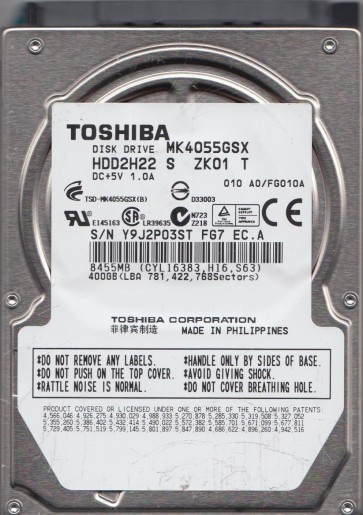
The Toshiba MK4055GSX is a 2.5-inch, 5400 RPM, SATA hard disk drive with a 40GB (37.2GB usable) storage capacity. It belongs to the MKxx55GSX series, known for its use in older laptops and external enclosures. This drive typically features a single-platter design and uses standard SATA interface. Understanding its architecture is critical for recovery: the drive uses a dedicated system area (SA) on the platters for firmware and translator modules, and a failure in these areas can mimic a physical head crash. The drive’s spindle motor is a fluid dynamic bearing, which is generally reliable but can seize after prolonged inactivity or physical shock.
Identifying Common Failure Types
1. Head Crash and Media Damage
Symptoms: Loud clicking, scratching, or grinding noises. The drive may spin up but fail to be detected, or be detected with an incorrect capacity (e.g., 0GB). Data becomes inaccessible. This is often caused by physical shock, a drop, or manufacturing defects in the head assembly. The MK4055GSX’s single head is delicate; even a small contamination can cause it to contact the platter surface, scraping off the magnetic coating.
2. Firmware Corruption and Translator Issues
Symptoms: Drive spins up normally, appears in the BIOS but with a incorrect model name or serial number, or hangs during detection. It may report “Unallocated” in Disk Management. This is a common software-level failure on this series. The firmware modules stored in the system area can become corrupted due to sudden power loss, bad sectors in the SA, or age. The translator module, which maps logical LBAs to physical sectors, is especially vulnerable.
3. Stiction (Bearing Seizure)
Symptoms: Drive makes no sound, or a single “tick” when powered on, but the platters do not spin. The spindle motor is locked. This occurs when the fluid dynamic bearing lubricant dries up or thickens over time, or after a non-operational shock that causes the motor to misalign. The MK4055GSX’s motor is prone to this if the drive has been stored unused for years.
4. Bad Sectors and Degraded Media
Symptoms: Drive works slowly, produces read errors, and the operating system reports “Delayed Write Failed” or “CRC errors.” SMART data will show Reallocated Sectors, Current Pending Sectors, or Uncorrectable Sectors. While often a sign of natural wear, it can escalate into a head crash if the drive continues operating. On this drive, bad sectors frequently cluster in the inner diameter zones.
Potential Recovery Paths
Professional Recovery (Recommended for Hardware Issues)
For physical failures (clicking, grinding, seizure): Do not attempt DIY. A professional lab with Class 100 cleanroom facilities is required. Technicians will replace the read/write head assembly with a matched donor head from an identical drive (same model and firmware revision). For stiction, they may carefully lubricate and unlock the spindle using specialized tools. For firmware issues, they use PC-3000 or similar tools to read firmware modules directly from the platters and rebuild the translator. Typical cost: $300 to $1500+ depending on complexity.
DIY Software Recovery (For Logical/Software Issues Only)
Before starting, verify the drive is not physically damaged. Listen for abnormal sounds. If the drive is quiet and detected normally, try these steps:
- Use a USB-to-SATA adapter: Connect the drive externally to avoid potential power issues from the laptop.
- Image the drive: Use a tool like ddrescue (Linux) or HDDSuperClone (freeware). Run:
ddrescue -d -f -r3 /dev/sdX /mnt/recovery/image.img /mnt/recovery/mapfile.log. This creates a sector-by-sector copy, skipping bad areas. Work from the recovered image, not the original drive. - For bad sectors: Use DMDE or R-Studio to scan the image and reconstruct partition structures. Do not attempt to repair or format the original drive.
What Not to Do
- Never open the drive case. The internal cleanroom environment is essential; even a speck of dust can destroy the platters. Opening the drive invalidates all professional recovery options.
- Do not run CHKDSK or fsck. These tools attempt to “fix” file system errors by writing to the drive, which can corrupt the MFT or directory structures and overwrite the data you are trying to recover.
- Avoid freezing the drive. This is an urban legend. Thermal expansion can cause further damage to the head or spindle, and condensation inside the drive leads to electrical shorts.
- Do not repeatedly power-cycle. Each spin-up on a failing drive risks further head damage. If the drive is clicking, stop immediately and consult a professional.
- Do not use data recovery software on the failing drive itself. Always create a clone/image first. Operating directly on the source drive will worsen its condition.
Summary
The Toshiba MK4055GSX is an older 2.5-inch SATA drive with common failure modes including head crash, firmware corruption, bearing seizure, and bad sectors. For any physical or audible failure, immediate professional intervention is required as DIY attempts will increase permanent data loss. For logical or bad sector issues, a careful imaging process using ddrescue or HDDSuperClone, followed by analysis of the image file, is the only safe DIY path. Never open the drive, run repair utilities, or freeze it. Prioritize cloning the drive to a healthy target before performing any recovery operations.