
Data recovery on vintage hard drives like the Western Digital WD2500AVJB starts with identifying the failure type – electronic, firmware, or mechanical. Each requires a different approach, and misdiagnosis can make things worse. Here’s a quick guide to help you assess your situation and decide on the next step.
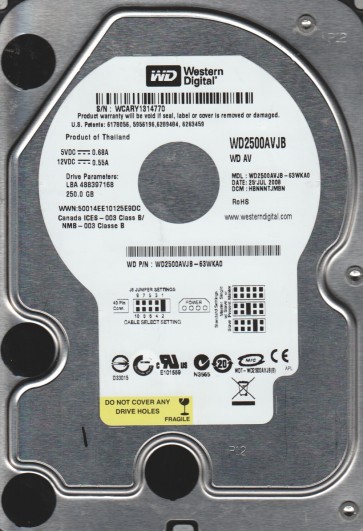
The Western Digital WD2500AVJB is a 250GB 3.5-inch SATA hard drive from the WD AV series, designed for audio/video streaming and surveillance applications. It features a 7200 RPM spindle speed, an 8MB cache, and IntelliSeek technology to optimize seek times for smooth data streaming. This drive is built for 24/7 operation in DVRs, NVRs, and media centers, with a focus on low power consumption and reduced vibration. While robust for its intended use, it shares common failure mechanisms with most modern hard drives, including mechanical wear, firmware corruption, and logical damage due to unexpected power loss or physical shock.
Common Failure Types
1. Mechanical Head Crash – Symptoms: Loud clicking, grinding, or repetitive ticking noises; drive not detected or spinning up only intermittently. Cause: Physical contact between the read/write head and the platter surface, often from shock, vibration, or wear over time. The WD2500AVJB’s high RPM increases the risk of head damage if dropped or jolted during operation.
2. Stiction and Bearing Seizure – Symptoms: Drive spins up but makes a whining or screeching sound; motor stops after a few seconds; system hangs on boot. Cause: Lubricant degradation or physical debris causing the spindle motor bearing to lock, or the read/write head parking ramp becoming stuck. Common in older drives or units exposed to dust or temperature extremes.
3. Firmware Corruption – Symptoms: Drive is detected with incorrect capacity, shows as uninitialized, or reports “SMART status bad” with rapid attribute changes. Cause: Sudden power loss, bad sectors affecting the system area, or a failed firmware update. The AV series uses a complex firmware structure for streaming optimization, making it vulnerable to corruption from unstable power sources.
4. Logical Damage and Bad Sectors – Symptoms: Files become unreadable, directory structure is corrupted, operating system freezes when accessing the drive, or CHKDSK reports extensive bad clusters. Cause: File system corruption from improper shutdown, virus attacks, or physical media degradation. In the WD2500AVJB, this often manifests in the first 100GB region due to the ATA streaming command set’s specific allocation patterns.
5. Electronic Board (PCB) Failure – Symptoms: Drive shows no signs of life (no spin, no detection), or burns a visible component on the controller board. Cause: Power surge, lightning strike, or component aging (e.g., blown TVS diode or failed preamp). The PCB on the WD2500AVJB is a common failure point, especially in DVR environments with unreliable power.
Potential Recovery Paths
DIY Methods (For Logical/Firmware Issues Only) – Attempt only if the drive spins quietly and is detected in BIOS. Use data recovery software like DDRescue or HDDSuperClone to create a sector-by-sector image to a healthy drive. Do not attempt to repair the original drive directly. For logical corruption, run file system check (e.g., fsck on Linux or chkdsk /f in Windows) only on the clone, never on the original. If firmware corruption is suspected, use a free tool like Victoria or MHDD to check SMART data and reallocate sectors; do not flash firmware without a verified donor drive and specialized equipment. For PCB failure, replace the board with an identical model from a donor drive, but only if the preamp chip on the head stack is the same (often requires desoldering the original ROM chip to the new board).
Professional Services (For Mechanical or Complex Issues) – Engage a certified data recovery lab if the drive has clicking, grinding, or no spin. The WD2500AVJB’s head assembly and platter stack are fragile; professional cleanroom work is required to replace heads or transplant platters. Expect costs between $500 and $3000 depending on severity. Look for labs that use PC-3000 or DeepSpar tools for firmware-level repairs. For severe bad sectors or firmware corruption that DIY cannot resolve, professional imaging with specialized tools (e.g., PC-3000 UDMA) is the only safe path.
What Not to Do
Do not open the drive enclosure in a non-cleanroom environment; dust particles will destroy platter surfaces. Do not apply power to a clicking or screeching drive repeatedly, as this grinds the platters and heads. Do not use recovery software on the original drive for physical issues; imaging is safe only after a clean head swap. Do not freeze the drive; thermal shock can warp platters and cause permanent damage. Do not attempt to replace the PCB without matching the preamp firmware and ROM; mixing components can cause immediate head failure.
Summary
The Western Digital WD2500AVJB is a reliable AV-series drive but prone to head crashes, bearing failure, firmware corruption, and PCB damage. For logical issues, clone the drive first and repair the clone; for mechanical problems, seek professional cleanroom recovery immediately. Never open, freeze, or repeatedly power a faulty drive. Always prioritize creating a byte-for-byte image before any repair attempt, and use professional services when the data value exceeds $500.