
Data recovery on vintage hard drives like the Western Digital WD3200JS starts with identifying the failure type – electronic, firmware, or mechanical. Each requires a different approach, and misdiagnosis can make things worse. Here’s a quick guide to help you assess your situation and decide on the next step.
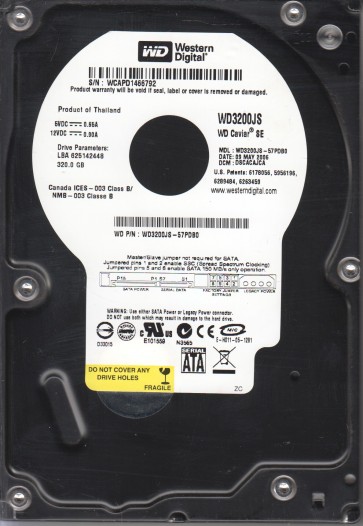
The Western Digital WD3200JS is a 3.5-inch 320GB SATA hard drive from the Caviar Blue family, utilizing 7200 RPM spindle speed and an 8MB cache. It is known for its reliability in desktop applications but is susceptible to specific failure modes due to its age and mechanical design. This drive often employs a Marvell 88i8845-RH read/write channel and a fluid dynamic bearing motor, making it prone to stiction and head degradation over time. Understanding its architecture is critical for effective recovery planning.
Common Failure Types
1. Head Crash / Stiction
Symptoms: Clicking sounds, repetitive ticking, or drive fails to spin up. Causes: Degraded lubricant in the fluid dynamic bearing leads to stiction (heads sticking to platters) or physical head slap after a shock event. The voice coil may lock, preventing spindle motor rotation.
2. Degraded Preamplifier (Preamp) Failure
Symptoms: Drive spins up but is not detected, or produces a scratching noise. Causes: The preamplifier chip (often a Marvell 88i8845) can fail due to electrostatic discharge or age, leading to corrupted read/write signals. This can mimic a bad head but often requires specialized replacement.
3. Bad Sector / Surface Degradation
Symptoms: Slow performance, file read errors, operating system freezes, or BSOD (Blue Screen of Death). Causes: Gradual wear of magnetic media, shock-induced platter damage, or write-induced errors. This is often progressive and can lead to total data loss if not addressed.
4. Firmware Corruption (SA Region Damage)
Symptoms: Drive spins normally, clicks or buzzes but is not recognized by BIOS, displays incorrect capacity, or fails to pass SMART attributes. Causes: Power surges, improper shutdown, or age-related degradation of the System Area (SA) on the platters. This is a logical failure but requires firmware-level intervention.
5. PCB / Electronics Failure
Symptoms: No spin, no signs of life, or drive enumerates but with corrupted data. Causes: Blown TVS diodes, failed motor controller (often a Smooth L7250), or damaged SATA connector. The PCB is relatively easy to replace but must be paired with a ROM transfer or firmware adaptation.
Potential Recovery Paths
DIY Methods (Low-Risk Situations Only)
Case 1: Bad Sectors (Logical Failure)
Use a Linux-based tool like `ddrescue` to create a sector-by-sector disk image. Command: `sudo ddrescue -f -n /dev/sdx /mnt/image.img /mnt/logfile.log`. Avoid writing to the drive to prevent further degradation. Use a read-only adapter (e.g., USB-to-SATA with write-blocker).
Case 2: PCB Failure
Identify the exact PCB revision (e.g., 2060-771548-000). Source a donor drive with matching PCB version and firmware family. Swap the ROM chip (8-pin SOIC) from the original PCB onto the donor PCB using a hot air station or soldering iron. Do not power on with mismatched ROM.
Case 3: Firmware Issues
Use a professional tool like PC-3000 UDMA or MRT (Hardware-based) to access the service area. For limited DIY, try connecting the drive via a dedicated SATA port and using a software SAT (Self-Monitoring, Analysis and Reporting) command to update firmware if the vendor provides a utility. This is dangerous and rarely works without hardware tools.
Professional Services (Recommended for Critical Data)
Head Replacement: Required for clicking or stiction. Performed in a Class 10 cleanroom using specialized tools to swap the head stack assembly from a donor drive. Cost: $500-$2000+ depending on severity.
Firmware Repair via PC-3000 / MRT: Applied for SA corruption or translation issues. Technicians can rebuild the firmware modules, such as the Module Operations Table (MOT) or the Service Area Translator. Cost: $200-$500.
Platter Transfer: In extreme cases with severe head damage, the platters are removed and transferred to a donor drive with matching geometry. This is high-risk and only done by advanced labs. Cost: $1500-$3000+.
What Not to Do
1. Do Not Power On a Clicking Drive Repeatedly. Each attempt can cause the heads to scrape the platters, permanently destroying data. Stop immediately after the first click.
2. Do Not Open the Drive Casing. Contamination from a single dust particle or fingerprint can render the platters unreadable. Cleanroom access is mandatory for head-on-platter exposure.
3. Do Not Attempt Software Recovery on a Physically Failing Drive. Running CHKDSK (chkdsk /f) on a drive with hardware issues can write over critical data and worsen the condition.
4. Do Not Use Disk Defragmentation Tools. Defragmenting a failing drive increase head movement and can induce a head crash. This is also harmful for solid-state drives but catastrophic for mechanical ones.
5. Do Not Shake or Tap the Drive. Tapping can dislodge stuck heads but more often causes additional platter damage. This is an archaic and dangerous technique that should never be used on modern drives.
Summary
The Western Digital WD3200JS is prone to head stiction, preamp failure, bad sectors, firmware corruption, and PCB issues. For logical failures like bad sectors, controlled DIY imaging with ddrescue is possible. For physical issues (head crash, stiction, or severe firmware corruption), professional services with cleanroom and specialized hardware tools are mandatory to avoid irreversible data loss. Never power on a clicking drive or open the casing. Prioritize creating a backup on a healthy drive immediately after any signs of failure.