
Data recovery on vintage hard drives like the Western Digital WD5000AAKB starts with identifying the failure type – electronic, firmware, or mechanical. Each requires a different approach, and misdiagnosis can make things worse. Here’s a quick guide to help you assess your situation and decide on the next step.
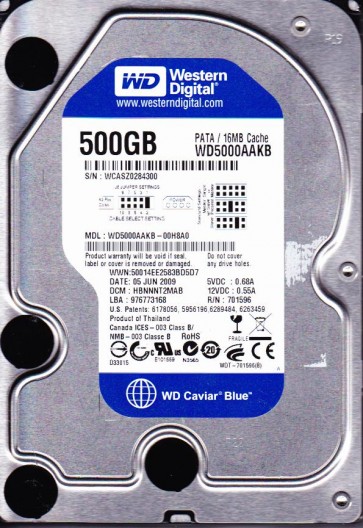
The Western Digital WD5000AAKB is a 500GB, 3.5-inch, PATA (IDE) hard drive from the Caviar Blue series, utilizing a 7200 RPM spindle speed and a 16MB cache. Introduced in the late 2000s, it is based on an older, single-platter design with a Marvell 88i8843 main controller and a Smooth L4210 motor driver. This drive is known for its reliability in older desktop and enterprise archival systems, but its age and interface type introduce specific failure modes distinct from modern SATA drives. The PATA interface is resilient to hot-plugging damage but is physically prone to pin bending or breakage on the 40-pin connector. The drive typically uses perpendicular magnetic recording (PMR) technology, which can exhibit a higher susceptibility to head degradation over thermal expansion cycles.
Common Failure Types
1. Head Stack Assembly (HSA) Stiction and Head Crash
Symptoms: A repetitive clicking sound (click of death), drive not spinning up, or system detecting the drive but reporting a ‘no disk’ or ‘device not ready’ error. In advanced cases, the drive may spin up but produce scratching noises.
Cause: Over time, the lubricant on the spindle bearing can degrade, causing the platters to expand or warp. The heads can stick to the platter surface (stiction), or the thin-film magnetic layer can be physically gouged away, leading to a head crash. This is common in drives that have been powered off for years or subjected to physical shock.
2. Preamp Failure (Read/Write Preamp on Flex Circuit)
Symptoms: The drive spins up normally, but the system cannot access data. The drive may identify with the correct model and capacity but then hang or fail to read sectors, often with a ‘sense key not ready’ error in SMART logs. The heads may be stuck in a parked position.
Cause: The preamplifier IC is located on the head flex cable near the actuator. Electrostatic discharge (ESD) or thermal stress can cause internal shorts or open connections within this component. This is a known failure point on the WD5000AAKB, distinct from the main controller chip.
3. Firmware Corruption (Module Damage in SA)
Symptoms: The drive spins up but is not recognized by the BIOS. It may appear as a ‘device with no medium’ or present an incorrect model string (e.g., ‘WD DC WHITE LABEL’). The drive may also freeze or hang when attempting to read data, entering a busy state without any error codes.
Cause: The Servo Area (SA) on the platters stores firmware modules. A sudden power loss during a write operation to the service area can corrupt critical modules like the Translator (P-List/G-List) or Overlay files. On this drive, corruption in the ’01’ module (drive defects table) is a common cause of ready-but-unreadable states.
4. Motor Driver Failure (Smooth L4210)
Symptoms: The drive does not spin up at all. No sound or a high-pitched whine from the motor. The drive may attempt to spin up but stall after a few seconds. The spindle motor may spin erratically or not at all.
Cause: The Smooth L4210 motor driver chip is a known failure point on this family of drives. It can fail due to a shorted voice coil motor (VCM) driver circuit, either from thermal runaway or from a power surge through the interface. This failure is not related to data on the platters but prevents any mechanical operation.
5. Logical Damage (File System Corruption and Bad Sectors)
Symptoms: The drive spins up and is detected correctly, but the operating system reports an ‘unformatted’ or ‘raw’ partition. The drive may have visible bad sectors that cause the system to hang during file access. SMART attributes show a high Reallocated Sector Count or Current Pending Sector Count.
Cause: The FAT32 or NTFS file system may be corrupted by improper shutdowns, malware, or cross-linking of files. The P-List (primary defect list) may be full, forcing the firmware to map bad sectors to a growing G-List (grown defect list), slowing down read/write operations.
Potential Recovery Paths
DIY Methods (Requires Technical Skill)
1. For Logical Damage (File System Corruption): Use a write-blocker (hardware or software) to connect the drive as a secondary drive. Then utilize data recovery software such as R-Studio, GetDataBack, or DMDE. Perform a sector-by-sector image to a healthy drive. Do not attempt to run chkdsk or fsck on a failing drive; it can cause further data loss. For partition table issues, test disk or DMDE can rebuild the partition table without writing to the source.
2. For Bad Sectors (Head Degradation): Use HDDSuperClone or ddrescue with the ‘–no-create’ and ‘–retry-passes’ options. Set the device timeout to a low value (e.g., 3 seconds) and allow the tool to skip bad areas. This creates a sparse image that can then be attempted for further recovery. Never force the drive to read a bad sector multiple times; this stresses the actuator and can cause a head crash.
3. For P-List Corruption (Non-Fatal Firmware): Advanced users can access the drive in terminal mode using a USB-to-TTL (UART) adapter (e.g., FT232). Commands like ‘E1’ can disable the head or ‘C’ can clear the SMART. If the firmware is corrupt but the SA is readable, rewriting the ’01’ module may restore access. Caution: Incorrect firmware writing can permanently destroy the drive.
Professional Services
For HSA Stiction, Head Crash, or Preamp Failure: This requires a Class 100 (ISO 5) cleanroom environment. A technician must remove the actuator arm, replace the head stack with a matched donor part from an identical WD5000AAKB (exact same revision and firmware version), and then perform a firmware transplant. The damaged preamp on the flex circuit must be desoldered and replaced, or a new donor flex circuit must be aligned. The cost ranges from $500 to $3,000 USD depending on the complexity and the number of heads.
For Motor Driver Failure: A professional can unsolder the failed L4210 chip and replace it with a known-good chip from a donor board. In many cases, the firmware is tied to the platters, and a straightforward PCB swap (without ROM transfer) will fail. The technician must either transfer the 2-wire Serial Flash (8-pin SOIC containing the unique adaptive data) from the original PCB to a donor PCB, or reprogram the donor PCB with the original firmware via software like PC-3000 or MRT Ultra.
For Severe Logical Damage (Bad to the Point of System Freeze): Professionals use hardware tools like the DeepSpar Disk Imager or PC-3000. These tools can stabilize the drive by controlling the spindle speed, adjusting the read channel parameters, and disabling broken heads. They interface at the hardware level to bypass the drive’s internal error recovery.
What Not to Do
1. Do not open the hard drive enclosure. The platters are sensitive to dust and static discharge. Opening the drive outside a cleanroom will cause irreversible contamination and a permanent head crash. Any visible scratch on the platter surface destroys data.
2. Do not apply power to a drive that shows signs of physical damage. If the drive makes clicking or knocking sounds, power it off immediately. Repeated power cycling can expand a small actuator problem into a complete head stack failure, gouging the platters.
3. Do not run chkdsk, fsck, or any repair utility. These tools are designed for healthy drives. On a failing drive, they misinterpret bad sectors as file system errors and can attempt to ‘fix’ them, which often overwrites critical file allocation data (MFT or FAT) with empty data.
4. Do not attempt a direct PCB swap from a generic donor board. The firmware (ROM) on the WD5000AAKB is unique per drive. Plugging in a donor PCB without transferring the original serial flash chip (the 8-pin SOIC-8) will result in the drive spinning but being unrecognizable, or potentially causing a short circuit in the preamp.
5. Do not freeze the drive. This is a myth. Freezing a drive can cause condensation inside the platter chambers, leading to head slider contact and water damage. The mechanical components expand and contract, and cooling does not repair a head crash; it only makes stiction worse.
Summary
The Western Digital WD5000AAKB is an aging PATA drive with specific vulnerabilities: head degradation (click of death), preamp failure, firmware module corruption, and motor driver failure. For logical issues, a sector-for-sector image with a write-blocker is the best DIY approach. For mechanical or electrical failures (head crash, motor driver, or preamp), a cleanroom replacement of the head stack or a controlled PCB ROM transfer is required. High-risk steps include opening the drive, running repair utilities, or incorrect PCB swaps. Professional recovery is mandatory for any physical damage to maintain data integrity.