
Data recovery on vintage hard drives like the Western Digital WD5001ABYS starts with identifying the failure type – electronic, firmware, or mechanical. Each requires a different approach, and misdiagnosis can make things worse. Here’s a quick guide to help you assess your situation and decide on the next step.
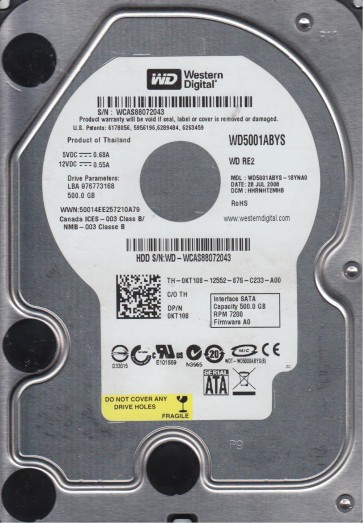
The Western Digital WD5001ABYS is a 500GB 3.5-inch SATA hard drive from the RE3 (RAID Edition 3) series. Designed for enterprise and 24/7 operation, it features a 32MB cache, a 7200 RPM spindle speed, and a robust build intended for high reliability in RAID arrays and server environments. Key attributes include TLER (Time Limited Error Recovery) support, which prevents the drive from being dropped from a RAID array due to extended error recovery. Its firmware is optimized for sequential read/write performance and error handling in multi-drive configurations. Despite its enterprise-class design, it remains susceptible to a range of mechanical, electronic, and logical failures over time.
Common Failure Types
1. Mechanical Head Crash or Stiction
Symptoms: Loud clicking, grinding, or scraping noises; drive is detected but cannot read or write; system freezes or becomes unresponsive when accessing the drive. Causes: Physical shock, aging lubricant, contamination from particulate matter inside the enclosure, or sudden power loss causing the head to contact the platter. The WD5001ABYS’s higher platter density and spin speed make it vulnerable to head/media damage after a sharp impact.
2. Firmware Corruption (SA Region Issues)
Symptoms: Drive spins up but is not detected by BIOS or OS; shows incorrect capacity (e.g., 0GB or full capacity in add/diagnostic tools); repeatedly tries to initiate self-calibration; or becomes locked in a busy state. Causes: Power surges, incomplete firmware updates, degraded servo data on the system area (SA) tracks, or aging NAND flash memory storing firmware modules. This is a known issue in many WD drives of this era, where the SA modules become unreadable.
3. Bad Sectors and Media Degradation (Logical Damage)
Symptoms: Slow read/write speeds, frequent CRC errors, corrupted files, OS chkdsk or disk utilities report pending sectors, and SMART attributes show reallocated sectors, current pending sectors, or uncorrectable sectors. Causes: Gradual wear of the magnetic layer, thermal expansion/contraction, excessive vibration during operation, or latent manufacturing defects. The WD5001ABYS can develop a cluster of bad sectors that spread if not addressed.
4. Electronic Failure (PCB/BGA Failure)
Symptoms: Drive does not spin up at all; no sound or a brief hum followed by silence; no detection in BIOS; visible burn marks or smell of burnt components. Causes: Power surge, lightning strike, failed voltage regulator or controller chip (often a BGA package on modern drives), or a shorted capacitor. The drive’s 12V and 5V power rails are common entry points for electrical damage.
5. Stuck Spindle Motor (Seized Bearing)
Symptoms: Drive emits a high-pitched whine or a repetitive chirping sound as the motor tries to spin but fails; no rotation detected; drive may be warm to the touch. Causes: Dried-out or congealed lubricant in the motor bearing, often after years of non-use or extreme temperature cycles.
Potential Recovery Paths
DIY Methods (For Logical and Simple Electrical Issues)
– Bad Sectors/Media Degradation: Clone the drive using ddrescue (Linux) or HDDSuperClone (Windows/Linux) to a healthy target drive. Do not attempt to force read failing sectors repeatedly. Use a controlled environment with a stable power supply. For TLER-enabled drives, ensure the cloning tool does not handshake with the drive’s error recovery; set appropriate retry limits.
– Non-Detected After Power Surge (PCB Swap Only): If the drive has identical PCB (printed circuit board) revision from a donor drive, you can attempt a PCB swap. This requires matching the PCB part number (e.g., 2060-xxxxx) and ideally the same firmware version. The drive’s system ROM (containing unique calibration data) must be transferred from the original PCB to the donor board using a hot air station or EEPROM programmer. Simple PCB swap without ROM transfer will fail on most WD drives.
– Firmware Issues (Advanced DIY): Using tools like MHDD or Victoria to access the system area (SA) via a terminal interface is possible but extremely risky. Attempting to write firmware modules incorrectly can permanently destroy the drive’s ability to spin or be recognized. This is generally not recommended for non-experts.
Professional Services (For Mechanical, Complex Electronic, and Critical Firmware)
– Mechanical Head Crash/Stiction: Requires a cleanroom (ISO Class 5 or better) environment. A professional data recovery engineer will replace the damaged head stack assembly (HSA) with a donor from an identical model. The platters are often removed and placed into a new chassis to recover data. This is a high-cost, high-risk procedure and should only be done by specialists.
– Firmware Corruption (Complex): Professional tools like PC-3000 or MRT can read the SA region directly, rebuild damaged modules, and sometimes extract data by ignoring defective firmware sections. They can also handle translated access to bypass bad translators. This is the only reliable method for severe firmware damage.
– Electronic Failure (BGA/Reballing): Professionals can reball or replace a failed controller chip (BGA) or voltage regulator. They may also use a specialized adapter to inject power directly to the motor controller. This is a micro-soldering job requiring high precision.
– Stuck Spindle: In a cleanroom, a professional will manually rotate the platters using a specialized tool to free the seized bearing, often requiring partial disassembly or applying controlled heat. This is not a DIY operation.
What Not to Do
WARNING 1: Do not open the drive’s internal chassis. The platters are extremely sensitive to dust and particles. Even a single speck of dust can cause a head crash, destroying the data surface. Opening the drive voids any warranty and almost guarantees permanent data loss unless performed in a cleanroom.
WARNING 2: Do not apply excessive power or reset the drive repeatedly if it is making clicking noises. Each click is a potential head crash, further damaging the platter surface. Immediately power off and seek professional help.
WARNING 3: Do not attempt to write firmware or use low-level format utilities (like HDD Low Level Format) on a failing drive. This will overwrite or corrupt the critical system area (SA), making recovery exponentially more difficult or impossible.
WARNING 4: Do not freeze the drive. This is a dangerous myth. Condensation will form inside the drive, causing short circuits and corrosion. The expansion/contraction from temperature change can also worsen stiction or head alignment issues.
WARNING 5: Do not use the drive after noticing significant bad sectors or SMART warnings. Continuing to use it may cause the heads to scrape the media, spreading the damage and reducing the chance of successful data recovery. Back up immediately if possible, or shut down.
Summary
The WD5001ABYS is a robust enterprise drive but is subject to specific failure modes: mechanical crashes, firmware corruption (especially in the system area), media degradation (bad sectors), electronic failures, and spindle bearing seizure. For logical issues like bad sectors, a careful cloning process with ddrescue is a viable DIY path. Simple PCB swaps for electrical failure require ROM transfer, while firmware problems and all mechanical issues require a cleanroom and specialist tools like PC-3000. Critical warnings: never open the drive, never reset a clicking drive, never write firmware or apply low-level formats, never freeze the drive, and never continue using a drive with active SMART warnings. Professional data recovery is the only safe option for hardware-level failures or when data is invaluable.