
Data recovery on vintage hard drives like the Seagate ST373355SS starts with identifying the failure type – electronic, firmware, or mechanical. Each requires a different approach, and misdiagnosis can make things worse. Here’s a quick guide to help you assess your situation and decide on the next step.
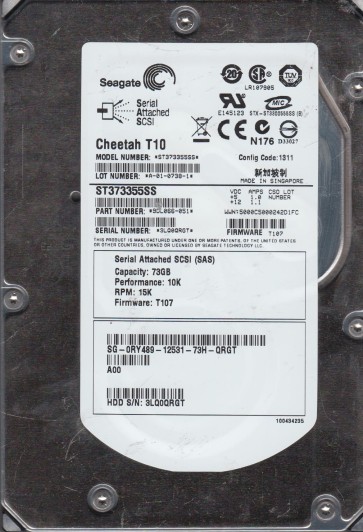
The Seagate ST373355SS is an enterprise-class 73.4GB 15K RPM SAS hard disk drive, part of the Cheetah 15K.5 family. It features a 3.5-inch form factor with a Fibre Channel or SAS interface (typically SAS for this model). Designed for high reliability and sustained throughput in server and storage array environments, it utilizes perpendicular recording technology. Given its age and enterprise usage, common failure points include the SAS controller chip, spindle motor bearings, and degradation of the read/write heads. The drive’s firmware is highly specialized for SCSI/SAS command sets, making it distinct from consumer SATA drives. Understanding that this is a mission-critical component in legacy systems is key; recovery often involves specialized hardware and firmware knowledge.
Identifying Common Failure Types
1. Electronic Failure (PCB/Controller Board)
Symptoms: Drive spins up but is not detected, makes clicking sounds (without a regular pattern), or shows a “drive not ready” error in the system logs. The drive may also have a burned component visible on the green PCB. This is often caused by power surges, faulty backplanes, or capacitor degradation. The SAS controller chip (e.g., Marvell or LSI) is a common point of failure. In this scenario, the heads, media, and spindle motor are usually intact.
2. Mechanical Failure (Stiction or Spindle Bearing Seizure)
Symptoms: The drive is completely silent or emits a single faint click on power-up, then stops. The platters do not rotate. This is often called spindle lock or bearing seizure caused by dried or degraded lubricant over years of operation. The heads may be stuck to the platters (stiction) due to head parking failures or physical shock. The motor cannot overcome the friction, and the drive will never spin up without intervention.
3. Head Crash or Media Damage
Symptoms: Loud, repetitive clicking (heads attempting to find servo patterns) accompanied by a scratching or grinding noise. The drive may be detected but with massive reallocation counts, non-responsive sectors, or immediate “I/O error” when accessing data. A head crash occurs when the read/write head physically contacts the spinning platter, damaging the magnetic coating. This can quickly spread contamination across the media, making data loss catastrophic if the drive is left powered on.
4. Firmware Corruption and Bad Sector Overload
Symptoms: Drive spins up normally, appears in the SCSI/SAS controller’s BIOS but reports wrong capacity (e.g., 0GB), or freezes when trying to read the configuration page. The drive may also make a “tick-tick” sound as it tries to re-read translator modules. Bad sector reallocation failures can corrupt the defect table (G-List) or the firmware modules that map data. This requires specialized firmware tools to rebuild the translator or repair the module checksums.
Potential Recovery Paths
Professional Data Recovery Services
For the ST373355SS, professional recovery is recommended for any mechanical issue or complex firmware problems. The process typically involves:
Assessment: A free or low-cost diagnosis using donor drives, SAS terminal analyzers (like PC-3000 SAS, Atola Insight, or DeepSpar Disk Imager).
Clean Room Work: For head crashes or stiction, the drive must be opened in a Class 10 (or better) clean room. The platters are transferred to a donor drive with an identical head stack assembly (HSA) and firmware revisions. The SAS zone is critical; mismatched revisions can cause immediate head failure.
PCB Replacement with ROM Transfer: For electronic failures, an identical donor PCB is required. The drive’s unique configuration data (including adapter settings and servo microcode) is stored on a serial EEPROM or the NVRAM. Professionals use hot-air stations and NVRAM programmers to transfer this chip to the donor board.
Firmware Repair: Using tools like PC-3000 SAS or MRT, specialists can access the drive’s service area, rebuild translator modules, clear bad sector logs, and create a full sector-by-sector image to an array or file.
Cost: Typically ranges from $500 to $3000+, depending on the severity and required clean room hours.
DIY Recovery Methods (Only for Specific Cases)
Warning: DIY on enterprise SAS drives is extremely high-risk. Do not attempt if the drive is making unusual noises or was dropped.
Case 1: Failed PCB with no mechanical damage. Identify the exact PCB revision number (e.g., 100463815). Locate the identical PCB (matching all controller chip numbers). Remove the PCB and locate the EEPROM (usually 8-pin SOIC next to the controller). Use a hot air station to unsolder this chip from the original board and solder it onto the donor board. Reinstall the donor board. This requires precision soldering and knowledge of ESD safety.
Case 2: Firmware failure with good electronics. Connect the drive to a SAS controller (like an LSI 9200-8e) on a workstation. Boot into a Linux live CD (e.g., SystemRescue). Use terminal commands (e.g., `ddrescue`) to attempt a read. Be aware that SAS drives do not return smart data over standard cable. The controller may hang. Some drives accept SCSI commands via a tool like `sg_ses` to enable LED logging. This is only useful if the drive passes initial detection.
Tools Needed: Hot air rework station, ESD-safe tweezers, soldering iron, flux, DMM for continuity testing. A donor drive at $30-80 on eBay. A SAS front-end or HBA card to test.
What Not to Do
Do not apply power if the drive is making grinding or clicking sounds. This can scratch the platters and destroy remaining data irrevocably.
Do not open the drive enclosure (break the HDA seal) outside a certified clean room. Airborne particles will scratch the platters on first spin-up.
Do not use file-level recovery software like Recuva or R-Studio on a failing SAS drive. This forces the heads to overwork and can cause secondary failure.
Do not attempt to swap electronics from a different model, even from the same family. The firmware and ROM are unique to each drive’s head map.
Do not apply percussive maintenance (tapping, shaking, or freezing). This is almost never effective for modern high-density drives and can misalign the heads.
Do not continue to run a drive that is producing reallocated sectors or timeouts. Unplug it immediately to preserve the remaining readable data.
Summary
Recovering data from a Seagate ST373355SS SAS drive requires a clear diagnosis of the failure type. The most common failures are electronic (PCB), mechanical (spindle lock or head crash), and firmware corruption. Professional recovery is strongly advised for any mechanical or complex firmware issue due to the drive’s proprietary nature and the need for Class 10 clean room procedures. A limited DIY approach is possible only for a known dead PCB with a successful ROM transfer from an identical donor. The golden rules are: never power a noisy drive, never open the HDA, and never rely on software for logical recovery when physical damage is present. Prioritize a proper assessment by a specialized data recovery lab that can handle SAS drives to maximize the chance of a complete and successful recovery.