
Data recovery on vintage hard drives like the Western Digital WD7500AADS starts with identifying the failure type – electronic, firmware, or mechanical. Each requires a different approach, and misdiagnosis can make things worse. Here’s a quick guide to help you assess your situation and decide on the next step.
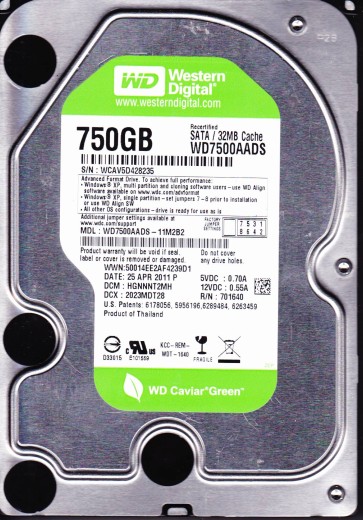
The Western Digital WD7500AADS is a 750GB 3.5-inch SATA hard drive from the Green Power (IntelliPower) line. It was designed for low power consumption and quiet operation, featuring a variable spindle speed (typically 5400-7200 RPM) and Advanced Format (4K physical sectors). It uses a Marvell 88i8840 main controller and a WD proprietary head assembly. Due to its age and power-saving firmware, it is prone to specific failure mechanisms related to head stiction, weak spindle motor bearings, and firmware corruption from idle spin-down cycles.
Common Failure Types
1. Mechanical Head Crash / Stiction
Symptoms: Clicking, grinding, or whining noises. Drive is detected but not spinning up, or spins up and then stops. Often preceded by a sudden drop or power loss.
Cause: The read/write heads physically contact the platter surface due to contamination, shock, or lubricant degradation (stiction). On the WD7500AADS, the heads are prone to parking issues due to the aggressive head parking algorithm.
2. Firmware Corruption (SA Failure)
Symptoms: Drive clicks, is detected with incorrect capacity (e.g., 0GB or 32MB), or shows as “Not Initialized” in Disk Management. It may spin up but be unresponsive in the OS.
Cause: Corrupt modules in the System Area (SA) due to power fluctuations, bad sectors in the SA, or failed firmware updates. The WD7500AADS is vulnerable to SA corruption from repeated spin-down/spin-up cycles.
3. Logical Damage (File System Corruption)
Symptoms: Drive spins normally, is detected, but shows an “RAW” file system, “The disk is not formatted” error, or inaccessible files. No physical damage.
Cause: Improper shutdown, virus attack, bad sectors on the partition table, or accidental deletion. This is a software-level issue, not hardware.
4. Bad Sectors (Degradation)
Symptoms: Slow read/write speeds, file copy errors, operating system freezes, or reallocation of sectors (SMART attribute 05 increasing).
Cause: Physical platter degradation, media corrosion, or head contamination. The 4K sector format can cause increased reallocation on old drives.
5. Spindle Motor Failure
Symptoms: Drive does not spin up at all. No vibration or sound. When powered, the drive may feel dead, or a faint high-pitched whine may be heard (stuck motor).
Cause: Seized bearings due to lubricant drying out, or electrical failure in the motor driver chip on the PCB.
Potential Recovery Paths
Professional Service (Recommended for Hardware Failures)
– Mechanical failure: Heads must be replaced in a cleanroom. The platters are transferred to a donor drive. This requires specialized tools (PC-3000, DeepSpar, Seagate F3).
– Firmware corruption: A professional will use a tool like PC-3000 to read and repair the SA modules, often with a hot-air station to remove the flash or read it off-board.
– Bad sectors: Can be imaged with a hardware imager (DeepSpar USB 3.0) that skips or retires bad areas. This is safer than any software attempt.
– Spindle motor: Often requires a motor replacement or transplant of the platters into a donor drive.
DIY (Only for Logical Damage or Simple Issues)
– File system corruption: Use a read-only data recovery software like R-Studio, DMDE, or TestDisk. Scan the raw drive and copy files to a different healthy drive. Never install software to the failing drive.
– Bad sectors (low count): Use ddrescue (Linux) or HDD Raw Copy Tool (Windows) to create a sector-by-sector image. Set retry passes to 1 or 2 to avoid further damage. Do not use chkdsk or format.
– Simple PCB swap: Only if the original PCB has a blown TVS diode (visible burn). Must match exact PCB number (2060-xxxxxx) and ROM must be swapped (requires hot air station).
What Not to Do
Do not run chkdsk /f or any write-repair tool on a clicking, buzzing, or heavily bad-sectored drive. This will cause further head damage and data loss.
Do not open the drive enclosure. The internal platters are extremely sensitive to dust. A single speck of dust can destroy data. Opening voids all professional recovery guarantees.
Do not freeze the drive. This is an urban myth that can cause condensation, warping the platters and ruining the heads. Avoid any thermal shock.
Do not continue to power cycle the drive if it makes unusual noises. Each power-up can cause further physical damage, especially to the heads or spindle.
Do not attempt to swap the PCB without a proper donor drive. Random PCB swaps often fail due to firmware mismatch and can corrupt the System Area permanently.
Summary
The Western Digital WD7500AADS is a power-saving drive susceptible to head stiction, firmware corruption from idle cycles, and logical errors. For any mechanical failure or firmware issue, seek a professional data recovery service with a cleanroom and PC-3000 tool. For logical damage or a low bad sector count, a careful DIY approach using read-only imaging tools (ddrescue, R-Studio) is acceptable. Never use repair utilities, open the drive, or apply thermal extremes. The safest path is always a clean, controlled sector-by-sector copy before any repair attempt.