
Data recovery on vintage hard drives like the Toshiba MK3261GSYG starts with identifying the failure type – electronic, firmware, or mechanical. Each requires a different approach, and misdiagnosis can make things worse. Here’s a quick guide to help you assess your situation and decide on the next step.
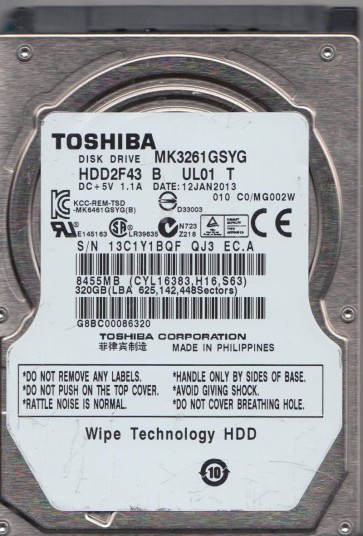
The Toshiba MK3261GSYG is a 2.5-inch, 320GB 7200RPM SATA hard disk drive, typically found in high-performance laptops and external enclosures. It features a perpendicular recording technology and a 16MB cache buffer. Key components include the printed circuit board (PCB), the head stack assembly (HSA) with read/write heads, the spindle motor that rotates the platters, and the internal firmware that manages logical-to-physical address mapping. Failure modes for this generation often involve mechanical wear, firmware corruption, or electrical component degradation. The drive’s high rotational speed (7200RPM) makes it more susceptible to shock damage and heat-related failures compared to slower 5400RPM models. Understanding its specific architecture is critical for selecting the correct recovery approach.
Identifying Common Failure Types
1. Mechanical Head Crash or Stiction
Symptoms include loud clicking, grinding, or scraping sounds. The drive may fail to spin up or spin up and then stop. This is often caused by physical shock, dropping the device, or manufacturing defects in the head suspension. The heads physically contact the platter surface, damaging the magnetic media and usually causing permanent data loss at the contact site. Immediate power-off is essential to prevent further platter damage. This failure type almost always requires cleanroom intervention.
2. Firmware Corruption (Media Cache or Translator Issues)
The drive may power on, spin up, and be detected incorrectly (e.g., as 0GB or with a wrong model name). Common symptoms include “SMART status bad” errors, the drive freezing during file access, or the system hanging on boot. Firmware corruption can occur due to sudden power loss, bad sectors affecting module storage areas, or logical errors during firmware updates. The Toshiba MK3261GSYG often suffers from corrupt module 37 (defect list) or module 1B (media cache). This is a software-level problem, but accessing the firmware area requires specialized tools like PC-3000 or MRT.
3. PCB (Printed Circuit Board) Electrical Failure
The drive is electrically dead: no spin, no sound, and not detected by BIOS. This can result from a power surge, faulty SATA cable, or component failure (e.g., burnt TVS diodes, failed motor controller chip, or damaged preamplifier). Visual inspection may reveal burnt components or bulging capacitors. A common DIY fix involves swapping the PCB, but the drive’s adaptive information (e.g., NVRAM or ROM) must be transferred from the original board to the donor board, otherwise the drive will not calibrate correctly or may fail to access user data.
4. Bad Sector Degradation
The drive spins normally but exhibits extreme slowness, frequent read errors, or file system corruption (e.g., “file or directory is corrupted and unreadable”). This is gradual physical degradation of the magnetic media, often accelerated by thermal stress or age. The drive’s firmware attempts to reallocate bad sectors, but excessive reallocation can lead to “read-only” mode firmware behavior. This failure type is treated as a logical issue, but imaging with a tool that handles read errors (like ddrescue) is required before any file-level recovery.
Potential Recovery Paths
ProfessionalService: Hardware-Level Recovery (Mechanical & Electronic)
For head crashes, severe clicking, or non-spinning drives, professional cleanroom services are required. A certified lab will open the drive in a Class 100 or better cleanroom to replace the head stack assembly with an identical donor part. The donor drive must match the exact model, firmware revision, and platter count. After head replacement, the drive is powered on in a specialized tool to read firmware modules, adjust adaptive parameters, and then create a sector-by-sector image. For PCB failures, professionals use hot-air soldering stations to transfer the original ROM chip to a donor board or use a programmer to rewrite the board’s firmware. Typical cost ranges from 300 to 2000 USD depending on damage severity. This approach has the highest success rate for mechanical failures.
DIY (Do-It-Yourself): Software-Only Recovery (Logical Issues)
If the drive is functional (spins, recognized, no abnormal noises) but has bad sectors or corruption, software tools can be used. Download and boot from a Linux live USB. Use ddrescue to create a compressed image: ddrescue -d -r3 /dev/sda /mnt/usb/image.img /mnt/usb/log.log. This bypasses file system and reads raw sectors. After imaging, use TestDisk to repair partition tables or PhotoRec to extract individual files. Ensure your destination drive has at least 1.5x the capacity of the failing drive. Do not mount the failing drive directly. DIY success is possible only if the drive has no mechanical or advanced firmware issues. Any unexpected sound means power off immediately.
DIY: PCB Replacement (Cautious Approach)
For electrically dead drives (no spin) but with known good mechanical condition, a PCB swap can be attempted. Source a donor PCB with the exact same part number (e.g., 1006XXXX on the board). Use a hot air station or soldering iron to remove the original 8-pin serial flash ROM (often a Winbond or Macronix chip) from the damaged board and solder it onto the donor board. Without transferring the ROM, the donor board will not have the correct adaptive data for the specific head/platter assembly, and the drive may not initialize or may fail to read user data. This requires intermediate soldering skills. If any physical damage is visible on the platters, do not attempt this.
What Not to Do
- Do not open the drive’s cover in a normal environment. Even a single dust particle on the platter can destroy data. Only a certified cleanroom can open a hard drive safely.
- Do not repeatedly power on a clicking drive. Each power cycle can cause the heads to scrape the platter surface, creating new bad sectors and irreversible damage.
- Do not apply freezer, rice, or shock methods. These are myths that can cause condensation, contamination, or further mechanical misalignment.
- Do not run CHKDSK or fsck on a failing drive. These tools write to the drive, potentially overwriting critical file system structures or forcing the drive to reallocate bad sectors, making subsequent recovery harder.
- Do not attempt to spin the platters by hand or use non-specialized tools to manipulate the internal mechanism. This will guarantee total data loss.
Summary
The Toshiba MK3261GSYG is a high-speed 2.5-inch drive prone to head crashes, firmware corruption, PCB electrical failure, and bad sector degradation. Accurate diagnosis is the first and most critical step. If the drive makes abnormal sounds, is electrically dead, or shows signs of mechanical distress, power off immediately and seek professional cleanroom recovery. For drives that spin normally but have logical issues (corruption, slowness), DIY imaging with ddrescue followed by file extraction using TestDisk/PhotoRec offers a viable path. Never attempt a DIY head replacement or open the drive. Always transfer the ROM chip when swapping a PCB. Backup your data before symptoms worsen. Data recovery is a race against time and physical damage. Choose the path appropriate for the failure type to maximize your chance of success.