Articles

Do It Yourself Laptop Repairs

As much as I like fast, shiny, new computer hardware, my actual needs are such that I get along fine with gear that is best described as “trailing edge technology.” I’ve been perfectly happy with a couple of older laptops for years now, but recently suffered hardware failures on both machines — one an easy fix, the other much, much harder to resolve. Thankfully, I was able to repair both machines, and, in this post, I’ll walk you through what was involved.

First up is the easy fix.

removingdeadharddrive Removing the dead hard drive

The hard drive on my aging Compaq N610C finally died on me. Fortunately, I have a few spare HDs kicking around, and replacing a drive in this laptop takes less than 5 minutes to accomplish. I simply had to remove a screw, slide out the old drive, swap the replacement and dead drive in the mounting bracket, then pop the “new” drive back in. Fast and easy!

Unfortunately, reinstalling the OS and needed software took far, far longer than the actual replacement of the drive (an hour later, as I type this, it’s still downloading updates).

deaddrivebracket The dead drive and the mounting bracket

The second repair was the non-trivial one, since it involved a failed backlight on my Dell D430. Let’s take a look at how involved this operation turned out to be:

removebezelkeyboard Step one was to remove the bezel and keyboard

To get to the backlight inside the display panel, I didn’t have to completely disassemble the laptop, but it was darned close. The keyboard needed to be removed to give me adequate slack on the cables, then the hinges needed to be unscrewed to free the display panel.

d430disassembled Keyboard and cables freed up, hinges released

Next up, the display panel was disassembled:

bezellcdpanel Next, the bezel on the LCD panel was removed

lcdpanelrevealed The LCD panel revealed

Now, the specific problem with the backlight was that it would flash for about a second when the laptop powered up, but then the light would go dark. Presumably this meant that either the light itself or the inverter board that powered the light was defective and in need of replacement. The lighting element on this laptop is actually a very tiny fluorescent tube, much like the large ones in common use in industrial settings. The inverter board takes care of converting the low-voltage DC current from the laptop batteries into high-voltage AC current to drive the lighting element.

Given the behavior of the display, I suspected the inverter board to be a problem. If the fluorescent tube were a problem, the display would likely have failed over time, appearing reddish and dim when the machine was first powered up. Since the display flashed brightly and briefly, I was pretty sure it was not the tube at fault.

In preparation for this repair job, I’d actually purchased a replacement inverter board. To confirm that this was the problem, I swapped out the cables between the old and new inverter and powered-up the D430. Surprisingly, the backlight displayed the exact same behavior with the new inverter! Given that, I sadly concluded that the problem lay with the lighting element itself, and I was faced with a much more complicated repair.

thebacklight The backlight itself

Removal of the lighting element from the panel was the trickiest part of all. The tube is about 2mm in diameter and is incredibly fragile. I was lucky to get it loose without breaking.

During disassembly of the tube, one of the power cables dropped free. These are soldered onto the ends of the tube — or should I say that they are supposed to be soldered onto the ends of the tube. Assuming that I had not pulled the cable loose, it seemed that I had found the problem. Apparently the solder join had failed over time, leaving just enough of a connection for the start-up current to flicker the backlight, but not enough for the light to function under normal operating current.

backlight The backlight completely stripped down

I carefully cleaned and resoldered the power cable, then reassembled the system enough to test:

lettherebelight Let there be light!

Thankfully, the backlight worked!

Having solved that problem, it was time to reassemble the thing.

tubeback Tube back in display panel, electrical tape applied

Before I completely closed up the laptop, I tested the display again. It really sucks to have to backtrack in this sort of repair.

displaypanel Another test of the display panel

And finally….

success Success!

So, an hour or so later, I had the D430 back in action.

In retrospect, I’m not sure I would have undertaken the backlight repair if I’d known it was going to be this involved. I’m glad to have resurrected the laptop, rather than consigning it to some sketchy recycling program or paying someone else a hundred bucks or more to fix it; however, I honestly don’t enjoy this kind of thing as much as I used to.

So, no, I really will not fix your computer for you.

Do It Yourself Laptop Repairs Read More »

ACE Data Group Announced Strategic Partnership With Dell

ACE Data Group, LLC, today announced that they have entered into a strategic partnership with Dell(www.dell.com). The partnership allows Dell support agents to recommend Data Recovery Services for any media recovery needs their customers may have. This expands the range of services Dell can offer their customers and greatly increases the level of customer satisfaction.

While most hardware manufacturers warranties only cover replacement of failed hardware and not data recovery, Dell is now well positioned to offer a comprehensive data recovery service for all of its commercial products. As the authority in the recovery industry, Data Recovery Services has provided reliable and cost effective solutions serving a global market for over 30 years. DRS facilities are cutting edge and staffed with the finest personnel from engineering to customer service. Data Recovery Services represents the best choice for Dell customers.

“Even the best equipment on the planet, such as Dell, can fail or become inaccessible due to natural disasters, power surges, failed hard drives and human error. This is where the DRS-Dell partnership comes into play to support Dell’s customers to the fullest.”says Data Recovery Services General Manager Don Wells.

Laptops and notebook computers take a lot of abuse, and with todays mobile technology, more and more critical data is being stored on these devices every day. Because they are often carried about and exposed to different environmental factors such as heat, water and dust, laptops and notebook computers are far more susceptible to data loss and became a subject for data recovery than their desktop counterparts.

“Our RAID data recovery technologies are unparalleled in the industry, and we have dedicated resources to support exactly what Dell customers would require. With the quality of Dell products and our experience and knowledge, this partnership has created a true, full circle of support.” continued Mr. Wells

More and more corporations, and even small businesses, move to the cloud and virtual environments with comprehensive replication and backup. But no RAID or cloud setup is immune to data loss, and even the best configured systems can still fail due to power surges or human error. Replication, for example, does not protect against accidental deletion of critical data because this operation will be replicated. Unfortunately, backup infrastructure and planning is not failure-proof itself and can be affected by data loss in the same ways current storage systems can. Also, many backups are not done “on the fly”, meaning a part of the important data may not have been backed-up in the time window when the data loss happened. This piece of information may be critical for business itself, not to mention possible compliance and regulatory issues of sensitive data.

ACE Data Group CEO, Charles Walker, regards the Dell partnership as a major goal for the future direction of the company, “This partnership is critical to our objective of being the number one data recovery and computer forensic service provider. We truly appreciate Dell’s confidence in our ability to not only solve complex recovery issues, but to also increase customer satisfaction and loyalty”.

About ACE Data Group LLC
ACE Data Group LLC, provider of computer forensic and data recovery services to customers all over the world. Since 1981, Data Recovery Services has worked with every type of media including HDD, SSD, RAID, SAN, NAS, flash drives, and tapes. For additional information visit their website at: http://www.datarecovery.net or call at 877-304-7189.

Related Post: Top 10 Data Recovery Companies

ACE Data Group Announced Strategic Partnership With Dell Read More »

EaseUS Data Recovery Now Supports Windows 8 & Mac OS X 10.8

easeus-logo EaseUS, a leading provider of data backup and disaster recovery and storage management solutions, today announces the general availability of EaseUS Data Recovery Wizard 5.6.1 and EaseUS Mac Data Recovery Wizard 5.6.1 for a better user experience.
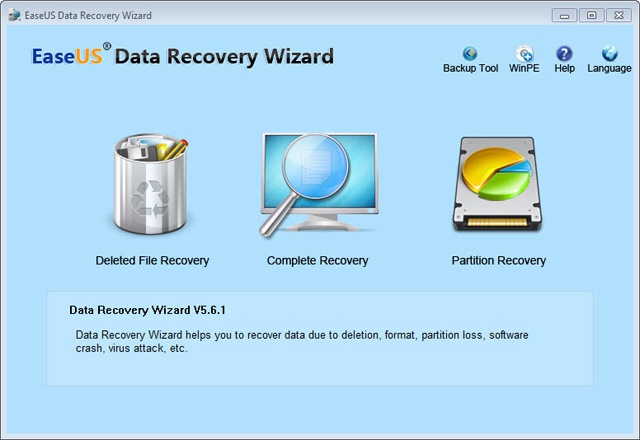
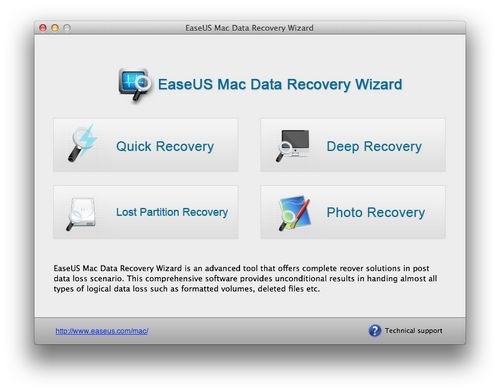
1. EaseUS® Data Recovery Wizard: 5.6.1 brings a new interface that makes the data recovery process easy even for a beginner. It ensures a safe and precise data recovery against numerous threats like: formatted or corrupted drives, missing critical file system structures, file deletion, application crash and computer viruses.

Another benefit for this update is that EaseUS Data Recovery Wizard is totally compatible with the up-coming Windows 8. Besides, this new version is designed to activate with the license number, in this way, you do not have to download and search a second time.

data-recovery-wizard

EaseUS Data Recovery Wizard Key Features:

  • English & German language support.
  • New! Windows 8 compatible – recover any data under Win 8.
  • New! Brand-new user interface for more intuitive data recovery process.
  • New! Faster scan lost files by skipping bad sectors automatically.
  • New! Once you have purchased you do not have to download and search a second time.
  • Recover deleted or lost files emptied from the Recycle Bin.
  • File recovery after accidental format, even Windows reinstallation.
  • Disk recovery after a hard disk crash.
  • Get back files after a partitioning error.
  • Get data back from RAW hard drives.
  • Specify file types before file recovery to find lost files quickly.
  • Recover office document, photo, image, video, music, email, etc.
  • Recover from hard drive, USB drive, memory card, memory stick, camera card, Zip, floppy disk or other storage media.
  • Support FAT12, FAT16, FAT32, NTFS/NTFS5 file systems.
  • Windows 2012/2000/XP/2003/Vista/2008/Windows 7/Windows 8.
  • Free file repair service.

2. EaseUS Mac Data Recovery Wizard: which can restore files from formatted disk, deleted or lost partition with original file names and storage paths, now supports to recover lost data from Mac OS X 10.8 (Mountain Lion). Having this tool in hand, you won’t be bothered by data loss any more.

mac-data-recovery-wizard

EaseUS Mac Data Recovery Wizard Key Features

  • Hot! Fast and safely recover unlimited types of data from deleted/lost/formatted/corrupted/damaged Mac hard drives and any other media storages devices, for example, supporting USB recovery, CF card recovery, SD card recovery and so on.
  • Show preview of your recovered photo, audios and videos to specify what you want to recover to save time.
  • An interactive and user friendly interface for better user experience.
  • Hot! Support Mac data recovery from NTFS, HFS, HFS+, HFSX, HFS Wrapper and FAT file system volumes.
  • Fast and accurately performs the complete recovery of data from Mac OS X 10.8 (Mountain Lion) & Mac OS X 10.7 (Lion) & 10.6 (Snow Leopard) & 10.5 (Leopard).

EaseUS Data Recovery Now Supports Windows 8 & Mac OS X 10.8 Read More »

Gigabyte to Terabytes

For fun, here is a comparison of some old storage media with something in our data recovery lab right now.

Gigabyte-to-Terabytes

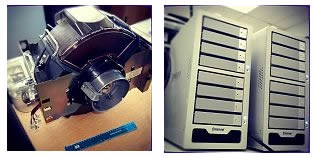
On the left is an IBM 3380 ‘direct storage access device’ circa 1980. Capacity: 1 GB. On the right, a RAID recovery on one of our lab workbenches, set up in a couple of storage cases.
Capacity: 48 TB.

The cases and the old IBM device are about the same size… ~30cm across, but of course 30 years difference.

Gigabyte:

The gigabyte is a multiple of the unit byte fordigital information storage. The prefix giga means 109 in the International System of Units (SI), therefore 1 gigabyte is1000000000 bytes. The unit symbol for the gigabyte is GB or Gbyte, but not Gb (lower case b) which is typically used for the gigabit.

Terabytes:

The terabyte is a multiple of the unit byte digital information. The prefix tera means 1012 in the International System of Units (SI), and therefore 1 terabyte is 1000000000000 bytes, or 1trillion (short scale) bytes, or 1000 gigabytes. 1 terabyte in binary prefixes is 0.9095 tebibytes, or 931.32 gibibytes. The unit symbol for the terabyte is TB or TByte, but not Tb(lower case b) which refers to terabit.

Gigabyte to Terabytes Read More »

IBM buys data storage company Butterfly Software

IBM Corp. said Monday it acquired Butterfly Software, a privately held data analysis and migration software company headquartered in Maidenhead, England.

Butterfly’s main feature is its ability to migrate data center infrastructures. According to the company website, it focuses on lowering the cost and risk of maintaining legacy storage and backup & recovery environments. This allows companies to consolidate enterprise data and analyze it for strategic purposes.

IBM has staked its claim in the analytics market. This acquisition plays to that strategy.

IBM said Butterfly makes storage planning software and migration tools, which can help companies save time, storage space, IT funds, and power consumption.

The companies did not disclose terms of the purchase.

Shares of IBM lost 69 cents to close at $205.29 Monday.

IBM buys data storage company Butterfly Software Read More »

WD Creates the World’s Thinnest 2.5” Hybrid Hard Drive

Sept. 10, 2012 – Western Digital Corp. today announced it is sampling a 5mm-thin hard disk drive(New 5 mm Standard Slashes Storage Footprint by Almost 50% Compared to Traditional 2.5-inch Hard Drives) featuring hybrid technology. Western Digital has developed hard drives slim enough for integration into today’s thinnest notebook PCs, which provide high-capacity storage and robustness while featuring instant-on and application performance similar to today’s client solid state drives (SSDs). The new technologies will be showcased during WD’s Investor Day, Sept. 13, 2012.

     “Mobile devices are becoming smaller, thinner, lighter and more responsive, working with our technology partners, WD has developed new 5 mm hard drives that enable high capacity storage along with excellent performance and superior economics to allow our customers to expand their thin offerings.”- said Matt Rutledge, vice president of client storage solutions at WD.

With device volumetric efficiency a key concern for system makers, WD began shipping 7 mm height hard drives for thin-profile notebooks earlier this year (historically, standard notebook hard drives have been 9.5 mm). WD 5 mm hybrid hard drives will enable the market’s thinnest computers to offer 500 GB of capacity, utilizing almost 50% less volume compared to current 9.5 mm hard drives and at one tenth the cost of similar capacity SSDs.

“Acer is partnering with WD to bring advanced notebook performance and capacity in the smallest form factor, It’s a part of our ongoing commitment to present leading technology that ultimately improves the total user experience of our customers.”- said David Lee, associate vice president of Mobile Computing Product business unit at Acer.

“We are seeing a shift in the computing world to more powerful mobile computing solutions,  notebook business unit. with this in mind, ASUS and WD are collaborating to create slimmer and more mobile notebook solutions — without sacrificing capacity or performance — to deliver smaller form-factor to consumers.” – said SY Shain, senior vice president of ASUS’

Hybrid Technology and Client Tiered Storage

WD’s innovative hybrid technology pairs MLC NAND flash storage for fast SSD-like data throughput and instant-on responsiveness with magnetic disks for efficient, high-capacity storage. Similar to the practice of multi-million dollar enterprise systems, WD’s hybrid technology utilizes the concept of tiered storage. Data accessed most frequently (often referred to as ‘hot’ data) is managed using speedy NAND flash to ensure fast response times, while data accessed less often (‘cold’ data) resides on the robust magnetic disks. The tiered design of hybrid hard drives, compared to current dual-drive solutions, also provides a redundancy benefit for users. The magnetic disk backs up all files residing in the NAND, protecting the user from inevitable NAND wear and preserving it for the more hot data handling. WD’s hybrid technology works in conjunction with the PC operating system to deliver higher performance than current hybrid offerings while minimizing NAND wear to allow the use of less expensive MLC NAND.

Hybrid hard drives combine NAND flash and magnetic disks, simplifying storage-element integration for OEM customers and providing a host of end user benefits: superior performance, responsiveness, lower power consumption, greater operating shock tolerance, and data protection. And unlike dual-drive designs, WD’s hybrid technology provides single-unit design homogeneity that OEM system manufacturers have long sought from the storage industry.

WD Creates the World’s Thinnest 2.5” Hybrid Hard Drive Read More »

How to Repair Hard Drive PCB Circuit Boards?

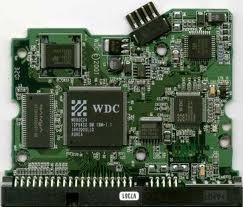
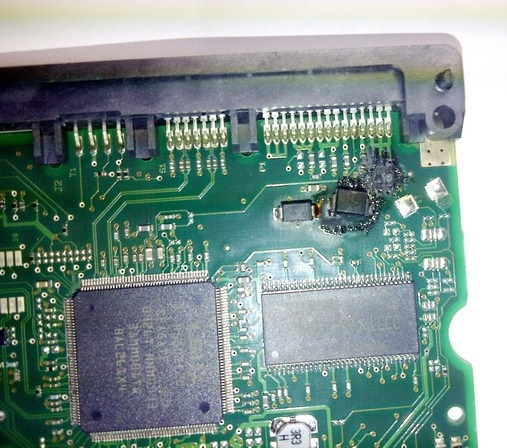
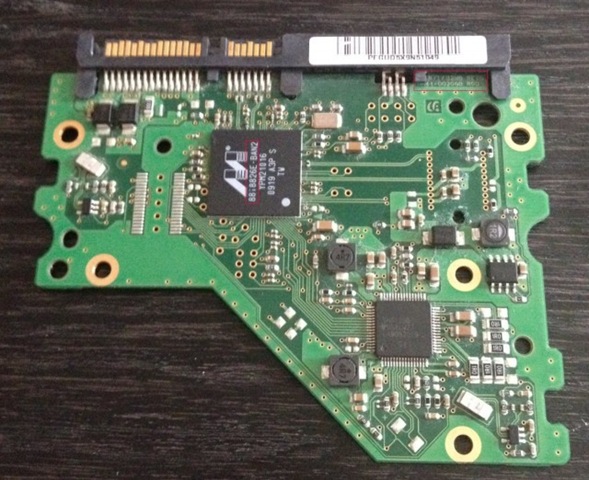
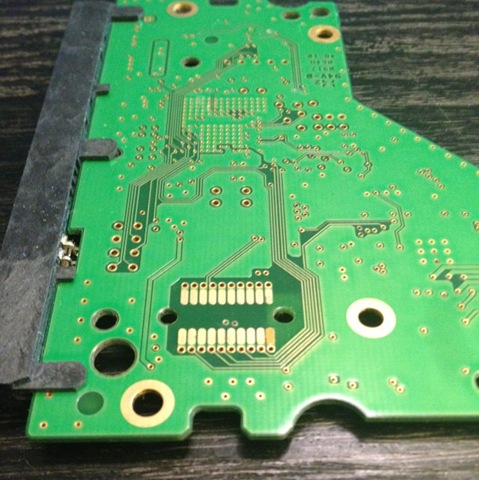
harddrivepcb Many hard drive failures are caused by problems with the PCB(HDD can’t spin; PCB board/chip be burnt; PCB interface broken; etc). If your hard drive does not spin when powered on, PCB replacement may allow you to recover your data. PCB replacement will not fix all hard drive failures, however, and like most other do-it-yourself repairs, it may void any remaining warranty on the drive. This process should be used only as a last resort after all other options have been exhausted. If you are not comfortable performing repairs yourself, many data recovery companies will perform this task — for a fee.

Before Repairing Hard Drive PCB Circuit Boards You Should Know:

  • Replacement HDD PCBs are almost always sold in limited quantities, so be sure to check auction sites and contact specialty vendors.
  • Don’t be tempted to use a similar-looking PCB that is not identical to the original; this will almost always cause damage.
  • Use caution when handling small electronic components. Hard drives are very sensitive to bumps; a small fall could do serious damage.

Instructions of Repairing Hard Drive PCB Printed Circuit Boards:

1. Confirm that the PCB actually needs to be replaced. If your hard drive spins when powered on or makes clicking noises, the fault is mechanical and will require professional data recovery. If the drive does nothing when powered on or shuts off intermittently, the PCB may be at fault.

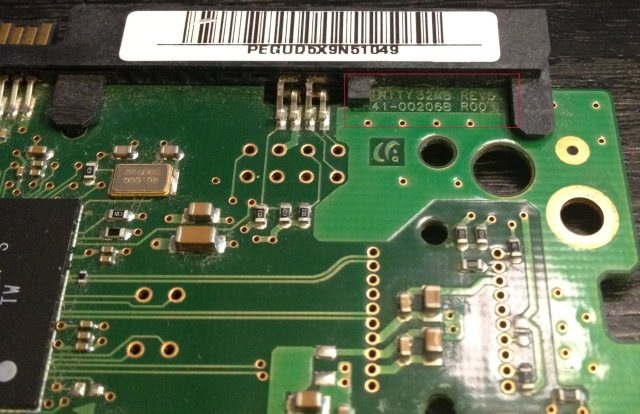
2. Locate a suitable replacement PCB. To do this, you will need the model number of the PCB, which is usually etched somewhere on the board itself. To remove the PCB, simply remove the screws that fasten it to the drive and carefully disconnect the ribbon cable. Many hard-drive manufacturers use specially shaped star or hex screws, so be sure to use the appropriate screwdriver to prevent stripping. Tearing the ribbon cable will render the drive unrepairable, so be gentle; it should come free with minimal force.

3. Purchase a replacement PCB. These can often be difficult to find, though many online resellers offer a wide variety; be sure to contact as many vendors as you can. You will need an identical board, both in physical shape and size as well as model number; substituting different boards may cause permanent data loss.

HDDZone.com is recommended, they provide all kinds of hard drive PCBs including Seagate, Maxtor, Western Digital, Samsung and others with worldwide free shipping.

4. Connect the replacement PCB. Gently connect the ribbon cable; make sure that it’s fully connected before mounting the PCB to the drive with the screws you removed before. Be sure to mount the PCB exactly as the original was mounted.

5. Test that the new PCB is working by turning off your computer and connecting only the power line to the drive. When you press the power button to turn the computer back on, the drive should spin. If it appears to be spinning properly, turn the computer off again and connect the hard drive as it would normally be configured to recover your data.

6. Cut the power and disconnect the drive if the hard drive fails to spin or makes any unusual noises when powered on. Ensure that you connected the PCB properly and that it is mounted securely. If you have performed these steps as stated and the hard drive still fails to spin, the problem is likely mechanical and will require professional data recovery.

Related Links:

Hard Drive PCB Swap Guide (Seagate, Western Digital, Samsung, Maxtor and others)

How to Repair Hard Drive PCB Circuit Boards? Read More »

24 Hour Data Saves the Night with Recent RAID Recovery

24 Hour Data RecoveryBusiness owners who provide important services can’t accept downtime, even if it means working through the night to re-build a RAID array after a hard drive failure. Encartele, a Dallas-based Voice Over IP provider for correctional and confinement facilities, relies on rock-solid technology to process hundreds of thousands of phone calls, keeping loved ones in touch across the miles.

When a RAID-5 array recently went bad, Encartele owner Scott Moreland faced a data recovery emergency at 10:30 at night. The company was performing system upgrades, so back-ups weren’t accessible.

“I couldn’t get the RAID re-built. I couldn’t access my critical data. I admit, I was freaking out a little bit,” Moreland said.

He searched the Yellow Pages for Dallas data recovery specialists. But nearly every data recovery company he called didn’t answer the phone.

“The few who answered quoted me astronomical rates for emergency data recovery at thattime of night,” Moreland says.

Emergency RAID Recovery: 24 Hour Data Saves the Night

Finally, Moreland says, he dialed the right number: 1-866-598-DATA. The round-the-clock data recovery specialists at 24 Hour Data answered the phone and suggested Moreland drop off the drive.

“My immediate reaction was, ‘I like this guy!’” Moreland recalls.

Moreland liked the 24 Hour Data experts even better when they called him five hours later to report they recovered all the mission critical data.

“I came back in the morning to pick up the re-built RAID array with all my data recovered and in place. It was that easy. Life was good,” Moreland says.

Living the Good Life with 24 Hour Data

Since then, Moreland says, his days of shopping for a data recovery service he can trust are over. “They have the most reasonable pricing I could find, and the service is top notch.”
He continues, “Data recovery is a highly specialized field, and we associate that with extremely high prices. But that doesn’t have to be the case.”

Describing 24 Hour Data’s RAID recovery rates as “fair” and “reasonable,” Moreland says he uses 24 Hour Data, and its partner firm, 24 Hour Computer, for all his high-level IT service. “I feel greater peace-of-mind knowing 24 Hour Data and 24 Hour Computer are there as a resource for my business. If anyone is looking for amazingly good service at a very fair price, I feel there’s no one better.”

24 Hour Data President Sean Wade says helping Dallas business owners like Moreland gives his job greater meaning. “Encartele provides an important communication service for correctional and confinement facilities. Inmates view Encartele’s phone and video calling services as their lifeline to loved ones. We’re proud to assist Encartele with RAID data recovery and repair services to help keep those communication lines open.”

Related Link: Best Data Recovery Company: 24 Hour Data

About 24 Hour Data

With more than 15 years experience in the data recovery industry, 24 Hour Data has unmatched success rates in data recovery for all forms of storage media, including flash data recovery, SSD data recovery(solid-state drive data recovery), hard drive data recovery, Mac recovery and more. Looking for a data recovery service you can trust to recover your lost data? Call the data recovery experts at 24 Hour Data.

24 Hour Data Saves the Night with Recent RAID Recovery Read More »

Seagate Barracuda 7200.9 PCB Buying Guide

As we know:  Seagate Barracuda 7200.9 HDD can’t spin; board/chip be burnt; interface broken; etc. These problems are caused by PCB malfunction. Swap PCB of your Seagate Barracuda 7200.9 hard drives can resolve the problems.

1. Seagate Barracuda 7200.9 Hard Drives PCB Buying Guide:

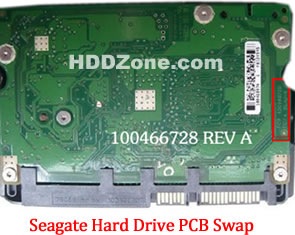
For Seagate HDD, just need the donor PCB has the same board number as yours.

seagate-hard-drive-pcb-swap

* Seagate Hard Drive PCB Swap

2. Before Seagate Barracuda 7200.9 HDD PCB Swap you should know:

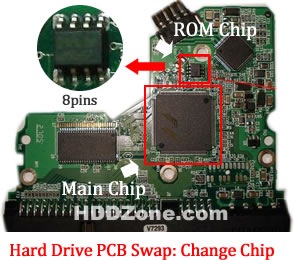
1. Most PCB’s BIOS chip(ROM Chip) store the unique information. We need change the BIOS form original PCB to replacement PCB, in order to make the replacement PCB compatible with the HDD.  The 8pins (4 pins on each sides) with 25P05VP、25P10VP、25F512、25F1024、25F1024AN、SST25VF512、SST25VF010, etc. are the BIOS Chip.

Tips: Most of the TV/Phone Repair Shop can offer these services for just $5-%20

hard-drive-pcb-swap-change-chip

* Hard Drive PCB Swap: Change BIOS Chip, Main Chip

2. Some PCB don’t have separate BIOS. The BIOS be integrated on the Main Controller IC(The biggest chip on the board, also named Main Chip). We should exchange the Main Controller IC to let the HDD be recognized.

3. Where to buy Seagate Barracuda 7200.9 PCB Circuit Boards?

Seagate 100383767 PCB
Seagate 100389148 PCB
Seagate 100387575 PCB
Seagate 100406937 REV B PCB
Seagate 100387574 PCB
Seagate 100368182 PCB
Seagate 100389148 PCB
Seagate 100355589 PCB
Seagate 100367025 PCB
Seagate 100367026 ST3200827AS PCB
Seagate 100367028 PCB
Seagate 100404226 PCB

Note: Seagate Barracuda 7200.9 PCB sells on HDDZone.com are fully tested before shipment(worldwide free shipping now!); These are just PCB (Printed Circuit Boards), not the whole HDD (Hard Disk Drive).

More other pcb swap guide please refer to this post: hard Drive PCB Swap

Seagate Barracuda 7200.9 PCB Buying Guide Read More »

5 Guidelines for Hospital Data Recovery Plans

hospital-data-recovery Toward the end of July, dozens of hospitals across the country lost access to crucial electronic medical records for close to five hours during a major computer outage. Human error caused the computer outage, which is just one of many potential disasters that can affect hospital data. Although no hospital or physician reported any harm to patients, the length of the outage and the delay of the backup system were alarming to those involved.

This incident makes recent findings from the Acronis Global Disaster Recovery Index 2012 particularly concerning. The survey was conducted by the Ponemon Institute in September and October 2011. Over 6,000 information technology practitioners were surveyed. Here are a few key findings of the survey.

• Fifty-five percent of respondents from the healthcare sector reported low confidence in their ability to recover data following a disaster.
• One third of healthcare sector respondents (33 percent) confessed they could not recover quickly following a disaster.
• Forty-two percent of healthcare sector respondents said they would suffer substantial downtime following a disaster.
• More than 34 percent of respondents admitted to spending nothing at all on backup and disaster recovery in 2011.

It is clear from the findings that healthcare organizations are not adequately preparing for data recovery and backup. According to Blaine Raddon, general manager for Acronis Americas, a software company that develops backup and disaster recovery products, instances like the recent computer outage usually push healthcare organizations to discuss their data storage and recovery plans. However, organizations should not be waiting until another hospital has a disaster to assess their data backup plan.

Here Mr. Raddon offers five guidelines healthcare organizations should follow to develop comprehensive data recovery and disaster plans. These plans should encompass any potential data loss issue, such as an administrator accidently deleting a critical file or a natural disaster.

1. Develop individual plans for departments. A hospital’s data recovery plan needs to be tailored to each department because the critical requirements of each department will vary. The data recovery plan cannot rest solely on the shoulders of the IT department. If each department includes business and patient data needs, the plan will be more comprehensive and effective.

“Think through the plan for each department level — what data is needed and what is the importance level? Some departments cannot have any downtime. They may need instant recovery because more than a couple minutes of downtime could mean life or death,” says Mr. Raddon.

2. Prepare for the best and the worst. Start with the worst case scenario to make sure the plan can handle a disaster situation, and work backward to develop a plan that covers the hospital for everyday user-driven problems.

“At the end of the day, the cases that are most often seen are human error and machine failure — things that are more predictable and user driven. Having the backup and recovery plan for when an administrator accidently deletes a file is just as important as a plan for when the hospital’s power supply is cut. Those may not be what people think of as a disaster that threatens patient data, but that is what occurs most often,” says Mr. Raddon.

3. Include personnel in the plan. According to Mr. Raddon, it is critical that personnel are included in the data recovery plan. This includes what everyone’s role in a data loss situation would be as well as backup for experts and administrators.

“If you have one IT person and he’s the only one who knows how to repair the hospital’s dataservers, what would happen if he was not available during a disaster? You have to include the people component in the plan to guarantee there are enough employees with the right training,” says Mr. Raddon.

4. Factor in downtime. A timeframe for downtime needs to be considered in the data recovery planning process so each department knows what it can live with.

“Some departments are dealing with life and death situations. Executives need to consider whether the hospital’s plan allows departments to return in a reasonable time frame. A two-hour recovery time frame for the intensive care unit may not cut it,” says Mr. Raddon.

5. Test the plan. Many hospitals believe their plan works but it’s never tested. That is a recipe for disaster, according to Mr. Raddon.

“A plan isn’t a plan if it isn’t tested, Hospitals should document their plan, frequently test it and run unannounced spot checks, which will show how the recovery may run in a true emergency,” says Mr. Raddon.

Written by Kathleen Roney

5 Guidelines for Hospital Data Recovery Plans Read More »

Scroll to Top