Articles

Videos for Computer Repair DIY

A computer repair technician is a person who repairs and maintains computers and servers. The technician’s responsibilities may extend to include building or configuring new hardware, installing and updating software packages, and creating and maintaining computer networks.

The repair of problems can range from a minor setting that is incorrect, to spyware, viruses, and as far as replacing hardware or an entire operating system.

Sometimes you may want to repair computer yourself even you are not a real computer repair technician, don’t worry, here are some videos provided by computertechnician.net can help you to solve some of the common computer issues.

  1. How to Repair the Blue Screen
  2. Make Your Computer Run Like New
  3. How to Make Your Internet Really Fast
  4. How to Fix Your Computer Without Downloads
  5. Computer Startup Problems Fixed
  6. How to Fix a Slow Computer
  7. 100 % CPU Usage
  8. How to Fix a Slow PC
  9. How to Fix a Computer
  10. How to Fix Your Computer for Good
  11. How to Fix a Mac Book Power Adapter
  12. Fix Your Mac Book Power Adapter
  13. How to Fix Your Mighty Mouse
  14. Clean Up Your Mac
  15. How to Make Your Mac Run Faster
  16. Mac OS X Tips and Tricks
  17. 3 Tips for New Mac Users
  18. Top 30 Mistakes by New Mac Users
  19. How to Fix Mac Book Booting Problems
  20. Ice T Presents Mac Repair
  21. How to Remove a Virus Without Using Antivirus Program
  22. How to Delete a Virus Manually
  23. How to Delete All Computer Virus Fast and Free
  24. How to Remove Viruses and Spyware Manually
  25. How to Remove Any Virus From Your Computer
  26. Top 5 Deadliest Computer Viruses
  27. Trojan Virus Removal
  28. Manually Remove Trojan Virus
  29. Microsoft Security Essentials Virus Test
  30. Learn Security Essentials
  31. How to Build a PC
  32. How to Install a Graphics Card
  33. PC Repairs for Dummies
  34. PC Cleaning
  35. How to Open a Locked Computer
  36. How to Upgrade Your Video Card
  37. How to Upgrade the Memory in Your Computer
  38. A+ Computer Repair
  39. How to Fix Overheating CPU
  40. How to Upgrade RAM
  41. How to Use Your Computer to Fix Your Car
  42. How to Start a Computer Repair Business
  43. Fix Your PC With a Crystal Pendulum
  44. Can Stores That Sell Computers Also Fix Them?
  45. How to Fix a Broken Keyboard
  46. How to Clean and Fix a Mouse
  47. How to Repair Laptop Adapter
  48. How to Fix a Black Screen Laptop
  49. How to Fix a Water Damaged Laptop
  50. Laptop Replacement Screen

Bonus! Destroy It Finally, if you can’t fix a broken computer, this is the video for you. It shows the top ten ways to destroy one that is good for nothing else. Fire, a bulldozer, cheese, and other methods are shared.

Be sure and use caution whenever following the above 50 must see YouTube videos for DIY computer repair. Some can void your warranty, and computers that are still under warranty can offer tech help over the phone or web.

Videos for Computer Repair DIY Read More »

Data Backup Glossary (Letter O)

Object-based storage device
Data Backup Glossary (Letter O)An object-based storage device (OSD) is a device that implements the standard in which data is organized and accessed as objects, where object means an ordered set of bytes (within the OSD) that is associated with a unique identifier. Objects are allocated and placed on the media by the OSD logical unit. With an OSD interface, metadata is associated directly with each data object and can be carried between layers and across storage device files. Records are no longer abstractions, but actual storage objects that are understood, managed, and secured at the device level.

Offline storage
Any storage medium that must be inserted into a storage drive by a person before it can be accessed by the computer system is considered to be a type of offline storage. Also called removable storage.

Online data storage
Also called Internet storage or hosted storage, online data storage is a data storage management solution that enables individuals or organizations to store their data on the Internet using a service provider, rather than storing the data locally on a physical disk, such as a hard drive or tape backup.

Open document management API
Open document management API (ODMA) is an open industry standard that enables desktop applications to interface with a document management system (DMS). ODMA simplifies cross-platform and cross-application file communication by standardizing access to document management through an API. ODMA allows multiple applications to access the same DMS without the need for a hard-coded link between the application and the DMS.

Operational data store
A type of database that serves as an interim area for a data warehouse in order to store time-sensitive operational data that can be accessed quickly and efficiently. In contrast to a data warehouse, which contains large amounts of static data, an operational data store contains small amounts of information that is updated through the course of business transactions. An operational data store will perform numerous quick and simple queries on small amounts of data, such as acquiring an account balance or finding the status of a customer order, whereas a data warehouse will perform complex queries on large amounts of data. An operational data store contains only current operational data while a data warehouse contains both current and historical data.

Overwrite(v.)
To record or copy new data over existing data, as in when a file or directory is updated. Data that is overwritten cannot be retrieved.
(n.) Refers to a file or directory that has been overwritten.

Data Backup Glossary (Letter O) Read More »

Seagate Announced New 4TB External Hard Drives

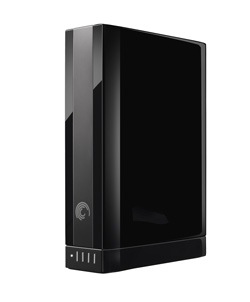
4TB External Hard DrivesOn September 7, 2011, Seagate announced it is shipping the new 4TB GoFlex Desk external hard drives.

This latest addition to the GoFlex Family of external hard drives showcases Seagate’s new desktop design. The new 4TB GoFlex Desk drive is now available from seagate.com and will be available from select online retailers within the month for a manufacturer’s suggested retail price of $249.99 USD. The entire line of GoFlex Desk products will also adopt the new industrial design in the coming weeks. The GoFlex Desk for Mac external drive featuring both FireWire 800 and USB 2.0 will be available in Apple stores by the end of the month.

Yet another industry first for Seagate, we have reached a new high-capacity in the 3.5-inch hard drive form factor. At Seagate, we are committed to pushing the limits for our customers and will continue to adapt and innovate our products based on customer needs, this latest GoFlex® Desk drive offering, with its new industry-leading capacity point, is a statement of our continued commitment to meet consumer needs. -said Patrick Connolly, vice president and general manager of Retail products for Seagate.

As more of our entertainment and personal data become digitized, the significance of greater access to local storage becomes increasingly more valued. The new GoFlex Desk 4TB drive has the space to contain over 2,000 HD movies. This new GoFlex Desk external drive comes at a time when people are archiving more of their memories in the form of digital photo and video.

IDC foresees there being an increase in global demand for personal storage capacity driven by the growing creation and acquisition of digitized videos, photos and music, – said Liz Conner, senior research analyst, Storage Systems, IDC.

Debuted in May of 2010, the award-winning GoFlex Family of hard drives provide an alternative approach to external storage solutions by allowing users to change interface adapters to stay current with the latest in interface technology. With USB 3.0 still undergoing adoption and the emergence of Thunderbolt technology in the coming months, the GoFlex adapter concept has been proven as an idea that works and Seagate plans to continue with this design for future iterations of the company’s external hard drives. The GoFlex drives are also Windows and Mac OSX compatible and have the flexibility to go between both operating systems. In addition to cross-platform compatibility, the GoFlex Desk drive can also be utilized with the GoFlex Home adapter if one chooses to use it as a network drive.

With the pre-loaded back up software, the GoFlex Desk external drive provides automatic, continuous back with encryption for all your files. The included USB 3.0 adapter also works with USB 2.0 ports making it easy to connect to your Windows or Mac computer. The adapter also features an illuminated gauge to display available space on the drive.

Seagate Announced New 4TB External Hard Drives Read More »

Hard Drive Data Recovery in Atlanta, USA

Hard Drive Data Recovery in Atlanta, USAThere are numerous contributing factors of data loss. Belows are the five common reasons of data loss. You should be aware of these things to avoid your valuable data from loss. If you have experienced data loss due to any of the reasons, you need for data recovery to recover your valuable data.

  • Hardware failure;
  • Firmware Corruption;
  • Partitions missing;
  • Accidental deletion and overwriting;
  • Operating System failure;

Data Recovery Services near Atlanta:

Secure Data Recovery Services of Atlanta GA
www.securedatarecovery.com/data-recovery-atlanta.html
201 17th Street, Suite 300 Atlanta, GA 30363
1-770-217-4955

Secure Data Recovery of Atlanta specialize in: Raid Recovery, Laptop Data Retrieval, Hard Drive Data Recovery, Mac Data Recovery, Email/File Data Recovery, SQL Data Recovery and Tape Recovery Services.

Data Recovery Atlanta
www.datarecoveryatlanta.com
235 Peachtree St. NE Suite 400 Atlanta, GA 30303
404.592.2042

Laptop, desktop, USB, RAID and external hard drive data recovery. We also recover thumb drives, sandisk cards, optical media, removable media and many other data storage devices and media

Atlanta Data Recovery Services
atlantadatarecovery.com
2250 Satellite Blvd, Suite 240 Duluth, GA 30097
1.888.481.9501

We provide hard disk recovery services for all storage media including: raid arrays, hard drives, tapes, opticals, removables, laptops & digital photos.

ACR Data Recovery
www.atl-datarecovery.com
4487-B Park Drive Norcross, GA 30093
770 925-4420

Use data recovery software for file recovery, and data recovery service for hard drive recovery and other disk recovery cases to recover data. See recovered data before purchasing software. Guaranteed quote upon request.

These are some of the hard drive data recovery service providers near atlanta, welcome to give your review for these services.

Hard Drive Data Recovery in Atlanta, USA Read More »

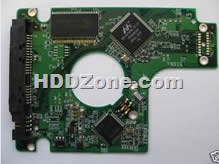
Western Digital PCB Board 2060-701450-011 REV A

Swap Western Digital  PCB board 2060-701450-011 REV A to recover your data from damaged HDD due to PCB failure. 2060-701450-011 REV A is the board number on this PCB. If your HDD’s PCB has problems, the drive usually cannot boot up or there may be an inaccurate display in the BIOS of the hard drive’s information. Also power may not get to the hard drive and as a result it will not spin up.

Western Digital 2060-701450-011 REV A PCB Board Details:

Board Number: 2060-701450-011 REV A
Main Controller IC: 88i6745M-TFJ1
HDD Motor Combo IC: L7206 1.2
Manufacturer: Western Digital

Note: Hard drive failures are NOT always caused by circuit board failure.

Possibilities of WD circuit board failures:

  1. Hard disk doesn’t spin up. Either no sound or a short, quiet tickling sound can be heard.
  2. Hard disk does not spin up. Buzzing sound can be heard.
  3. Hard drive spins up fine, but is not recognized in device manager or in BIOS. Hard drive recognized with default manufacturer value (like 0GB capacity, wrong SN or Model).
  4. There is a burning smell can be sensed coming from a hard drive or pcb circuit board.
  5. You can see a burned component on the circuit board.
  6. Hard drive makes a clicking sound.
  7. Extremely slow reading.
  8. Hard drive, after some time disappears from Device Manager and from the system. May also be running very hot.

Western Digital PCB Board 2060-701450-011 REV A Photo:

Western Digital PCB Board 2060-701450-011 REV A

Buy this WD pcb board online: Western Digital PCB Board 2060-701450-011 REV A

More Western Digital IDE PCB

Western Digital PCB Board 2060-701450-011 REV A Read More »

Data Backup Glossary (Letter N)

Near-line storage
Data Backup Glossary (Letter N)Near-line storage is used by corporations, including data warehouses, as an inexpensive, scalable way to store large volumes of data. Near-line storage devices include DAT and DLT tapes (sequential access); optical storage such as CD-ROM, DVD, and Blu-ray; magneto-optical which utilize magnetic heads with an optical reader; and also slower P-ATA and SATA hard disk drives. Retrieval of data is slower than SCSI hard disk which is usually connected directly to servers or in a SAN environment. Near-Line implies that whatever media the information is stored on, it can be accessed via a tape library or some other method electronically as opposed to off-line which signified some human intervention is required, such as retrieving and mounting a tape. Near-line can be slower, but the type of data (historical archives, backup data, video, and others) dictates that the information will not require instant access and high throughput that SAN and SCSI can provide and is less expensive per byte.

Network-attached storage(NAS)
A network-attached storage (NAS) device is a server that is dedicated to nothing more than file sharing. NAS does not provide any of the activities that a server in a server-centric system typically provides, such as e-mail, authentication, or file management. NAS allows more hard disk storage space to be added to a network that already utilizes servers without shutting them down for maintenance and upgrades. With a NAS device, storage is not an integral part of the server. Instead, in this storage-centric design, the server still handles all of the processing of data but a NAS device delivers the data to the user. A NAS device does not need to be located within the server but can exist anywhere in a LAN and can be made up of multiple networked NAS devices.

Nyquist’s Law
Also called Nyquist’s Theorem. Before sound as acoustic energy can be manipulated on a computer, it must first be converted to electrical energy (using a transducer such as a microphone) and then transformed through an analog-to-digital converter into a digital representation. This is all accomplished by sampling the continuous input waveform a certain number of times per second. The more often a wave is sampled the more accurate the digital representation. Nyquist’s Law, named in 1933 after scientist Harry Nyquist, states that a sound must be sampled at least twice its highest analog frequency in order to extract all of the information from the bandwidth and accurately represent the original acoustic energy. Sampling at slightly more than twice the frequency will make up for imprecisions in filters and other components used for the conversion.

Data Backup Glossary (Letter N) Read More »

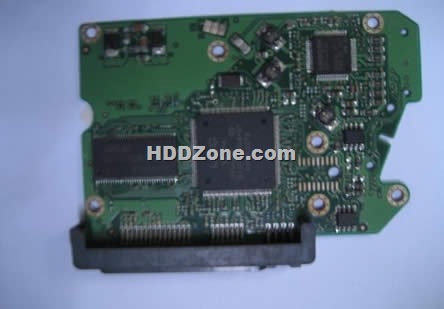
Western Digital 2060-701424-007 REV A PCB

Swap Western Digital  PCB 2060-701424-007 REV A(Printed Circuit Boards) to recover your data from damaged HDD due to PCB failure. 2060-701424-007 REV A is the board number on this PCB. If your HDD’s PCB has problems, the drive usually cannot boot up or there may be an inaccurate display in the BIOS of the hard drive’s information. Also power may not get to the hard drive and as a result it will not spin up.

Western Digital 2060-701424-007 REV A PCB Board Details:

Board Number: 2060-701424-007 REV A
Main Controller IC: 88i6545-TFJ1
HDD Motor Combo IC: L6284 2.2
Manufacturer: Western Digital

Note: Hard drive failures are NOT always caused by circuit board failure.

Possibilities of WD circuit board failures:

  1. Hard disk doesn’t spin up. Either no sound or a short, quiet tickling sound can be heard.
  2. Hard disk does not spin up. Buzzing sound can be heard.
  3. Hard drive spins up fine, but is not recognized in device manager or in BIOS. Hard drive recognized with default manufacturer value (like 0GB capacity, wrong SN or Model).
  4. There is a burning smell can be sensed coming from a hard drive or pcb circuit board.
  5. You can see a burned component on the circuit board.
  6. Hard drive makes a clicking sound.
  7. Extremely slow reading.
  8. Hard drive, after some time disappears from Device Manager and from the system. May also be running very hot.

Western Digital 2060-701424-007 REV A PCB Photos:

Western Digital 2060-701424-007 REV A PCB

Buy this WD pcb board online: Western Digital 2060-701424-007 REV A PCB

More Western Digital 2.5″ Laptop PCB on HDDZone.com

Western Digital 2060-701424-007 REV A PCB Read More »

Data Backup Glossary (Letter M)

Magnetic drum
A direct-access, or random-access, storage device. A magnetic drum, also referred to as drum, is a metal cylinder coated with magnetic iron-oxide material on which data and programs can be stored. Magnetic drums were once used as a primary storage device but have since been implemented as auxiliary storage devices.

Magneto-optical
Magneto-optical (MO) is a type of data storage technology that combines magnetic disk technologies with optical technologies, such as those used in CD-ROMs. Like magnetic disks, MO disks can be read and written to. And like floppy disks, they are removable. However, their storage capacity can be more than 200 megabytes, much greater than magnetic floppies. In terms of data access speed, Mo disks are faster than floppies but not as fast as hard disk drives.

Mass storage
The various techniques and devices for storing large amounts of data. Modern mass storage devices include all types of disk drives and tape drives. Mass storage is distinct from memory, which refers to temporary storage areas within the computer. Unlike main memory, mass storage devices retain data even when the computer is turned off.

Massive array of idle disks
In storage terminology a massive array of idle disks (MAID) is a technology that uses a large group of hard disk drives (hundreds or even thousands), with only those drives that are needed actively spinning at any given time. MAID is a storage system solution that reduces both wear on the drives and also reduces power consumption. Because only specific disks spin at a given time, what is not in use is literally a massive array of idle disks, which also means the system produces less heat than other large storage systems.

Mean time to repair
In data storage, mean time to repair (MTTR) is the average time before an electronic component can be expected to require repair.

Mean time until data loss
In data storage, mean time until data loss (MTDL) is the average time until a component failure can be expected to cause data loss.

Media
Plural of medium.

Objects on which data can be stored. These include hard disks, floppy disks, CD-ROMs, and tapes.

In computer networks, media refers to the cables linking workstations together. There are many different types of transmission media, the most popular being twisted-pair wire (normal electrical wire), coaxial cable (the type of cable used for cable television), and fiber optic cable (cables made out of glass).

The form and technology used to communicate information. Multimedia presentations, for example, combine sound, pictures, and videos, all of which are different types of media.

Metadata catalog service
Metadata catalog service (MCS) is a mechanism for storing and accessing descriptive metadata and allows users to query for data items based on desired attributes. MCS may be used for storing and accessing metadata about logical files.

Mixed platform environment
A heterogeneous environment that includes multiple platform types.

Mount
In the network file system (NFS), a protocol and set of procedures to specify a remote host and file system or directory to be accessed, and their location in the local directory hierarchy.

ms, MS
When spelled ms, short for millisecond, one thousandth of a second. Access times of mass storage devices are often measured in milliseconds.
When spelled MS, short for Microsoft or mobile subscribers.

Multi-platform
See heterogeneous environment.

Multi-site
Geographically dispersed; having more than one location.

Data Backup Glossary (Letter M) Read More »

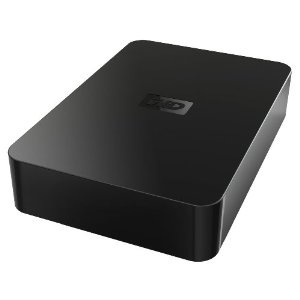
WD Elements 3TB External Hard Drive WDBAAU0030HBK-NESN

WDBAAU0030HBK-NESNDesigned with the same commitment to quality that made WD external drives the number one drives in the world, Western Digitals WD Elements 3TB external hard drives are the right answer for simply affordable add-on storage. Just plug it in to a USB port and start saving your photos, music, video, and files.

Model: WDBAAU0030HBK-NESN

Interface: USB 2.0
Capacity: 3TB
Form Factor: 3.5″

This drive is preformatted for use in Windows, and can be reformatted for use with Mac OS X using Apple’s Disk Utility application. The drive is ready to use right out of the box –you won’t have to load any software from a CD to get the drive to work. It is an excellent option for users who would like to add storage capacity to their system.

  • Designed with the same commitment to quality that made WD external drives the number one selling drives in the world
  • Plug-and-play design allows you to connect the power and plug the drive into a USB port to instantly add more storage to your computer
  • Turns on and off with your computer. Enters idle mode when not in use. Utilizes a WD drive with power-saving WD GreenPower Technology and an EnergyStar compliant power supply
  • Packaged in a minimized eco-friendly, recyclable packaging made from recycled materials
  • Designed for use with Windows-based computers. Can be easily reformatted for use with Macs

Customer Reviews of the Western Digital WDBAAU0030HBK-NESN:

Its a great external hard drive, I have several 1.5TB models just like this deployed in our office, and just like them they are very quiet and effective as a backup solution.

Yes it’s on, for reals. It’s so quite it makes me question my own ears. I got the 3TB version, and maybe I will be able to fill it in about 100 years. j/k. I have 5 externals running off of a powered hub on my laptop at all times and this one takes the cake as the largest and quietest one of them all. One HD to rule them all? Maybe, if the cake is a lie. Seriously, buy this one and site back and relax.

Price: $180.99 (Price on amazon.com: $124.99)

What’s in the box: USB 2.0 external hard drive, USB cable, AC adapter, Quick Install Guide.

WD Elements 3TB External Hard Drive WDBAAU0030HBK-NESN Read More »

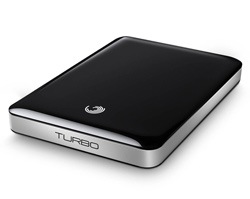
Seagate Hard Drives To Feature SafetyNet Data Recovery Services

safetynet-data-recovery-serviceSeagate today unveiled the GoFlex® Turbo performance drive with SafetyNet™ data recovery services (DRS). SafetyNet data recovery is the first recovery service offering by a hard drive manufacturer to be included as part of the purchase price of an external drive. With the latest super speed USB 3.0 interface and RPMs clocked at 7200, the GoFlex Turbo drive is equipped to handle transfer speeds up to 40% faster than that of its USB 2.0, 5400-RPM siblings. This latest addition to the GoFlex family was developed with the understanding that those who place a high value on their data should have the peace of mind that their data is even more secure regardless of what unforeseen incident might occur to the drive. The new GoFlex Turbo performance drive features two-years of SafetyNet data recovery services and is now available from BestBuy.com for a manufacturer’s suggested retail price (MSRP) of $119.99 for 500GBs and $139.99 for 750GBs.*

Seagate® GoFlex® Turbo performance drive with SafetyNet™ data recovery services

“With this new GoFlex® Turbo performance drive, it is our aim to provide more peace of mind for the people who choose Seagate to back up and store their valued digital assets, when our products are used as a backup to a primary system or even as supplemental storage, people should know that they can get a further layer of assurance that their data will be there when they need it.” said Patrick Connolly, vice president and general manager of Seagate’s retail product group.

“Seagate is now bringing to market a solution that shelters our customers, who purchase the GoFlex® Turbo with SafetyNet™, from the potential thousand-dollar cost of recovering lost files. Seagate is providing a solution that will no longer cost thousands of dollars to recover files. SafetyNet™ DRS provide an extra layer of protection for your content.”

SafetyNet™
SafetyNet Data Recovery Services are included with the new GoFlex Turbo performance drive that provides additional protection in the event of data loss. Many things can contribute to data being inaccessible from a drive and Seagate is now providing a safeguard against mishaps such as: physical damage to the drive, human error and software viruses. The GoFlex Turbo performance drive includes two years of SafetyNet Data Recovery Service, a service which separately often comes with a price tag of hundreds to thousands of dollars. The SafetyNet service covers one recovery attempt on your GoFlex Turbo performance drive within a two-year period. Seagate’s Data Recovery Specialists will determine whether remote or in-lab service is the best way to recover the data.*

* The SafetyNet program provides one data recovery attempt in the first two years after date of original purchase. Not all data may be recoverable. For more information, see SafetyNet program terms and conditions at seagate.com/safetynet. SafetyNet service currently is available only to legal residents of US.

Seagate Hard Drives To Feature SafetyNet Data Recovery Services Read More »

Scroll to Top