Articles

Seagate Barracuda 7200.11 Circuit Board 100496208

Swap Seagate Barracuda 7200.11 PCB Circuit Board 100496208 to recover your data from damaged HDD due to PCB failure. 100496208 is the board number on this PCB. If your HDD’s PCB has problems, the drive usually cannot boot up or there may be an inaccurate display in the BIOS of the hard drive’s information. Also power may not get to the hard drive and as a result it will not spin up.

100496208 Seagate Barracuda 7200.11 PCB Circuit Board Details:

There are two types of this 100496208 board:

Name: ST3320613AS
Board Number: 100496208
Main Controller IC: lsi-B5504A
HDD Motor Combo IC: SH6964BD

Name: ST3320613AS
Board Number: 100496208
Main Controller IC: V723A
HDD Motor Combo IC: SH6964BD

1. Seagate 100496208 lsi-B5504A Barracuda 7200.11 PCB Circuit Board:

Seagate-100496208-lsi-B5504A-Barracuda-7200-11-PCB

2. Seagate 100496208 V723A Barracuda 7200.11 PCB Circuit Board:

Seagate-100496208-V723A-Barracuda-7200-11-PCB

If you need this pcb board you can order it online on HDDZone.com

More: Seagate Barracuda 7200.11 PCB Circuit Board

Seagate Barracuda 7200.11 Circuit Board 100496208 Read More »

Data Backup Glossary (Letter L)

Data Backup Glossary (Letter L)Light archive
In reference to data storage, an archive that can be accessed by many authorized users. Access to the data is open to all the members of the “community” that have a need for the data.

Lightbox
In digital asset management (DAM) systems, an area within the web site (or web service) or other internal DAM where users can create and store a list of assets they want to reference or use at a later time. Lightboxes are common on stock photo web sites where registered users can store images until they are ready to download them.

Linear tape open
Linear tape open (LTO) is a technology that was developed jointly by HP, IBM, and Certance (Seagate) to provide a clear and viable choice in an increasingly complex array of tape storage options.  LTO technology is an “open format” technology, which means that users have multiple sources of product and media. The open nature of the technology also provides a means of enabling compatibility between different vendors’ offerings.

Local area network
A local area network (LAN) is a communications infrastructure—typically Ethernet—designed to use dedicated wiring over a limited distance (typically a diameter of less than five kilometers) to connect a large number of intercommunicating nodes.

Lost cluster
Also called a lost allocation unit, or a lost file fragment. A data fragment that does not belong to any file, according to the system’s file management system, and, therefore, is not associated with a file name in the file allocation table. Lost clusters can result from files not being closed properly, from shutting down a computer without first closing an application, or from ejecting a storage medium, such as a floppy disk, from the disk drive while the drive is reading or writing.

Low-level format
(n.) A formatting method that creates the tracks and sectors on a hard disk. Low-level formatting creates the physical format that dictates where data is stored on the disk. Modern hard drives are low-level formatted at the factory for the life of the drive. A PC cannot perform an LLF on a modern IDE/ATA or SCSI hard disk, and doing so would destroy the hard disk. A low-level format is also called a physical format.

(v.) The process of performing low-level formatting.

Data Backup Glossary (Letter L) Read More »

Cost of Seagate Data Recovery Service

Cost of Seagate Data Recovery ServiceSeagate data recovery service helps you retrieve lost files or put data where it serves you best. With “no files, no charge” policy, and industry leading technology make us the best and safest choice for recovering or migrating your critical data. Seagate also optimizes your data for use in the E-Discovery process, saving you time and money.

Seagate Data Recovery Service: Hard Drive Data Recovery, RAID Data Recovery, Database Recovery, Server Data Recovery, Tape Data Recovery, Data Migration Services, Digital Photo Recovery, Data Recovery For Windows, Unix And Linux Data Recovery, Data Restoration…

1. Automatic Quote of Seagate Data Recovery Service:

Simply answer some questions (Seagate Data Recovery Solution Wizard) and they will immediately provide you with a range of options to get your data back. They will also tell you exactly how much recovery costs so that you can determine if the value of the data justifies the cost quoted for the recovery effort before submitting the pre-approved case to begin the recovery process:

Note: An automatic quote only for a single media with Windows or MAC operating system.

  • What type of storage device do you have?
  • What type of operating system do you have?
  • Can your computer still view the storage device?
  • Has the device been physically damaged, or is it making any abnormal noise?

Cost of Seagate Data Recovery Service:
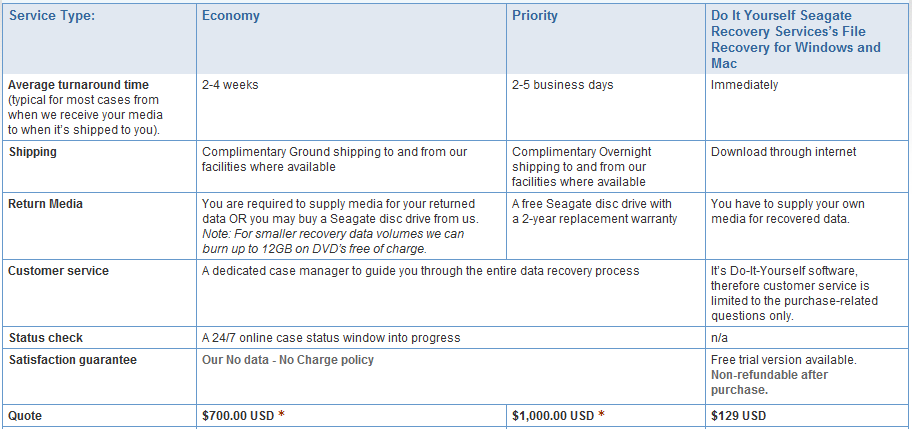
Cost of Seagate Data Recovery Service

2. Accurate quote of Seagate Data Recovery Service:

If your data loss situation is more complex and will require a data recovery expert’s evaluation before they can provide you with an accurate quote.

USA, Canada:
1-800-475-0143

Europe:
+44 (0)800 7832826     +33 (0)805 540631
+49 (0)800 5892917     +49 (0)89 28890 447
+32 (0)2 5357 586        +31 (0)20 6556 485
Fax: +31 (0)20 6556 499

Australia
Fax: 0011-800-6333-3282

Remember: Seagate Recovery Services has a strict No Data – No Charge policy. There is no recovery fee if your media’s data cannot be recovered.

My media is still under warranty?
Seagate Recovery Services recognizes all competitive hard drive manufacturers’ warranties! If during the recovery process,they void the warranty, they will replace the failed product with a comparable Seagate drive free of charge. In addition, if you choose their priority service, you will get a free Seagate disc drive covered by a 2-year warranty.
Cost of Seagate Data Recovery Service Read More »

Data Backup Glossary (Letter I)

iFCP
The Internet Fibre Channel Protocol (iFCP) allows an organization to extend Fibre Channel storage networks over the Internet by using TCP/IP. TCP is responsible for managing congestion control as well as error detection and recovery services. iFCP allows an organization to create an IP SAN fabric that minimizes the Fibre Channel fabric component and maximizes use of the company’s TCP/IP infrastructure.

Image

  • In computer science an image is an exact replica of the contents of a storage device (a hard disk drive or CD-ROM for example) stored on a second storage device.
  • Often used in place of the term digital image, which is an optically formed duplicate or other reproduction of an object formed by a lens or mirror.

Incremental backup
Any backup in which only the data objects that have been modified since the time of some previous backup are copied. Incremental backup is a collective term for cumulative incremental backups and differential incremental backups. Contrast with an archival, or full, backup, in which all files are backed up regardless of whether they have been modified since the last backup.

Information classification and management
Information classification and management (ICM) is a class of application-independent software that use advanced indexing, classification, policy and data access capabilities to automate data management activities above the storage layer.

Infrastructure
The combined set of hardware, software, networks, facilities, and other components (including all of the information technology) necessary to develop, test, deliver, monitor, control, or support IT services. Associated people, processes, and documentation are not part of an infrastructure.

Intelligent information management
Intelligent information management (IIM) is a set of processes and underlying technology solutions that enables organizations to understand, organize, and manage all sorts of data types (for example, general files, databases, and e-mails). Key attributes that define an IIM solution include the following:

Interrecord gap
The space between two consecutive physical blocks on a data recording medium, such as a hard drive or a magnetic tape. Interrecord gaps are used as markers for the end of data and also as safety margins for data overwrites. An interrecord gap is also referred to as an interblock gap.

Internet small computer systems interface
Internet small computer systems interface (iSCSI) is a transport protocol that enables the SCSI protocol to be carried over a TCP-based IP network. iSCSI was standardized by the Internet Engineering Task Force and described in RFC 3720.

IP storage
A technology being standardized under the IP Storage (IPS) IETF Working Group. Same as SoIP.

Data Backup Glossary (Letter I) Read More »

Hard Drive Data Recovery in London, UK

Hard Drive Data Recovery In LondonThere are numerous contributing factors of data loss. Belows are the five common reasons of data loss. You should be aware of these things to avoid your valuable data from loss. If you have experienced data loss due to any of the reasons, you need for data recovery to recover your valuable data.

  • Hardware failure;
  • Firmware Corruption;
  • Partitions missing;
  • Accidental deletion and overwriting;
  • Operating System failure;

Data Recovery Services near Lodon:

1. Data Recovery Lab
145-157 St. John Street, City of London (0800 043 9610)
datarecoverylab.co.uk

Hard Drive Recovery, file recovery, Mac Recovery, hard disk recovery and RAID data recovery is provided by Data Recovery Lab, UK.

2. Nationwide Data Recovery
Portland House, Bressenden Pl, London (0800 599 9112)
nationwidedatarecovery.co.uk

Nationwide Data Recovery provide data recovery services to customers who experience problems recovering data from platter damage and data retrieval.

3. Geeksnerds Limited
2 London Wall Buildings, City of London (020 7374 4696)
datarecoveryuk.co.uk

Data recovery London lab located near Liverpool station and morgate tube station in central London. Data recovery in Birmingham, West Midlands.

4. Data Recovery London
The City Business Centre 2 London Wall Buildings London, EC2M 5UU  (020 7448 5068)
datarecoverylondon.co.uk

Data Recovery London experts recover data from hard drive, RAID arrays, Tape disk, laptop,email, SQL data base and all file systems using latest recovery tools and techniques.

5. ABC Data Recovery Ltd
184 Lower Road, Southwark, London, SE16 2UN (0845 2002 845)
abcdatarecovery.co.uk

ABC Data Recovery Ltd, Specialist in Hard disk repair, Server Recovery, Raid 5 Recovery experts. Also produce R3Cover Data recovery Software.

Hard Drive Data Recovery in London, UK Read More »

Data Backup Glossary (Letter H)

Heterogeneous environment
An IT environment that includes computers, operating systems, platforms, databases, applications, and other components from different vendors.

Hierarchical storage management
Hierarchical storage management (HSM) is a data storage system that automatically moves data between high-cost and low-cost storage media. HSM systems exist because high-speed storage devices, such as hard disk drives, are more expensive (per byte stored) than slower devices, such as optical discs and magnetic tape drives. While it would be ideal to have all data available on high-speed devices all the time, this is prohibitively expensive for many organizations. Instead, HSM systems store the bulk of the enterprise’s data on slower devices, and then copy data to faster disk drives when needed. In effect, HSM turns the fast disk drives into caches for the slower mass storage devices. The HSM system monitors the way data is used and makes best guesses as to which data can safely be moved to slower devices and which data should stay on the hard disks.

High availability
The availability of resources in a computer system in the wake of component failures in the system. High availability can be achieved in a variety of ways—from solutions that use custom and redundant hardware to ensure availability to solutions that provide software solutions using off-the-shelf hardware components. The former class of solutions provides a higher degree of availability, but is significantly more expensive than the latter class. This high cost has led to the popularity of the latter class, with almost all vendors of computer systems offering various high availability products. Typically, these products survive single points of failure in the system.

High-level format
(n.) A formatting method that initializes portions of the hard disk and creates the file system structures on the disk, such as the master boot record and the file allocation tables. High-level formatting is typically done to erase the hard disk and reinstall the operating system back onto the disk drive.

(v.) The process of performing high-level formatting.

Holographic data storage
A mass storage technology that uses three-dimensional holographic images to enable more information to be stored in a much smaller space. In holographic storage, at the point where the reference beam and the data carrying signal beam intersect, the hologram is recorded in the light sensitive storage medium.

Hosted service
A service in which day-to-day related management responsibilities are transferred to the service provider. The person or organization that owns or has direct oversight of the organization or system being managed is referred to as the offerer, client, or customer. The person or organization that accepts and provides the hosted service is regarded as the service provider. Typically, the offerer remains accountable for the functionality and performance of a hosted service and does not relinquish the overall management responsibility of the organization or system.

Hot backup
A technique used in data storage and backup that enables a system to perform a routine backup of data, even if the data is being accessed by a user. Hot backups are a popular backup solution for multi-user systems as no downtime to perform the backup is required. If a user alters the data during the backup process (for example, makes changes at the exact moment the backup system is processing that data) the final version of the backup may not reflect those changes. Hot backup may also be called a dynamic backup or active backup.

Hot potato routing
A form of routing in which the nodes of a network have no buffer to store packets in before they are moved on to their final predetermined destination. In normal routing situations, when multiple packets contend for a single outgoing channel, packets that are not buffered are dropped to avoid congestion. But in hot potato routing, each packet that is routed is constantly transferred until it reaches its final destination because the individual communication links cannot support more than one packet at a time. The packet is bounced around like a “hot potato,” sometimes moving further away from its destination because it has to keep moving through the network. This technique allows multiple packets to reach their destinations without being dropped.

Hot standby
A method of redundancy in which the primary and secondary (backup) systems run simultaneously. The data is mirrored to the secondary server in real time so that both systems contain identical information.

Data Backup Glossary (Letter H) Read More »

Data Backup Glossary (Letter G)

Data Backup Glossary (Letter G)Ghost imaging
Using ghosting software, a method of converting the contents of a hard drive—including its configuration settings and applications—into an image, and then storing the image on a server or burning it onto a CD. When contents of the hard drive are needed again, ghosting software converts the image back to original form. Companies often use ghost imaging when they want to create identical configurations and install the same software on numerous machines.

Gigabyte
2 to the 30th power (1,073,741,824) bytes. One gigabyte is equal to 1,024 megabytes. Gigabyte is often abbreviated as G or GB.

Giant magnetoresistive
Giant magnetoresistive (GMR) is a hard disk drive storage technology. The technology is named for the giant magnetoresistive effect, first discovered in the late 1980s. While working with large magnetic fields and thin layers of magnetic materials, researchers noticed very large resistance changes when these materials were subjected to magnetic fields. Disk drives that are based on GMR head technology use these properties to help control a sensor that responds to very small rotations on the disk. The magnetic rotation yields a very large change in sensor resistance, which in turn provides a signal that can be picked up by the electric circuits in the drive.

Data Backup Glossary (Letter G) Read More »

RAID Array Failures & Recovery

RAID Arrays Failures & RecoveryA hardware RAID implementation requires at minimum a RAID controller. On a desktop system this may be a PCI expansion card, PCI Express expansion card or built into the motherboard. Controllers supporting most types of drives may be used – IDE/ATA, SATA, SCSI, SSA, Fibre Channel, sometimes even a combination. The controller and disks may be in a stand-alone disk enclosure, rather than inside a computer. The enclosure may be directly attached to a computer, or connected via SAN. The controller hardware handles drive management and performs any parity calculations required by the chosen RAID level.

Hardware RAID Failures:

  • Actuator Failure
  • Bad sectors
  • Controller Failure
  • Controller Malfunction
  • Corrupted RAID
  • Lightning, Flood and Fire Damage
  • Damaged Motor
  • Drive physical abuse
  • Hard disk component failure and crashes
  • Hard disk drive component failure
  • Hard drive crashes
  • Hard drive failure
  • Head Crash
  • Intermittent drive failure
  • Media Damage
  • Media surface contamination
  • Multiple drive failure
  • Power Spike
  • Power Supply Burn out or failure
  • RAID controller failure
  • RAID corruption
  • RAID disk failure
  • RAID disk overheat
  • RAID drive incompatibility
  • RAID drive overheat
  • RAID Array failed
  • Vibration damage

Hardware RAID Failures(Human Error):

  • Unintended deletion of files
  • Reformatting of drives / Array
  • Reformatting of partitions
  • Incorrect replacement of media components
  • Accidentally deleted records
  • Mistaken overwritten database files
  • Employee sabotage
  • Lost/Forgotten password
  • Overwritten files
  • Overwritten RAID config files
  • Overwritten RAID settings
  • RAID incorrect setup
  • RAID user error

Software RAID implementations are now provided by many operating systems. Software RAID can be implemented as:

  • layer that abstracts multiple devices, thereby providing a single virtual device (e.g. Linux’s md).
  • a more generic logical volume manager (provided with most server-class operating systems, e.g. Veritas or LVM).
  • component of the file system (e.g. ZFS or Btrfs).

Software RAID Failures:

  • Back up failures
  • Computer virus and worm damage
  • Corrupt files / data
  • Damaged files or folders
  • Directory corruption
  • Firmware corruption
  • Repartition
  • Server registry configuration
  • Missing partitions
  • RAID configuration
  • Reformatting

Software RAID Failures(Application Failure)

  • Applications that are unable to run or load files
  • Corrupted files
  • Corrupted database files
  • Data corrupted
  • Locked databases preventing access
  • Deleted tables

About RAID Data Recovery

The majority of Small-to-Medium Enterprises across the globe have turned to RAID-configured systems for their storage solutions. The most frequently cited reasons for utilizing RAID Arrays in businesses today are the highly fault-tolerant level the solution offers and the cost effectiveness of acquisition and maintenance.

However, if a RAID Array does fail due to component malfunctions (including hard drives and controller cards) or operating and application corruption, it leaves the data unusable and in most cases corrupted.

RAID data recovery is an intricate task since RAID data configurations are often custom-built applications developed by competing manufacturers. Without in-depth knowledge of how RAID arrays are configured at both a hardware, firmware and software level, data recovery attempts will not only fail, but result in further data corruption.

RAID Array Failures & Recovery Read More »

Hard Drive Data Recovery in Seattle

Hard Drive Data Recovery in SeattleLooking for a professional data recovery service in Seattle area? In Seattle area there are many recovery companies and here is a list just for your referance:

1. SalvageData Recovery Services
1100 Dexter Avenue N, Ste 100, Seattle, WA 98109, USA
+1 206-438-9044
www.salvagedata.com

2. DataTech Labs Data Recovery – Seattle
7324 15th Avenue Northwest, Seattle, WA 98117, USA
+1 206-452-2013
www.datatechlab.com

DataTech Labs is a full service data recovery company specializing in hard drive data recovery and Raid data recovery. We also service camera cards, flash drives or any other media device.

3. 1st Data Recovery . com
1425 Broadway, Seattle, WA 98122
(206) 548-4476
www.1stdatarecovery.com

22 Yrs Exp. Specializing In Physical Damaged Hard Drive, Server, Raid, And Tape Data Recovery.

4. Adr Data Recovery
1700 7th Ave # 2100, Seattle, WA 98101-1360
(206) 357-8406
www.datarecoveryseattle.com

We recover data from unbootable computers, unrecognized and crashed or clicking hard drives, deleted or formatted media and RAID Servers. We also specialize in Computer Forensics.

5. ReStoring Data
601 Union Street, Seattle, WA 98101
(206) 456-5151
www.restoringdata.com

Professional and affordable data recovery service from any hard drives, RAID, and flash media, regardless of OS, interface or make.

6. WeRecoverData.com Data Recovery Labs
701 5th Ave., Suite 4200, Seattle, WA 98104
(206) 407-3148
www.werecoverdata.com

Data recovery service from all hard drives, servers, RAID, flash drives, tape, memory cards and any other digital storage. Free evaluations. No-Data-No-Fee. 24/7 emergency service.

If you are living in Seattle area maybe you have heard about one or some all of them, they are all top-customer-reviews recovery companies that can help you so much. If you also know other companies can provide professional recovery services please feel free to contact me, I can list them here in time. Thank you!

Hard Drive Data Recovery in Seattle Read More »

Data Backup Glossary (Letter F)

Failback
After a failback event, the restoration of a failed system component’s share of a load to a replacement component. When a failed controller in a redundant configuration is replaced, the devices that were originally controlled by the failed controller are usually failed back to the replacement controller to restore the I/O balance, and to restore failure tolerance. Similarly, when a defective fan or power supply is replaced, its load, previously borne by a redundant component, can be failed back to the replacement part.

Failover
The automatic substitution of a functionally equivalent system component for a failed one. Failover most often involves intelligent controllers connected to the same storage devices and host computers. If one of the controllers fails, failover occurs, and the survivor takes over its I/O load.

Fibre Channel ATA
Fibre Channel ATA (FATA) is a hybrid hard drive first introduced by HP in 2004 that combines both Fibre Channel and ATA technologies. FATA drives use an ATA drive mechanism, offering the same performance and capacity as a standard ATA drive, but also feature a Fibre Channel connector, which enables the FATA drive to be used where conventional Fibre Channel drives are currently connected.

File server
A computer with the primary purpose of serving files to clients. A file server may be a general purpose computer that is capable of hosting additional applications or a special purpose computer capable only of serving files.

Popular data backup media:  Magnetic tape, Hard disk, Optical storage, Floppy disk, Solid state storage, Remote backup service…

Data Backup Glossary (Letter F) Read More »

Scroll to Top