Articles

5 Reasons Why Your Digital Photos Gone Missing

photorecoveryWith the holiday season quickly approaching, many of us are looking forward to spending time with our family and friends. These special times, which used to be captured on film, are now recorded digitally on a video recording device or a camera. It has revealed that the top causes of memory card disasters from digital camera users desperate to recover their memories.

1. Reformatting

Users often forget that reformatting a memory card will remove all the files stored on it including protected pictures and print orders. This data can only be retrieved by experts so Ontrack advises users to think again before you reformat.

2. Overwriting

A common mistake is the accidental overwriting of images held on camera memory cards with new photos. It’s easily done. So check, check and check again that you’ve successfully transferred your images onto your PC, laptop, CD or DVD before taking new pictures.

3. Cracked and damaged media

Packing memory cards into overstuffed suitcases can result in them becoming bent or damaged on the journey home, making them unreadable. Wrapping cards in clothes and placing them in the middle of your case offers some degree of protection in transit and helps ensure the safety of your pictures during your return trip.

4. Burnt media

Leaving memory cards in an elevated temperature environment – close to a heat source such as a radiator or oven – will increase the chances of failure.  Heat is unlikely to cause damage to the digital photos on the memory card but may stop the card from being recognized in a card reader.

5. Holiday injuries

For those of you that opt for a tropical vacation instead of a snowy week with the in-laws, digital cameras often get dropped in the sand or splashed with water around the pool, damaging smart media to the extent that photos can’t be viewed. Only an expert can recover digital images from smart media damaged in this way, so users should be careful to keep digital cameras in padded and watertight cases to keep them safe.

5 Reasons Why Your Digital Photos Gone Missing Read More »

Data Backup Glossary (Letter A)

Data Backup Glossary (Letter A)ABARS
Aggregate group backup and recovery support (ABARS) is a backup system for MVS S/390 mainframes from IBM. ABARS performs data backup and recovery processes on a predefined set of data called an aggregate. During backup processing, the data is packaged as a single entity in preparation for taking it offsite. This enables the recovery of individual applications in user-priority sequence. The original design of ABARS was for use in disaster recovery, but is also used for transfer of workloads and remote distribution of data.

Active-active
Also called dual active, active-active is a network of independent processing nodes in which each node has access to a replicated database. This database access enables each node to access and use a single application. In an active-active system, all requests are load balanced across all available processing capacity. When a failure occurs on a node, another node in the network takes its place.

Agent
A program that performs one or more services (such as gathering information from the Internet), acting for or as a principal. In an EVault solution, an agent is installed on each server or device needing data protection. It requires no changes to underlying server hardware. The agent installs directly onto multiple operating system environments with minimal overhead. Communicating closely with the other two modules—EVault Director and CentralControl—the agent initiates ongoing, delta (or block-level change) processing of backup data. It also works to perform adaptive compression for more compact data transmission over LANs or WANs. The agent also can encrypt data prior to the data being sent.

Appliance
An intelligent device programmed to perform a single well-defined function, such as providing backup, file, web, network, or print services. Appliances differ from general purpose computers in that their software is normally customized for the function they perform, pre-loaded by the vendor, and not alterable by the user.

Archive(n.)

A disk, tape, or directory that contains files that have been moved off primary storage.
A file that contains one or more files in a compressed format. Due to the file’s content or age, it is infrequently accessed and can be stored in slower, lower cost devices.

(v.) To move files to a long-term storage medium for backup.

(adj.) In DOS systems, the archive attribute marks files that have been modified since the last backup.

Asynchronous replication
A replication technique in which data must be committed to storage at only the primary site and not the secondary site before the write is acknowledged to the host. Data is then forwarded to the secondary site as the network capabilities permit.

ATA disk on chip
ATA disk on chip (ADC) is a chip that contains both a solid state disk (SSD) and an ATAPI bus interface. ADC is housed in a 600 mm 32-pin DIP package and uses a standard ATA/IDE protocol. ADC is most commonly used in thin client systems, PDAs, and other small form factor devices.

Automated cartridge system
An automated cartridge system (ACS) is a storage and retrieval system, often used for library management. The ACS provides cartridge storage cells, transports, and a robotic mechanism to move cartridges between the cells.

Automated cartridge system library software
Automated cartridge system library software (ACSLS) is the software that controls an automated cartridge system (ACS).

Automatic backup system
An automatic backup system triggers backups by event—for example, a schedule point or a threshold reached—rather than by human action.

Automatic failover
The automatic substitution of a functionally equivalent system component for a failed one. The term failover is most often applied to intelligent controllers connected to the same storage devices and host computers. If one of the controllers fails, failover occurs, and the survivor automatically takes over its I/O load.

Availability
In computer systems and networking, the amount of time that a system is available during those time periods when it is expected to be available, often measured as a percentage of an elapsed year.

Data Backup Glossary (Letter A) Read More »

Hard Drive Data Recovery in Dallas,TX

Hard Drive Data Recovery in Dallas,TXLooking for a professional data recovery service in Dallas area? In Dallas area there are many recovery companies and here is a list just for your referance:

1. Secure Data Recovery Services – Dallas TX
2911 Turtle Creek Blvd. Suite 300, Dallas, TX 75219
(214) 530-5992
www.securedatarecovery.com

Services‎: 24/7 Emergency Data Recovery Emergency Data Recovery Service Diagnostics includes: Raid Servers, Mac Laptops, SQL Database repair, Raid Repair and Hard Drive Recovery Services – 24 Hours 7 Days a week

All my data fully recovered. I found Hard Drive and RAID Data Recovery Services – Dallas after searching for local companies in the area, basically somewhere I can bring in my hard drive to see if the data on it is recoverable. I liked the fact this Hard Drive and RAID Data Recovery Services – Dallas provides a free diagnostics, that way I can decide if I want to have the recovery performed or not. It didn’t take long for them to get back to me with the results at which point I authorized the recovery to begin. I admit I had my doubts, I was nervous, in fact I went to bed each night with my fingers crossed under my pillow. The customer service was good, they kept me up to date on the recovery process. Once everything was finished it was such a relief. I verified the recovered information and as they said they would, Hard Drive and RAID Data Recovery Services Dallas recovered everything on my damaged disk!

2. Dallas Data Recovery
4514 Cole Ave., Suite 600, Dallas, TX
469.328.9898
www.harddriverecoverydallas.com

Services: Dallas data recovery: Hard drive, laptop, desktop, USB, external hard drive recovery and RAID data recovery Services. Data Recovery Dallas recovers data from all RAID configurations, hard drives, servers, laptops, external hard drives and USB flash drives. Local service in TX Call 469.328.9898

3. SalvageData Recovery Services
Data Recovery Dallas, TX
5430 LBJ Freeway, Ste 1200 Dallas, TX 75240
Phone: (972) 996-2552
www.salvagedata.com

Services: Hard drive recovery, hard disk data recovery, data recovery services, data retrieval, RAID data recovery, hard drive repair, hard drive crash, data recovery software, hard drive data recovery, computer data recovery, Dataleach.

My hard drive was crashed and I lost some important data of my company. I really need my lost data. I think I am lucky in my life, when some told me, this is possible, u can get back your data in short time, thanks salvage data.

If you are living in Dallas area maybe you have heard about one or some all of them, they are all top-customer-reviews recovery companies that can help you so much. If you also know other companies can provide professional recovery services please feel free to contact me, I can list them here in time. Thank you!

Hard Drive Data Recovery in Dallas,TX Read More »

WD Will Offer a New Storage Solution for Small Business Owners

Storage SolutionWestern Digital announced it will be offering a small-office storage server product and has signed an OEM software agreement with Microsoft Corporation to include the Windows® Storage Server 2008 R2 Essentials operating system software. WD® will combine its leading storage technologies with Microsoft’s operating system to deliver a complete storage solution for the small business market. The result will be a product that simplifies connection, protection and collaboration online for small businesses and the information technology services organizations that support them.

Fast, dependable and secure access to data, along with complete backup and recovery capability are becoming as crucial for small-to-medium-sized businesses (SMBs) as it is for large enterprises. According to Forrester Research, SMBs will outpace the projected IT market growth rate of 7.1%. In terms of infrastructure spending increases, storage and servers top SMBs’ hardware budget plans. Fifty-three percent of SMBs indicate that they will increase their storage spend.1 To serve this market, WD joined with Microsoft to incorporate the most advanced online features so businesses can easily and securely share information with clients, consultants or satellite offices located anywhere in the world.

“Small businesses will find great value in the combination of WD’s hardware solutions and the recently released Microsoft Windows Storage Server 2008 R2 Essentials solution from Microsoft. I am excited about the opportunity we have with WD and their solutions for helping small businesses run more efficiently,” said Nick Parker, VP of Worldwide Marketing for the OEM Division at Microsoft.

“By combining Microsoft’s platform with WD’s strength in the storage market, the two organizations bring extraordinary synergies that boost productivity and efficiency for small business. With this, WD will offer storage solutions for small business that provides centralized, online shared storage capable of meeting the storage requirements of the small business owners in today’s fast paced business environment,” said Thomas Gallivan, WD’s vice president of marketing for SMB branded products.

To receive future sales and product information regarding WD’s upcoming SMB products, you can email smbstorage@wdc.com.

WD Will Offer a New Storage Solution for Small Business Owners Read More »

Hard Drive Data Recovery In Miami Florida

datarecoverymiamiLooking for a professional data recovery service in Miami area? In Miami area there are many recovery companies and here is a list just for your referance:
1. Secure Data Recovery Services
80 S.W. 8th Street, Suite 2000, Miami, FL 33130
(786) 372-0656
securedatarecovery.com

Performs professional data recovery for businesses and individuals for over 14 years backed by over 25,000 successful data recovery operations.

Services Specialize in‎ Hard Drive Recovery, Raid Data Recvery, Mac Data Recovery, SQL Data Recovery, Laptop Data Recovery, Raid Repair, Hard Drive Repair, Server Data Recovery Services

They recovered all the data from my damaged external hard drive. Hard Drive Data Recovery Raid Services – Miami did an outstanding job and helped me in a way I didn’t think was possible. My dog tipped over my external disk and I got the click of death. The drive was no longer accessible and made a constant clicking sound.I took it to a few places before coming across Hard Drive Data Recovery Raid Services – Miami. I had them take a look at it. I felt confident and decided to proceed with this company once I received the diagnostics results. I have all my data back and now keep my pets out of my work space.I had great communication with the staff and honestly the level of service in some points exceeded my expectation. I would def use them again, but I hope a hard drive never fails on me and I now backup my important information.

2. Data Recovery Miami
5068 Northwest 74 Avenue, Miami, FL 33166
(305) 228-6163
acedatalab.com

Data Recovery, $199 Flat Rate, 24/7, No Data, No Recovery Fee.

Happy To Have Them! I would like to give my heartfelt thanks to the people at Computer Based Associates. Frankly I am an IT manager but I even did not backup my home computer. Suddenly, my 500 GB Western Digital hard drive did not spin up any more. I lost everything that was important to me. One of my co-workers gave me the phone number for them since he got data recovered there from a smoking hard drive. They fixed the hard drive, I don’t know how they did it, and got all my data. They have their own clean room and facility instead of sending hard drives to other locations.

3. Data Recovery Hialeah
801 Brickell Avenue, Suite 900, Miami, FL 33131
(305) 537-5000
datarecoveryhialeahfl.com

Provides data recovery services that includes: Mac Data Recovery and Repair, Hard Drive Recovery, Raid Data Recovery and Repair and Laptop Data Recovery Services in Hialeah, FL. Florida.

Data Recovery Services‎‎: Hard Disk Drives, RAID Arrays, Servers, Laptops, Tape Drives, Flash Media.

Full Recovery I had the pleasure of using Data Recovery services of Hialeah to retrieve data off of 4 flash drives that my nephew destroyed. They got most of the pictures off of it, and much of my work data. I’m happy to recommend them to anyone for their professionalism and work. Thanks

4. Data Recovery Miami
9100 South Dadeland Boulevard, Miami, FL 33156
(786) 372-0656
datarecoverymiami.com

Hard Drive Data Recovery‎, Raid Data Recovery‎, Server Data Recovery‎, Apple Data Recovery‎, Mac Data Recovery‎, Database Data Recovery‎, Tape Data Recovery‎, Flash Data Recovery‎, Usb Data Recovery‎, Sql Data Recovery‎, Oracle Data Recovery‎, Dbase Data Recovery‎, Unix Data Recovery‎, Novell Data Recovery‎, Windows Data Recovery‎, Sharepoint Data Recovery‎, Cd Data Recovery‎, Dvd Data Recovery‎, Bluray Data Recovery

Grateful for excellent service. My external drive went out after I caught a malware virus and it started messing with my files. I shipped my drive to Hrad Drive Data Recovery Services Miami and they removed the malware for me, restored and backed up my documents.

If you are living in Miami Florida area maybe you have heard about one or some all of them, they are all top-customer-reviews recovery companies that can help you so much. If you also know other companies can provide professional recovery services please feel free to contact me, I can list them here in time. Thank you!

Hard Drive Data Recovery In Miami Florida Read More »

Tips for Learning Data Recovery Technology

Tips for Learning Data Recovery TechnologyData Recovery, as the new field of IT industry has been gradually accepted by computer users. Computer began to be popular in our work and study. More and more people store the information on the computer. As the storage equipment’s production process and other factors, any kind of data storage media have the risk of data losing.

When encounters the data losing, the users’ storage data can’t be reconstructed. However the user needs the data urgently and don’t have enough time to rebuild it. Now using the data recovery technology to get the data back can greatly reduce the loss. This is why data recovery has large market.

Because the data recovery business had been developed in past few years, data recovery technicians are relatively lacking. There is a lot of data recovery software can be download by data recovery fans, so more emphasis on software use. The software is the combination of regular algorithms. However, the data loss reasons are different. Therefore, there is no one kind of data recovery software can recover the data loss in all the cases.

As the data recovery business’ rise, more and more organizations and individuals have taken part in data recovery training business. The result is the data recovery training levels are too different.

So what about the data recovery knowledge we should to learn? As we mentioned the data loss reasons are vastly different, the data recovery cases are too much to learn. So what we should to learn at the beginning?

We can’t visit a file just because some information is lost. If we know the data store principle and which information lost will cause the file lost, we can recover the file. In fact, data recovery software are also recover the data by using the data store principle (file system principle). However, the data recovery software just can deal with the relatively simple types of malfunctions.

Therefore, to study the data recovery technology, Microsoft’s file system (FAT16, FAT32, NTFS) must be very fluent. Just learn some common data recovery cases can’t master the data recovery technology. When learn the senior, you will find you don’t know how to do.

Tips for Learning Data Recovery Technology Read More »

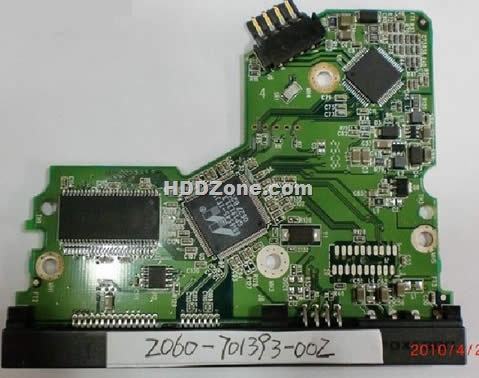
Western Digital PCB 2060-701393-002

Swap Western Digital  PCB 2060-701393-002(Printed Circuit Boards) to recover your data from damaged HDD due to PCB failure. 2060-701393-002 is the board number on this PCB. If your HDD’s PCB has problems, the drive usually cannot boot up or there may be an inaccurate display in the BIOS of the hard drive’s information. Also power may not get to the hard drive and as a result it will not spin up.

Western Digital 2060-701393-002 PCB Board Details:

Board Number: 2060-701393-002
Main Controller IC: 88i6545-TFJ1
HDD Motor Combo IC: L6283 1.3
Manufacturer: Western Digital

Note: Hard drive failures are NOT always caused by circuit board failure.

Swap PCB 2060-701393-002 will not solve the problem below:

1. The hard drive will power up normally (no ticking noises, errors etc) but will not be recognized by the computer;
2. The hard drive will power up normally and be recognized correctly but will report a size of 0 bytes;
3. The hard drive will power up but report SMART errors on boot;

Western Digital 2060-701393-002 PCB Photos:

Western Digital  PCB 2060-701393-002

Buy this pcb board online: Western Digital PCB 2060-701393-002

More Western Digital SATA PCB

Western Digital PCB 2060-701393-002 Read More »

How to Make Use of the Internet for Effective Data Recovery

backupIf you’ve been reading HD Doctor for some time now you would have come across an article or two on how important backing up your data regularly is and how to do it. I have once played with backing up important data on my computer before and I had to pay dearly for it, I have now learned my lessons and I’ll be talking about that in this post.

It is also very important for you to realize that you shouldn’t just depend on backing up your files on a DVD or an external hard disk, because even though these are great options a place more secure for you to backup your files is the internet and this article will be talking about how to make use of the internet to backup your files.

The Importance of Online Backup
Before I go into how to back up your data online I’ll first be explaining some of the major reasons why you need to consider backing up your files online below.

It is Secure: The number one reason why I prefer to be backing up my files online compared to backing it up on external devices is because it is secure. You can easily worry about your CD being infected by a virus or about anything going wrong with your hard disk but with online backup you don’t have to worry about any external drive corrupting – it is the most secure form of backup system I have seen.

It is Free: The next great thing about online backup is that it is free. There are various online backup services and most of them give you gigabytes of disk space which is enough to store your basic and most important files. If you need more space you can easily go for a premium package. This isn’t the case with online backup also because you don’t have to buy anything. Just set up the right software on your computer and you’re ready to go.

It is Reliable: Online backup systems can be trusted and relied upon in hard times. You don’t have to worry about disks getting lost or files suddenly getting erased. The only thing you need is a strong password you can easily remember and you’re good to go.

It is Flexible: The major thing I love the most about online backup systems is the flexibility it has. There are thousands of backup service providers fighting for your attention and you can easily choose your favorite and the one you think is best for you.

Top Online Backup Services
Once you’ve made up your mind to start backing up your files online there are a few services that can help you get started. Two of my favorite and most used services are listed below:

1. Dropbox: I personally use dropbox and I trust and recommend it. All you need to do is create a free account and you will be allotted a 2.5GB disk space for you to store anything and you can easily earn more space by referring others. You only need to install the dropbox software that will create a folder on your computer. You can easily copy any file you want to backup to your dropbox online account to this folder and it will be transferred there instantly.

2. Mozy Backup: Mozy backup is also another great option and even though it isn’t as popular and sophisticated as dropbox it is also a great option. All you need to do is create an account and install the mozy client – with this you can easily backup your files anytime and also schedule it to backup anytime you want.

This guest post is written by Paul who helps you choose the best Comcast cable internet

How to Make Use of the Internet for Effective Data Recovery Read More »

Levels of Data Recovery Specialists

Data Recovery SpecialistsGenerally data recovery specialists can be divided into three different levels, according to their technical competence and the recovery methods they use.

1. First level’s data recovery specialists just can use the software which are developed by others. Such as the widely used data recovery software: FinalData、EasyRecovery and R-STUDIO; The system recovery software: DISKGEN (DISKMAN), etc. In fact, these are very good software. Even if a great skilled programmer is difficult to write the similar data recovery software or the better software than the above-mentioned software. However, sometimes these classical software can’t play a role with two reasons:

a). The situations of data loss are complicated and different. The software can’t be applied to every case;

b). These software don’t have thought. They use the fixed mode which is set by programmer to judge and deal with the fault. Sometimes the result may be biased or even wrong. Therefore these technicians who just can use the ready-made software have the limit capacity to deal with the data loss problem.

2. Second level’s data recovery specialists know the main file systems’ sector store rules. They can analyze data which stored on the sectors. Then fix some error system parameters by the malfunction reasons and the status of the storage medium. With the above-mentioned classical software, their problem solving skills will be greatly enhanced. When they analyze the sector’s data, they can give full play to their logical thinking skills, and then do the right operation.

3. Third level’s data recovery specialists can develop corresponding program according to their need to analyze the sectors’ data. Using these programs, the operator can quickly and accurately judge the reasons which caused the malfunction, and then find the best way to recover the data. With the above-mentioned classical software, their data recovery skill can attain the higher level. At the same times, these technicians can constantly improve these software’s function by their operation experience. Let these software can help others to detect and diagnose data loss reasons better.

Levels of Data Recovery Specialists Read More »

Hard Drive Data Recovery in Vancouver, Canada

Hard Drive Data Recovery in Vancouver, CanadaData recovery near Vancouver, BC, Canada

Looking for a professional data recovery service in Vancouver, BC area? In vancouver area there are many recovery companies and here is a list just for your referance:
1. Aceon Data Recovery
Address: 890 West Pender St. #600, Vancouver
Tell: (604) 873-3300
Website: www.aceondatarecovery.com

Lost Your Data?… We’ll give you all the free data recovery advice you can handle. Aceon Clean Room Hard Drive Data Recovery. We recover Hard Drives, Smart Phones, Cell and Mobile Phones, Cameras and Flash Memory. No data no charge.

2. ReStoring Data Inc
Address: 666 Burrard Street #500, Vancouver
Tell: (877) 737-8003
Website: www.restoringdata.ca

ReStoring Data Inc. is a specialized data recovery and computer forensics company that focuses on recovering vital data from personal computer and notebook hard disk drives, as well as server drives, RAID arrays, memory cards, flash drives, and much more.

3. DataPro Data Recovery Lab
Address: 355 Burrard Street #1000, Vancouver
Tell: (604) 762-6359
Website: www.datarecoverypro.com

4. 1st Data Recovery

Address: 1066 West Hastings #2000, Vancouver
Tell: (604) 681-3770
Website: www.1stdatarecovery.com

Most data recovery $500.Any os,any media.Data recovery from dead,corrupted storage devices: hard drive,tape,raid server,PC,Mac,linux,Netware.

If you are living in vancouver area maybe you have heard about one or some all of them, they are all top-customer-reviews recovery companies that can help you so much. If you also know other companies can provide professional recovery services please feel free to contact me, I can list them here in time. Thank you!

Hard Drive Data Recovery in Vancouver, Canada Read More »

Scroll to Top