Articles

Free Hard Drive Tools (Part I)

1. Hard Drive Capacity Restore Tool

License: Freeware
Author: Atola Technology
Operating System: MS Windows 2000/2003/XP
Hard Drives Supported: All hard drives
Version: 1.2

HDD Capacity Restore Tool allows you to restore factory capacity of all hard drives.
Sometimes you can use HDD Capacity Restore Tool to actually increase the capacity of a hard drive (if it was limited by the distributor; for example, Hewlett-Packard sometimes sells 80-GB hard drives but sets a 40-GB limit. You can restore the full 80-GB capacity in this case).

Download HDD Capacity Restore v1.2
Capacity restore guide

2. Partition Find and Mount

License: Freeware
Author: Atola Technology
Operating System: MS Windows 2000/2003/XP
File Systems Supported: NTFS all versions, FAT12 (floppy), FAT16, FAT32

Partition Find and Mount allows you to recover deleted partitions.
What’s special in Partition Find and Mount is that it allows you to mount lost partitions right into the system, so the operating system sees that lost partition like a good one. It also has the possibility to create and mount images of the entire hard drive or separate partitions.

Download Partition Find and Mount

3. Wipe Hard Drive Tool
License: Freeware
Author: HDDGURU.COM
Operating System: MS Windows 2000SP4/2003/XP
Hard Drives Supported: All hard drives
Version: 2.35 build 1178

HDD Wipe Tool is a freeware utility for low-level hard drive erasing.
•    Supported interfaces: S-ATA (SATA), IDE (E-IDE), SCSI, USB, FIREWIRE. Big drives (LBA-48) are supported.
•    The program also supports low-level erasing of FLASH cards using a card-reader.

HDD Wipe utility will erase and re-certify a SATA, IDE or SCSI hard disk drive with any size of up to 281 474 976 710 655 bytes. Work with USB and FIREWIRE external drive enclosures. Low-level erasing of Flash Cards is supported too.
HDD Wipe Tool will clear partitions, MBR, and every bit of user data. The data cannot be recovered after using this utility. The program utilizes Ultra-DMA transfers when possible.
WARNING: After running this free wipe tool, the whole disk surface will be fully erased. Therefore, data restoration will be impossible after using this utility!

Download HDDGURU HDD Wipe Tool ver.2.35 build 1178

4. Hard drive firmware update utility (Bootable CD ISO)
This utility, on the bootable CD, will then examine your system, detect all 2.5/1.8 inch hard drives installed, and then check the firmware revision of the drive. If required, it will prompt you to run the appropriate firmware update program for your drive.
Supported drives:
IBM DARA-2x, IBM DJSA-2x, IBM IC25NxATDA04, IBM IC25TxATDA05
IBM IC25NxATCS04, IBM IC25TxATCS05, IBM IC25NxATCS05

HITACHI DK2x7A-x, HITACHI DK2x8A-x, HITACHI DK2x9A-x
HITACHI DK23AA-x, HITACHI DK23BA-x,HITACHI DK23CA-x
HITACHI DK23DA-x, HITACHI DK23EA-x, HITACHI DK23FB-x
IBM/HITACHI IC25NxATMR04, HITACHI HTS54xM9AT, HITACHI HTS72xM9AT
HITACHI HTS42xM9AT, HITACHI HTS54xG9AT,HITACHI HTS7210xxG9AT00
HITACHI DK1xFA

TOSHIBA MKx09MAT, TOSHIBA MKx19GAX, TOSHIBA MKx26GAX
FUJITSU MHN2xAT, FUJITSU MHR2xAT, FUJITSU MHT2xAT
FUJITSU MHT2xAH

This package is compiled into an ISO format, which is compatible with CD writing software and writable to a CD-R or a CD-RW disc.
Any hard drive password must be removed prior to running this utility.

A written CD-R or CD-RW disc will be bootable. It will boot from your ThinkPad optical disc drive and run the update utility program.

Download Hard drive firmware update utility release FWHD41 (ISO image to burn a CD)

Free Hard Drive Tools (Part I) Read More »

Glossary of Samsung Hard Disk Drive (Letter B)

Bad Block/Sector
An area on the media that is damaged and thus not reliable (detected by ECC). Such areas are generally auto assigned to spare sectors

Binary
Means of storing data on media, using two digits, (i.e. 0 & 1)

Bit
Binary Digit (i.e. 0 or 1). The form in which computers process information

Block (also cluster)
A group of sectors accessed/stored as a logical unit

BIOS
(Basic Input/Output system, firmware that is permanently stored in the memory of the CPU). The BIOS ROM first performs test routines when a system is switched on. It searches for and loads the operating system from the disk and contains programs to access the system hardware

BPI
Bits per Inch, reflects Areal Density

Buffer
A part of the HDD which temporary stores data. The buffer compensates for a difference in data transfer rates and data processing rates

Byte
a number of bits, considered a unit (8 bits = 1 byte)

Glossary of Samsung Hard Disk Drive (Letter B) Read More »

WD Introduced its New My Book and My Passport External Hard Drives with USB 3.0 Connectivity

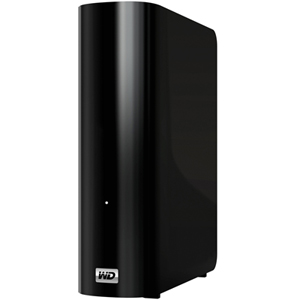
Oct. 5, 2010 – WD today introduced its new My Passport® Essential™ portable hard drive, My Passport® Essential™ SE portable hard drive, and My Book® Essential external hard drive. All three drive families come in a variety of capacities and offer lightning-fast USB 3.0 connectivity. Highest industry capacity is another key feature for the My Book Essential drive, which is now available in 3 TB capacity, in addition to 1 and 2 TB capacities. Equipped with WD SmartWare™ visual backup software for automatic, continuous backup, these drives provide users the extra space they need to store or back up all of their digital memories, such as high-resolution photos and videos, along with music and other critical files, all in one place.

The drives not only take advantage of the latest blazing-fast USB 3.0 technology, but are also fully compatible with USB 2.0 connections for those who have yet to upgrade their computers to USB 3.0. When connected to a SuperSpeed USB 3.0 port, consumers can transfer data at speeds up to 5 Gb/s. At that rate, a two-hour HD video will transfer in as little as three minutes. The same two-hour video would take approximately 13 minutes to transfer on a USB 2.0 port.

My Passport Essential, still WD’s smallest portable drive, is available in a 500 GB capacity and comes in five fun colors – Midnight Black, Cool Silver, Real Red, Pacific Blue and Arctic White (Arctic White only available in EMEA and APAC). My Passport Essential SE portable hard drives are available in 750 GB and 1 TB capacities and come in stylish black, silver, metallic blue and metallic red colors. The pocket-sized My Passport portable hard drives are powered directly through the USB cable; no separate power supply is needed.

My Book Essential, the world’s number-one selling hard drive, also impresses with its small footprint, sleek design and high-capacity storage ranging from 1 TB up to a massive 3 TB3. The drive is compatible with both USB 2.0 and USB 3.0 ports, and uses WD SmartWare visual backup software.

“With more and more devices like the iPod touch®, iPhone®4 and other smartphones adding video-capable cameras, digital video is becoming ubiquitous. Most homes already have thousands of photos and music files, increasing the need for storage around the house. Having the extra capacity to store these files and move them around quickly is becoming a big issue for many consumers around the world, WD’s newest line of My Book and My Passport external hard drives features the latest USB 3.0 connection technology, which more than triples the speed to transfer media files, but still works with today’s USB 2.0 ports. In addition, consumers can take advantage of the highest capacity available on external hard drives with the new 3 TB My Book Essential drive.” – said Dale Pistilli, vice president of marketing for WD’s branded products group.

Features:
My Book Essential external hard drives, My Passport Essential and My Passport Essential SE portable hard drives feature:

  • Dual USB 3.0 and USB 2.0 interfaces;
  • Up to 3x faster transfer rates when compared to USB 2.0;
  • WD SmartWare software for automatic, continuous backup;
  • Password protection for privacy; and,
  • Planet-friendly packaging from recycled materials which can, in turn, also be recycled.

Capacity and Compatibility:
The My Passport Essential portable hard drive is available in 500 GB capacity. The My Passport Essential SE portable hard drive is available in 750 GB and 1 TB capacities. The My Book Essential external hard drive is available in 1 TB, 1.5 TB, 2 TB and 3 TB capacities. The drives are formatted NTFS for Windows® XP, Windows Vista®, or Windows 7. These drives require reformatting for Mac® OS® X Leopard® or Snow Leopard®.

Price and Availability
My Passport Essential portable hard drives and My Book Essential external hard drives offer a 2-year limited warranty in the U.S. and are now available at select U.S. retailers and online at wdstore.com.

MSRP for My Passport Essential portable is $99.99 USD. MSRP for My Passport Essential SE drives range from $129.99 USD to $169.99 USD. MSRP for My Book Essential drives range from $129.99 USD to $249.99 USD.

WD Introduced its New My Book and My Passport External Hard Drives with USB 3.0 Connectivity Read More »

Glossary of Samsung Hard Disk Drive (Letter A)

Acoustic Noise
The level of sound the drive produces while operating, the smaller the number,the better

Access
The level of sound the drive produces while operating, the smaller the number,the better

Access time
Access time measures the time lapsed between the access command and the point in time where the head is positioned to read or write a specific sector (address), measured in milliseconds (ms). (The access time for HDDs is a combination of seek time, controller overhead, and rotational latency, i.e. time taken for desired sector to rotate under head for access)

Actuator
The mechanism that moves the head(s) to the correct cylinder. It generally comprises of two parts; a rotary voice coil and head gimble assembly. The actuator arm houses the head at the tip of its arm

Address
Assigning certain areas of a disk to particular data

Areal Density
Bit density; Bits per Inch (BPI) x Tracks per Inch (TPI). This reflects how dense the data is stored on the media of the HDD

ATA-3
Fast ATA (E-IDE), PIO Mode 4, S.M.A.R.T., Simple password, more sophisticated power management

Atapi
ATA packet interface, a communications protocol which allows the electronic controllers for IDE hard disk drives to handle up to four devices, including CD-ROMs and tape drives and tape drive, Atapi devices plug into the IDE Interface

Ultra-ATA
Merge of ATA-3 and Atapi into one, Strong command overlap

Ultra-ATA
A new, even higher performance Ultra DMA (transfer rate of 66 MB/s)

AV
Audio Visual. AV drives denotes drivers modified to enhance transfer rate performance for specific applications

Average Latency
The average amount of time it takes for the drive to rotate to the correct address, so that the head can begin reading or writing in its desired location (is derived from the spindle speed)

AVI
Audio video interleaved. A standard system, form Microsoft, for integrating sound and vision for Windows into a single file for hard disk or CD-ROM

Average Seek Time
The average time for a head to seek the address, calculated over a large number of random seeks

Glossary of Samsung Hard Disk Drive (Letter A) Read More »

Norton Online Backup

Norton Online Backup Norton Online Backup automatically protect and remotely store your files at their secured data centers. Norton Online Backup also provides you convenience by giving you more ways to securely access and share your files anytime you have an internet connection.

Norton Online Backup Overview:
Storage: 25GB
Operating System: Windows 7 / XP/ XP Pro / Vista /Mac OS X v10.5+
Delivery: Download
Price: $49.99/Year (Protect up to 5 PCs)
Coupon Code: 15NORTONSTORE (Get 15% off)

Norton Online Backup Main Features:

  • Delivers easy-to-use, professional-grade, backup protection for your files
  • Lets you access your files from any Internet-connected computer
  • Makes transferring files between computers a breeze
  • Works with both Windows and Mac computers
  • Simplifies file sharing
  • Lets you search backup sets for specific files by keyword
  • Saves older versions of your backed up files

How does Norton Online Backup works:
Download and install Norton Online Backup client to get started protecting documents, music, videos and digital photos with automated online backup that’s easy to use.

Norton Online Backup Reviews:

Useful Links:

Low price on Amazon.com: $19.99 (Save $30.00. This is the cheapest price. Norton Online Backup 2.0 1User/25GB )

Norton Online Backup Read More »

Glossary of Western Digital Hard Disk Drive (Letter V,W,Z)

Viterbi Detection
An algorithm used in read channel technology that detects an entire sequence of data bits at once and determines the most likely sequence of data bits by comparing an actual sequence of data bit samples with possible sequences of data bit samples to accurately detect data written to disk.

voice coil
An actuator motor. The force of a magnetic rotary voice coil produces a movement of the head that is proportionate to the force exerted by the coil.

WAN
Wide Area Network. A computer network that crosses metropolitan, regional, or national boundaries.

WD AV
The trade name for WD’s line of hard drives for audio/video applications.

WD AV-GP
Trade name for WD’s line of eco-friendly audio/video hard drives that deliver power savings as the primary attribute.

WD Backup™
Easy-to-use software for immediate and scheduled data backups and restoring of files.

WD Caviar®
The trade name for WD’s line of hard drives for desktop personal computers.

WD Caviar® Black™
Trade name for WD’s line of high performance desktop drives.

WD Caviar® Blue™
Trade name for WD’s line of desktop drives designed for everyday computing.

WD Caviar® Green™
Trade name for WD’s line of eco-friendly desktop hard drives that deliver power savings as the primary attribute.

WD Discovery™
WD software application that allows the host computer to find one or more WD network storage systems in the same network segment.

WD GreenPower Technology™
WD technology that yields lower operating temperatures for increased reliability and low acoustics for ultra-quiet PCs and external drives.

WD Passport®
The trade name for WD’s line of portable external hard drives.

WD Raptor®
The trade name for WD’s line of Enterprise hard drives.

WD Raptor® X
The trade name for WD’s line of Gamer hard drives.

WD RE
The trade name for WD’s line of RAID Edition desktop hard drives.

WD RE4
The trade name for WD’s line of RAID Edition "designed for Enterprise" desktop hard drives.

WD RE4-GP
Trade name for WD’s latest generation of eco-friendly enterprise hard drives that deliver power savings as the primary attribute.

WD Scorpio®
The trade name for WD’s line of 2.5-inch internal hard drives.

WD Scorpio® Black™
Trade name for WD’s line of high performance notebook drives.

WD Scorpio® Blue™
Trade name for WD’s line of notebook drives designed for everyday computing.

WD ShareSpace™
Trade name for WD’s 4-bay network storage system.

WD SmartWare™
WD’s easy-to-use backup and encryption software that visually presents data in a control center, providing peace of mind that precious photos, videos and files are securely protected.

WD Sync™
WD sychronization and encryption software.

WD VelociRaptor™
The trade name for WD’s line of 10,000 RPM, 2.5-inch enterprise hard drives.

WhisperDrive™
A WD acoustic technology that significantly reduces hard drive noise levels.

Winchester disk
The former code name for an early IBM hard disk model, sometimes still used to refer to the technology and design of most traditional hard drives.

Windows®
An operating system for desktop computers.

word
Two bytes that are processed together in a single operation.

workstation
A personal computer with exceptional capacity and performance capabilities for use mainly in engineering, design, and audiovisual applications, which demand immediate access to data and the ability to manipulate it in technically sophisticated ways.

write
The recording of flux reversals onto the magnetic surface of a disk.

write cache
High speed RAM used to buffer data transfers from a host to a hard drive.

write verify
A feature which verifies that data written to a disk is readable. Immediately after writing data to a disk, a drive with this feature verifies that it can read the data just written. If the drive is unable to read the data, it writes the data to another area of the disk and attempts to write verify again.

zoned recording
Increases the number of sectors on the outer tracks of a drive, since the circumference of outside tracks is greater. This type of recording affords more disk capacity, because there can be more sectors on larger outer tracks than would be possible if the number of sectors per track were constant for the whole drive.

Glossary of Western Digital Hard Disk Drive (Letter V,W,Z) Read More »

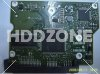
Seagate Barracuda 7200.12 Hard Drive PCB

Buy Seagate Barracuda 7200.12 hard drive PCB on HDDZone.com with low price, fast shipping and top-rated customer service! All kinds of Seagate Barracuda 7200.12 hard drive PCB for your Data Recovery and HDD Repair Needs!

Seagate Barracuda 7200.12 Hard Drive PCBSeagate Barracuda 12 PCB ST31000528AS 100535537
Name: ST31000528AS
Board Number: 100535537
Main Controller IC: V60131/B5502C20
HDD Motor Combo IC: SH6968B
Seagate Barracuda 7200.12 Hard Drive PCBSeagate Barracuda 12 PCB 100535704
Board Number: 100535704
Main Controller IC: B5502C30
HDD Motor Combo IC: SH6964BD
Seagate Barracuda 7200.12 Hard Drive PCBSeagate Barracuda 12 PCB ST31000528AS 100536501 REV A
Name: ST31000528AS
Board Number: 100536501 REV A
Main Controller IC: B5502C20/V60131
HDD Motor Combo IC: SH6968B

Note:

  • These are just PCB(Printed Circuit Boards), not the whole HDD(Hard Disk Drive) .
  • All boards have been fully tested before shipment, no refund and exchange policy.
  • It is a buyer responsibility to know if the board is adequate for his hard drive model.
  • Hard drive failures are NOT always caused by circuit board failure. We cannot guarantee your drive to be repaired by replacing the board.

HDDZone.com: Seagate barracuda 7200.12 Hard Drive PCB

Seagate Barracuda 7200.12 Hard Drive PCB Read More »

Seagate Introduces the world’s First 1.5TB Portable External Drive

New FreeAgent® GoFlex™ Ultra-Portable External Drive Packs a Punch with Unprecedented Amount of Storage, Blazingly Fast USB 3.0 Connection and Pre-loaded Films.

September 21, 2010 – Seagate launched the world’s first 1.5 terabyte (TB) 2.5-inch portable external hard drive. Available immediately, the new 1.5TB FreeAgent® GoFlex™ ultra-portable drive delivers an all-in-one, technically advanced solution to help store, share and enjoy libraries of digital content in one’s preferred medium—whether on a Mac or PC, or a television, at home or on the go. With 1.5TB of capacity people can now store and carry up to 60 HD movies, 750 video games, thousands of photos or countless hours of digital music.

This ultra–upgradable, ultra–portable hard drive makes it ultra–easy for you to store, backup, encrypt and access your files anytime, anywhere.

Seagate introduces the world’s first 1.5TB portable, external hard drive with a Blazingly Fast USB 3.0 Connection and Pre-loaded Films.

“Today’s announcement is a ‘triple-crown’ of consumer technology—packaging record breaking capacity, blazingly fast USB 3.0 connectivity and the bonus of movie entertainment—making the 1.5TB GoFlex™ ultra-portable drive an unprecedented and innovative solution, bringing this solution to market on the heels of our 3TB GoFlex™ Desk drive and the Momentus® XT solid state hybrid drive is proof of Seagate’s continuing technology leadership and tradition of setting storage industry milestones.” – said Darcy Clarkson, vice president of Global Retail Sales and Marketing for Seagate.

Shipping now in the United States and rolling out globally later this year, all 1.5TB GoFlex ultra-portable drives¹ will ship with a USB 3.0 interface cable, accelerating the transfer speed of a drive up to 10x when connected to a USB 3.0 port, when compared to a USB 2.0 port. For example, a drive using a USB 3.0 connection can transfer a 25GB file in under five minutes versus the 14 minutes it would take using a traditional USB 2.0 drive². In addition, all GoFlex ultra portable drives will now also ship with the new Superspeed USB 3.0 cable, which will still continue to work with existing USB 2.0 ports.

“Consumers continue to push the growth of digital music, photos, and video content, and increasingly want access to this content from a variety of CE devices, including a PC, higher capacity disk drives in combination with higher bandwidth interfaces like USB 3.0 will help to make a greater number of large multimedia files more accessible from multiple devices in the home.” – says John Rydning, IDC’s research director for hard disk drives.

A key addition to the GoFlex™ family, the new 1.5TB GoFlex ultra-portable drive delivers ultimate flexibility in how people collect, protect, share and enjoy their digital libraries, all in a convenient compact package. In addition to coming bundled with USB 3.0 connectivity, the drive can be used with an array of add-on cables and accessories such as the GoFlex™ Net media sharing device and the GoFlex™ TV HD media player, that provide the flexibility to enjoy your content on a TV, a network, using a mobile device, or via the Internet.

All 1.5TB GoFlex ultra-portable drives are compatible with both the Windows® operating system and Mac® OS X computers. Each drive includes an NTFS driver for Mac, which allows the hard drive to store and access files from both Windows and Mac OS X computers without reformatting. The NTFS driver is simply installed once on the Mac® OS X computer, allowing it to read and write files on a Windows formatted³ drive.

The 1.5TB GoFlex ultra-portable drive with USB 3.0 adapter is available in black and can be purchased on Seagate.com and through select retailers for $249.99.

Seagate Introduces the world’s First 1.5TB Portable External Drive Read More »

Glossary of Western Digital Hard Disk Drive (Letter U)

Ultra ATA
A high-speed host data transfer feature that transfers data at up to 133 MB per second. See also Ultra DMA.

Ultra DMA
A protocol for transferring data between a hard drive through the bus to the computer’s RAM. Also known as Ultra ATA, Ultra ATA/66, Ultra ATA/100, and Ultra ATA/133.

Ultra/150 CQ
A technology that optimizes the sequence of data transfers from the host to the hard drive, providing increased data transfer efficiency and resulting in higher performance for enterprise applications.

uncorrectable error
An error that cannot be overcome using error detection and correction.

unformatted capacity
The total number of usable bytes on a disk, including the space that is required to record location, boundary definitions, and servo data. See also formatted capacity.

unrecoverable error
A read error that cannot be overcome by an ECC scheme or by re-reading data when host retries are enabled.

untagged queuing
The ability of a drive to receive a maximum of one input/output (I/O) process from each initiator.

upgrade
In hard drives, the replacement of a hard drive with one offering greater capacity or performance or both.

UPnP
Universal Plug n Play. A set of computer network protocols that simplify the implementation of networks in the home by allowing devices to connect seamlessly. See also protocol.

UPnP NAT traversal
Combines UPnP and NAT features.

UPS
Uninterruptable Power Supply. A standalone device that provides secondary power to connected equipment in the event of a power failure.

USB
Universal serial bus. A serial bus for connecting peripherals to a microcomputer. It connects external drives, printers, modems, mice, keyboards, etc., through a single, general-purpose port. It can automatically add and configure new devices without having to shut down and restart the system.

USB 2.0
Hi-Speed USB (USB 2.0) supports data transfer rates up to 480Mb/s. USB 2.0 is backward-compatible with USB 1.1. If you connect to a USB 1.1 device, data is transferred at USB 1.1 speed (up to 1.1 Mb/s).

USB 3.0
SuperSpeed USB (USB 3.0) supports data transfer rates of up to 5 Gb/s. USB 3.0 is backward-compatible with USB 2.0. If you connect to a USB 2.0 device, data is transferred at USB 2.0 speed (up to 480 Mb/s).

USB 3.0 HBA adapter
WD’s USB 3.0 PCI adapter card. Allows users to upgrade their PC to take advantage of the faster data transfer speeds available through the SuperSpeed USB 3.0 port.

Glossary of Western Digital Hard Disk Drive (Letter U) Read More »

Free Raid Data Recovery Software – ReclaiMe Free RAID Recovery

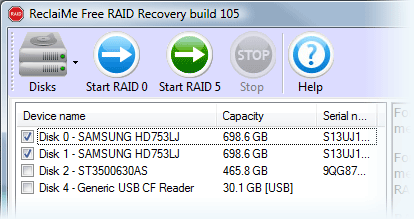
Free RAID recovery software to recover RAID 0, RAID 5, RAID 0+1, and RAID 1+0. Recovers array parameters such as disk order and parity location.

ReclaiMe Free RAID RecoveryFile Name: ReclaiMe Free RAID Recovery
Publisher: Reclaime.com
Raid Supported: RAID 0, RAID 5, RAID 0+1, RAID 1+0
Price: Free

What can ReclaiMe Free RAID Recovery Do?

1. Recover the following RAID parameters:

  • Start offset and block size;
  • Number of member disks;
  • Member disks and data order;
  • Parity position and rotation;

2. Once you recovered the parameters, you can

  • Run ReclaiMe data recovery software to recover data from the array;
  • Create the array image file;
  • Write the array to disk;
  • Save layout to the XML file;

How to recover RAID data by using ReclaiMe Free RAID Recovery?

1. Download, install, and launch ReclaiMe Free RAID Recovery software.
2. If it is needed, open or create disk image files of the member disks using the Disks button.
3. Decide on the type of your array

  • For RAID 0 select a minimum of two devices from the list and click Start RAID 0
  • For RAID 0+1 and 1+0, select all the available member disks and click Start RAID 0. It is required to select a minimum of two disks.
  • For RAID 5, select all the available member disks and click Start RAID 5. Minimum of two disks is required. ReclaiMe Free RAID Recovery software can recover RAID 5 with one disk missing.

4. Wait until the program completes detecting the parameters. It can take from a couple of minutes to several hours. The process completes when either Scan progress or Confidence is completely filled. Note that Scan progress always grows while Confidence may decrease.
5. At the step all the parameters have been already restored. Then you can select:

  • Run ReclaiMe to recover data. If ReclaiMe data recovery software has been already installed on the computer, then it is launched in RAID recovery mode and displays the partitions on the array. If you do not have ReclaiMe, you will be offered to download ReclaiMe data recovery software.
  • Save layout to the XML file. Save the recovered array parameters to the file in XML format. Note that you can open this file in ReclaiMe and start to recover data off the array using ReclaiMe RAID recovery mode.
  • Use with other data recovery software. Provides step-by-step instructions on how to transfer the recovered parameters to certain well-known data recovery tools. Note that the instructions are created for each particular case of RAID and you should follow them exactly. Should the need arise, the instructions can be copied to the clipboard using Copy to the clipboard button.

Before you start your RAID recovery, please consider the following:

  • If one of the member disks of RAID 5 or RAID 0+1 is physically damaged (produces unusual sounds, e.g. clicking or repeated spin-up and spin-down sounds), don’t use this disk for the recovery.
  • If you cannot avoid using a physically damaged disk, say, for RAID 0 recovery, try to create the disk image file – use Create disk image under Disks on the toolbar in ReclaiMe Free RAID Recovery software.
  • If you have a hardware RAID, you should
    1. Clearly label the member disks, the cables, and the controller ports, so that the original setup can be reassembled if need be.
    2. Disconnect the array member disks from the RAID controller and then attach them as a separate/standalone disks to a non-RAID controller. ReclaiMe Free RAID Recovey needs to access the disks separately to be able to reconstruct RAID parameters.
  • If you plan to recover data once the RAID parameters are restored, prepare a free disk space equal to the amount of data which you are going to recover.

Related Links:

  • Download: http://www.reclaime.com/dl/setup-raid-recovery.exe
  • Software Details: http://www.freeraidrecovery.com/Default.aspx

Recommended RAID Recovery Shareware: Getway RAID Recovery Software

Free Raid Data Recovery Software – ReclaiMe Free RAID Recovery Read More »

Scroll to Top