Articles

WD My Passport AV 320 GB Portable External Media Drive

WD My Passport AV 320G Portable External Media Drive WD® introduced its new My Passport™ AV portable media drives. Designed specifically for video storage and playback, the new My Passport AV portable media drives deliver a plug-and-play experience for digital media enthusiasts. Available now at select retailers and WD’s online store, the My Passport AV portable media drive is offered with 320 GB of capacity.

A large and increasing number of game consoles, camcorders, TVs, DVRs, Blu-ray players and media players, including the WD TV® Media Player family, allow consumers to connect a USB drive and play the multimedia content from the drive on an HD TV. The My Passport AV portable media drive is designed to meet the requirements of this demanding video streaming environment. It delivers the formatting and low-power consumption that assures out-of-the-box compatibility with many leading CE (consumer electronics) devices.

WD worked to ensure that the My Passport AV portable media drives operate seamlessly with the Direct Copy feature offered in Sony’s new Handycam® video recorders. Direct Copy lets Handycam users offload and archive HD video directly to a My Passport AV portable media drive without a computer, creating room to shoot more HD videos when their Handycam hard drive becomes full.

Consumers can then play back their stored videos using Sony’s latest Blu-ray players or any of the WD TV media players by just connecting the My Passport AV portable media drive via the USB port on these players. Specific Handycam and Blu-ray model compatibility information is available on the WD Web site.

With its small footprint, the My Passport AV portable media drives are designed to fit neatly in a home entertainment center. The included stand and extra long cable makes it easy to position the drive neatly in entertainment centers, maximizing the airflow and minimizing heat around the drive.

“With more and more devices capable of generating and playing back HD video – camcorders, Blu-ray players, game consoles – portable hard drives are the best solution for this 8 GB-per-hour capacity-intensive content. The My Passport AV portable media drive is optimized for a better digital video experience with a growing list of consumer electronics, starting with Sony’s latest camcorders and Blu-ray players,” said Dale Pistilli, vice president of marketing for WD’s branded products group.

Price and Availability
The New My Passport AV portable media drives feature a 2-year limited warranty and are available now at select retail stores and WD’s online store. MSRP for the My Passport AV portable media drive with 320 GB is $109.99 USD.

This item has not yet been released on amazon.com. You may pre-order it now (at a low price of $79.99) and they will deliver it to you when it arrives.

My Passport AV Compatibility
My Passport AV portable media drives are formatted FAT321 and are compatible with Windows® XP, Windows Vista™, Windows 7, Mac® OS X® and Apple’s Tiger®, Leopard®, and Snow Leopard®. My Passport AV portable media drives utilize the same drive technology found in WD AV drives inside leading cable and satellite set-top boxes and DVRs (digital video recorders) around the world.

The My Passport AV portable media drives are compatible with the following devices:

* WD TV family of media players;
* 2010 and later Sony camcorders with Direct Copy functionality;
* Sony 2010 Blu-ray Disc Players including BDP-S370, BDP-S470, BDP-S570;
* Sony 2010 Blu-ray Disc Home Theater Systems including BDV-E370, BDV-E570;
* JVC LT-32P689 television;
* Samsung® LN32A550 television;
* Phillips® 42PFLA332D television;
* Microsoft Xbox 360® (compatible with the USB media playback feature); and,
* Sony PlayStation®3.

For a complete list of devices compatible with the My Passport AV portable media drives, please visit the WD Web site. A product specification sheet and photos of My Passport AV drives are available on the company’s Web site at http://www.westerndigital.com/MyPassportAV.

WD My Passport AV 320 GB Portable External Media Drive Read More »

My Book World Edition II 4 TB

My Book World Edition II 4 TB Brand: Western Digital
Elements Model: WDH2NC40000N
Port RJ-45: 1 x 10/100/1000M
HDD Interface: 2 x SATA
Operating System: Windows XP/Vista/Mac OS X Tiger or Leopard
Form Factor: Desktop
Capacity: 4 TB
RAID: Raid 1
Dimensions: 6.5″ x 6.3″ x 3.9″
Weight: 5.51 lbs.
Temperature: 5°C – 35 °C
Manufacturer Warranty:
Parts: 5 year limited
Labor: 5 year limited

Simplified set up and best-in-class performance make the My Book World Edition network drive the perfect choice for centralizing and backing up data on all the computers in your home.

Features:

· Automatic and continuous backup for all the computers on your network – Now you can easily back up data from all your networked computers with the included continuous backup software. Set it and forget it; every time you save something it’s instantly and automatically backed up.

· The double-safe place for your data – Using RAID mirroring technology, this system automatically and continuously maintains a second copy of your data for extra safe data protection. If one drive in this two-drive system ever fails, the system continues to run and your data is safe. How’s that for peace of mind?

· Centralized storage to share and stream all your family’s digital content – Built-in media server for streaming music, photos and movies to any PC, Mac or DLNA certified multimedia device such as Playstation 3, Xbox 360, wireless digital picture frames, and connected audio receivers. DLNA 1.5 & UPnP certified. Centralize your music collection and play from Macs or Windows PCs using iTunes software.

· Remote access – Access your files anywhere, anytime using MioNet remote access technology from WD.

· iTunes server support – Centralize your music collection and stream to a Mac or Windows PC using iTunes software.

· Simple file recovery – Restore lost, damaged or older files back to their original location with a couple of clicks. Backup files are stored in the same file structure that you originally saved them, so it’s easy and intuitive to find files.

· Share your personal content – MioNet remote access technology makes it easy for you to securely share photos and documents with friends and family.

· USB 2.0 utility port – Turn any USB drive into an instant network drive or extra capacity for your World Edition II.

· Cooler, quieter, eco-friendlier – Equipped with WD drives using WD GreenPower Technology, this system consumes significantly less power and delivers performance on par with power hungry externals using 7200 RPM hard drives.

Price: $599.99

My Book World Edition II 4 TB Read More »

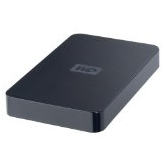
WD Elements 640 GB USB 2.0 Portable External Hard Drive

WD Elements 640 GB USB 2.0 Portable External Hard Drive Brand: Western Digital Series
Elements Model: WDBAAR6400ABK-NESN
Color: Midnight Black
Interface: USB 2.0
Capacity: 640GB
Form Factor: 2.5″
Dimensions: 5.00″ x 3.10″ x 0.60″
Weight: 0.44 lbs.
Manufacturer Warranty:
Parts: 1 year limited
Labor: 1 year limited

Easily portable. Designed with the same commitment to quality that made WD external drives the number one selling drives in the world, Western Digital’s WD Elements™ USB 2.0 portable hard drive is simple, easy-to-use, light and easy to carry. No need to carry a bulky power adapter; this drive get its power from the USB cable. Just plug it in to any USB port and start saving your photos, music, video, and files. Simply affordable; Easy to use; USB powered; Kit contents: USB 2.0 portable hard drive; USB cable; Quick Install Guide.

Features:

  • USB powered – These drives require no power adapter; they are powered directly through the USB cable.
  • Compact design – Weighing in at only a few ounces, these small drives fit easily into a pocket or purse.
  • Preformatted for PCs – Designed for use with Windows-based computers. Can be easily reformatted for use with Macs.

System Requirements:
Available USB port
Windows 7 / Vista / XP
Mac OS X Tiger or Leopard

List Price: $149.99

WD Elements 640 GB USB 2.0 Portable External Hard Drive Read More »

Backup Software: Symantec Norton Ghost 15.0

Backup Software: Symantec Norton Ghost 15.0 Norton Ghost 15.0 protects your applications, settings, folders, files and everything else on your PC with professional grade backup and recovery. So you can quickly restore your PC and recover lost or damaged files.

Key Benefits:

  • Creates full system and file backups — Safeguards your system, settings, applications, and files with flexible, comprehensive backup protection.
  • Restores from system failures — Recovers your system and data even when you can’t restart your computer.
  • Enables convenient, secure offsite backups — Saves recovery points to an FTP site for easier offsite management and even backs up your data to network-attached storage devices.
  • Backs up on schedules and events — Lets you decide what is backed up and when so you can customize backups based on how you use your computer.

Features:

  • NEW! Cold Imaging lets you back up files without installing Ghost.
  • NEW! Blu-ray Disc allows you to back up large amounts of data to high-capacity Blu-ray Disc — up to 25 GB per disc (50 GB dual-layer).
  • NEW! Windows® 7 support including support for Bitlocker™ provides enhanced data protection through drive encryption and integrity checking.
  • NEW! Symantec ThreatCon integration leverages intelligence from Symantec’s industry-leading security research organization to automatically backup files whenever ThreatCon reaches a specified threat level.
  • Full system (disk image) backup lets you easily backup everything on a hard drive or partition.
  • File and folder backup lets you back up only the files and folders you choose, rather than backing up and entire disk.
  • File backup search finds and backs up only the types of files you choose, such as photos, MP3 files, and documents.
  • Incremental backup copies only files that have changed for fewer, faster backups.
  • Customizable, event-based backup triggers backups based on key events, such as when you install a new program or when there are sudden increases in data storage.
  • Offsite backup copies recovery points to a FTP site for easier offsite backup management.
  • NAS backup gives you the option of backing up your files to network-attached storage devices.
  • Advanced compression automatically compresses files so you can store more files in less space.
  • Advanced encryption helps keep your sensitive documents safe from prying eyes.
  • System protection lets you easily restore your system, applications and files even when you can’t restart the operating system.
  • Google Desktop™ integration makes data recovery even faster with searchable backup indexes.
  • LightsOut Restore lets you quickly restore your system without needing a bootable CD.
  • Remote management lets you remotely control other Norton Ghost installations (12.0 and higher) on your local area network.
  • Scheduled P2V allows you to automatically create a virtual disk from your most recent backup.
  • Version support lets you restore older disk images made with Ghost 10, 12 and 14.
  • Multiple storage options let you back up to almost any media, including Blu-ray Disc®, CDR/RW and DVD+-R/RW drives, USB and FireWire® (IEEE 1394) devices, network drives, and Iomega® Zip® and Jaz® drives.

Operating system: Windows XP/Vista/7

Price: $69.99

Backup Software: Symantec Norton Ghost 15.0 Read More »

Windows Forensics: The Field Guide for Corporate Computer Investigations

Windows Forensics The evidence is in–to solve Windows crime, you need Windows tools.

An arcane pursuit a decade ago, forensic science today is a household term. And while the computer forensic analyst may not lead as exciting a life as TV’s CSIs do, he or she relies just as heavily on scientific principles and just as surely solves crime.

Whether you are contemplating a career in this growing field or are already an analyst in a Unix/Linux environment, this book prepares you to combat computer crime in the Windows world. Here are the tools to help you recover sabotaged files, track down the source of threatening e-mails, investigate industrial espionage, and expose computer criminals.

  • Identify evidence of fraud, electronic theft, and employee Internet abuse
  • Investigate crime related to instant messaging, Lotus Notes(r), and increasingly popular browsers such as Firefox(r)
  • Learn what it takes to become a computer forensics analyst
  • Take advantage of sample forms and layouts as well as case studies
  • Protect the integrity of evidence
  • Compile a forensic response toolkit
  • Assess and analyze damage from computer crime and process the crime scene
  • Develop a structure for effectively conducting investigations
  • Discover how to locate evidence in the Windows Registry

Windows Forensics: The Field Guide for Corporate Computer Investigations Read More »

Computer Forensics: Hard Disk and Operating Systems

Computer Forensics Computer Forensics: Hard Disk and Operating Systems (Ec-Council Press Series : Computer Forensics) by EC-Council

The Computer Forensic Series by EC-Council provides the knowledge and skills to identify, track, and prosecute the cyber-criminal. The series is comprised of five books covering a broad base of topics in Computer Hacking Forensic Investigation, designed to expose the reader to the process of detecting attacks and collecting evidence in a forensically sound manner with the intent to report crime and prevent future attacks. Learners are introduced to advanced techniques in computer investigation and analysis with interest in generating potential legal evidence. In full, this and the other four books provide preparation to identify evidence in computer related crime and abuse cases as well as track the intrusive hacker’s path through a client system. The series and accompanying labs help prepare the security student or professional to profile an intruder’s footprint and gather all necessary information and evidence to support prosecution in a court of law. Hard Disks, File and Operating Systems provides a basic understanding of file systems, hard disks and digital media devices. Boot processes, Windows and Linux Forensics and application of password crackers are all discussed.

Computer Forensics: Hard Disk and Operating Systems Read More »

SATA Hard Drive Cables

Connectors and cables present the most visible differences between SATA and parallel ATA drives. Unlike PATA, the same connectors are used on 3.5-inch SATA hard disks for desktop and server computers and 2.5-inch disks for portable or small computers; this allows 2.5-inch drives to be used in desktop computers with only a mounting bracket and no wiring adapter. Smaller disks may use the mini-SATA spec, suitable for small-form-factor Serial ATA drives and mini SSDs.

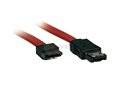
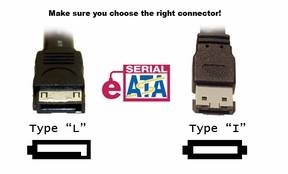
There is a special connector (eSATA) specified for external devices, and an optionally implemented provision for clips to hold internal connectors firmly in place. SATA drives may be plugged into SAS controllers and communicate on the same physical cable as native SAS disks, but SATA controllers cannot handle SAS disks.

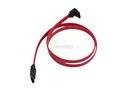
There are SATA ports (on motherboards of a PC) that can use SATA data cable with locks or clips, thus, reducing the chance of accidentally unplugging while the PC is turned on. So does the same with SATA power connector and SATA data connector connected to a SATA HDD or SATA optical drive. Also, there are right-angled and left-angled connectors only on one end of SATA data cable, which can only be used when connecting to a SATA HDD or SATA optical drive.

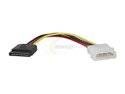
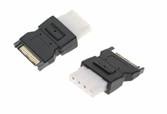
The SATA standard specifies a different power connector than the decades-old four-pin Molex connector found on pre-SATA devices. Like the data cable, it is wafer-based, but its wider 15-pin shape prevents accidental mis-identification and forced insertion of the wrong connector type. Native SATA devices favor the SATA power-connector, although some early SATA drives retained older 4-pin Molex in addition to the SATA power connector.

SATA Power Cable

1. Molex 4pin Male To 15pin SATA Power Cable

SATA Power Cable

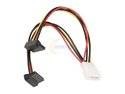
2. Molex 4pin Male To Two 15pin SATA Power Cable

SATA Power Cable

3. SATA Power Cable With Two 90 Degree Power Connector

SATA Power Cable

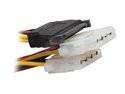
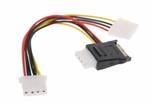
4. 15-Pin SATA Power Male to two Dual Molex 4-Pin Female

SATA Data Cable

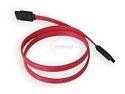
5. SATA Data Cable

SATA Data Cable

6. Serial ATA data cable with single right-angle connector

SATA Data Cable

7. SATA Cable with 2 Right Angle Connectors

SATA Data Cable

8. SATA to eSATA Transition Cable

SATA Data Cable

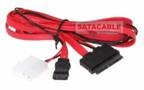
9. Sata 1.8 inch All in one power and data cable

SATA Data Cable

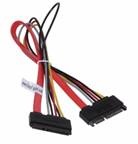
10. SATA Internal Extension cable 22-pin extension cable male to female clip_image021[34]

SATA Data Cable

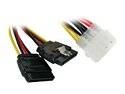
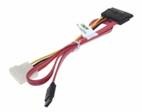
11. Serial ATA Data Cable with Power Adapter

SATA Data Cable

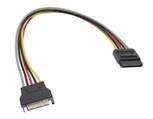
12. SATA Power Cable Extension Male to Female 15-Pinclip_image021[35]

SATA Data Cable

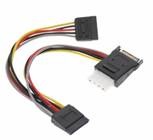
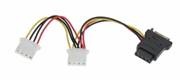
13. SATA Power Splitter Cable with Molex 4-Pin Outptu and Dual 15-pin Sata Output 7 inch cables

eSATA Cable

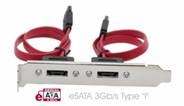
14. eSATA Extender Cable Internal to External Cable Bracketclip_image021[36]

Sata Power Cable

15. SATA Power Adapter Cable Splitter with 3-Molex Power outputs from One SATA Power Inputclip_image021[37]

Sata Power Cable

16. 4-Pin Molex Output from sata power cable input, SATA to Molex Y-Cableclip_image021[38]

SATA to eSATA cable

17. SATA I type Connector and SATA L type Connectorclip_image021[39]

SATA Power Connector

18. SATA Power Extender Plug 15-Pin Input to 15-Pin Outputclip_image021[40]

SATA Power Connector

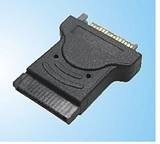
19. SATA to Molex Power Cable Adapter 15-pin Female to 4-pin Maleclip_image021[41]

SATA Hard Drive Cables Read More »

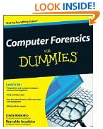
Computer Forensics For Dummies

Computer Forensics For Dummies Uncover a digital trail of e-evidence by using the helpful, easy-to-understand information in Computer Forensics For Dummies! Professional and armchair investigators alike can learn the basics of computer forensics, from digging out electronic evidence to solving the case. You won’t need a computer science degree to master e-discovery. Find and filter data in mobile devices, e-mail, and other Web-based technologies.

You’ll learn all about e-mail and Web-based forensics, mobile forensics, passwords and encryption, and other e-evidence found through VoIP, voicemail, legacy mainframes, and databases. You’ll discover how to use the latest forensic software, tools, and equipment to find the answers that you’re looking for in record time. When you understand how data is stored, encrypted, and recovered, you’ll be able to protect your personal privacy as well. By the time you finish reading this book, you’ll know how to:

  • Prepare for and conduct computer forensics investigations
  • Find and filter data
  • Protect personal privacy
  • Transfer evidence without contaminating it
  • Anticipate legal loopholes and opponents’ methods
  • Handle passwords and encrypted data
  • Work with the courts and win the case

Plus, Computer Forensics for Dummies includes lists of things that everyone interested in computer forensics should know, do, and build. Discover how to get qualified for a career in computer forensics, what to do to be a great investigator and expert witness, and how to build a forensics lab or toolkit.

Computer Forensics For Dummies Read More »

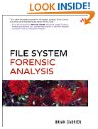
File System Forensic Analysis

file system forensic analysis This is an advanced cookbook and reference guide for digital forensic practitioners. File System Forensic Analysis focuses on the file system and disk. The file system of a computer is where most files are stored and where most evidence is found; it also the most technically challenging part of forensic analysis. This book offers an overview and detailed knowledge of the file system and disc layout. The overview will allow an investigator to more easily find evidence, recover deleted data, and validate his tools. The cookbook section will show how to use the many open source tools for analysis, many of which Brian Carrier has developed himself.

Coverage includes:

  • Preserving the digital crime scene and duplicating hard disks for “dead analysis”
  • Identifying hidden data on a disk’s Host Protected Area (HPA)
  • Reading source data: Direct versus BIOS access, dead versus live acquisition, error handling, and more
  • Analyzing DOS, Apple, and GPT partitions; BSD disk labels; and Sun Volume Table of Contents using key concepts, data structures, and specific techniques
  • Analyzing the contents of multiple disk volumes, such as RAID and disk spanning
  • Analyzing FAT, NTFS, Ext2, Ext3, UFS1, and UFS2 file systems using key concepts, data structures, and specific techniques
  • Finding evidence: File metadata, recovery of deleted files, data hiding locations, and more
  • Using The Sleuth Kit (TSK), Autopsy Forensic Browser, and related open source tools

When it comes to file system analysis, no other book offers this much detail or expertise. Whether you’re a digital forensics specialist, incident response team member, law enforcement officer, corporate security specialist, or auditor, this book will become an indispensable resource for forensic investigations, no matter what analysis tools you use.

File System Forensic Analysis Read More »

The Purpose Of Computer Forensics

Computer Forensics Computer forensics is the branch of forensic science that examines evidence stored digitally on a hard drive or other data storage medium.

History

Computer forensics can be traced back to the beginning of the 1990s when computers began to be integrated into our daily existence. DIBS USA was one of the first computer forensics companies to emerge.

Function

Computer forensics is about the preservation and extraction of data. Data is often found in server logs or on suspects’ hard drives. Since every move on a computer leaves a footprint, forensic experts have to find out how to tie that footprint to a case.

Misconceptions

Computer forensics doesn’t involve a lot of high-level hacking or computer security knowledge since most of the data that investigators would be looking for is in logs. The hardest part is going through each of those logs that can contain thousands of entries per second.

Types

There are various types of computer forensics that look to fulfill different purposes. Network analysis shows data traffic while another branch could involve retrieving data off a scorched laptop hard drive.

Effects

Computer forensic technology has led a lot of criminals to use encryption technology. Since military-grade encryption is legal for use in the United States, many people encrypt their files with algorithms that are impossible for forensic experts to crack.

The Purpose Of Computer Forensics Read More »

Scroll to Top