Articles

What are the common Reasons of Hard Disk Drive failure?

What are the common Reasons of Hard Disk Drive failure?

1. Electronic Component Failure
2. Motor Failure
3. Read / Write Head Failure
4. Media Damage
5. Firmware Corruption
6. Logical Failure

One or all of the above primary causes may be evident when diagnosing a failed hard disk drive.

Electronic Component Failure

Electronic components may fail due to voltage transients, heat or poor handling. Substitution, repair and re-programming is generally required in order to recover data stored on the hard disk. PCB assemblies are however hyper tuned at the manufacture stage and specialist re-programming and calibration is subsequently required to restore the hard disk to a working condition.

Motor Failure

Hard disk motor spindles have fluid bearings; sometimes this fluid leaks or becomes overheated and in-effective. The motor will then seize and the hard disk platters fail to rotate. Platter and component re-location to another hard disk assembly is required to effect a repair and restore data.

Read / Write Head Failure
Read / write heads are aerodynamically designed to “fly” at nanometer distances above the surface of the platters. Ceramic thin film sensors at their tip detect magnetic information (data) stored on the surface of the platter. Occasionally the atmosphere in the hard disk enclosure will become contaminated or vibration will cause the dynamic of the head to be disturbed. This disturbance will cause the read /write process to malfunction resulting in bad data read write cycles and eventual failure.
This type of failure usually manifests itself as a distinct clicking noise as the head actuator makes failed repeat attempts to locate data at the same platter track location.

Media Damage

Amazingly all computer hard disk magnetic storage media is manufactured imperfect but to acceptable and controllable levels. During normal operations imperfections will sometimes increase above the predefined acceptable level. This can be due to heat, vibration, head crash, shock or other factors. The operating system will flag errors or fail to boot and data files will then become in-accessible. Read/.Write head replacement and file repair will allow data file structures to be examined and assessed as to their validity.

Firmware Corruption

Hard disk firmware holds precise parameters relevant to the configuration of the assembly at the time of manufacture. Occasionally the firmware becomes corrupt or will “roll back” to an incorrect set of parameters. Under these conditions the location of the stored data as reported to the operating system will be lost. Simple restoration of the correct parameters will allow the hard disk to function correctly. What causes this corruption? Operating system to drive software bugs, control bus protocol failure, it is difficult to determine but failures do occur.

Logical Failure

Data files are stored at logical locations that relate to a number of physical locations on the surface of the hard disk platters. These logical locations are held in tables by the operating system and indexed when running specific software applications. Operating system errors, reloads or incorrect upgrade applications will sometimes corrupt these tables and data will become in-accessible. This is generally referred to as a logical failure. Logical errors can be repaired with software tools available from the internet. Be cautious however – if you are intending to run a fix utility on your disk you can inadvertently damage these tables irreparably and your data will be unrecoverable. This is especially true when running ScanDisk and Chkdsk on a damaged hard drive.

Hard Drive Failure Signs

  • Your computer “freezes” too often (the picture on the screen is still and does not react to mouse or keyboard manipulations)
  • Regular booting problems. That may be a sign of bad sectors on the disk with corrupted booting data.
  • You computer is terribly slow while accessing, saving and opening files.
  • The usual sound produced by your hard drive is louder than before
  • Regular appearance of BSOD (Blue Screen of Death), “Operating system not found or Missing Operating System” or “your hard drive is not formatted” messages at startup.

Even if you haven’t backed up your files yet, these signs give you a chance and some time to copy the data before the drive crashes.

Far more ominous signs are:

  • Your computer is still running normally, but you can hear unusual metallic sounds (grinding, clicking, whirring, scratching, buzzing). That’s a very bad sign that may imply mechanical damage.
  • You cannot hear any hard drive sounds at all. When the information is written to or read from the disk, it spins and produces sounds, you must be accustomed to these normal sounds. As an example, hard drive becomes silent when it’s inside components expand and get stuck because of overheating.
  • Your hard drive is clicking or producing grinding metallic sounds, your computer won’t recognize the hard disk. This is a sign that hard drive failure have happened.

If the above occurs, shut down immediately and contact a disk recovery service! If you keep your computer running the platters may be damaged and your files will be unrecoverable. Also, if your hard drive has undergone mechanical damage or was exposed to water, fire, smoke or high temperatures, don’t try to power it up. Contact a disk recovery service.

What are the common Reasons of Hard Disk Drive failure? Read More »

Maxtor HDD Firmware Repair Tool 2.0

Maxtor Firmware Repair 2.0 is a program  aiming at solution for typical firmware malfunction of Maxtor 541DX (2B020H1 2B010H1), which may manifest itself as follows:

1. HDD is not identified or identified by its factory alias “Maxtor Athena”;
2. HDD starts the motor and then hangs.

How does Maxtor Firmware Repair 2.0 work?

1. The restoration program will not overwrite the HDD data so it is applicable to data recovery.

2. It provides the users with a most friendly operation interface and it only takes you a few seconds to restore an HDD with typical firmware malfunction.

3. So, after you have this powerful freeware installed, all you have to do is to insert the bootable disk and have the target HDD connected correctly to you IDE slot. In minutes, you could start fixing the defective HDD using this powerful utility by pressing several keys.

4. This free version can only restore typical firmware malfunction of Maxtor 541DX series HDDs but not for others.If you need to restore other series of Maxtor HDD, you can purchase our professional version Maxtor Firmware Repairer PRO.

CD-ROM: Maxtor Firmware Repair 2.0
Floppy Disk: Maxtor Firmware Repair 2.0

Maxtor HDD Firmware Repair Tool 2.0 Read More »

HDD Scan and Repair Tool 3.0

Are you facing a scandisk on your HDD because there is some bad sectors?
Is it annoying and time-consuming? then you’ve come to the right place.

HDD Scan And Repair 3.0 is the only one known professional program which can scan HDD over 136 G directly that need not the support of computer mainboard with high speed. It can utmost afford 2000 G HDD in theory.

Notice: If you have recently installed Windows Service Pack 2 (SP2) you would be having problems with your SP2 after using HDD Scan And Repair 3.0 installation program to create the bootable floppy disk.

How does HDD Scan and Repair 3.0 work?

1. A breakthrough of this program is that, without depending on BIOS, it can control read and write to the HDD directly, with high-speed, veracity, friendly interface and simple management; there will be an intuitionistic and intact report for the physical defective sectors created after the scanning. The continual defective sectors can be easily skipped; therefore the defective HDD will not get stuck.?

2. There is a “Restorer” in this program which can restore the usual physical defective sectors by adding them into the G-list.

3. So, after you have this powerful freeware installed, all you have to do is to insert the bootable disk and have your target HDD connected correctly to you IDE slot. In minutes, you could start fixing the defective HDD using this powerful utility by pressing several keys.

CD ROM: HDD Scan And Repair 3.0
Floppy Disk: HDD Scan And Repair 3.0

HDD Scan and Repair Tool 3.0 Read More »

Seagate HDD Firmware Repair Tool 5.0

Seagate Firmware Repair 5.0 is a demoware  aiming at one-key solution towards typical firmware malfunction of Seagate Barracuda VII drives, which may manifest itself as follows:
1. HDD is not identified or identified incorrectly;
2. HDD starts the motor and then hangs.

How does Seagate Firmware Repair Demo 5.0 work?

1.The restoration program will not destroy the HDD data so it is applicable to data recovery.

2.It provides the users with a most friendly operation interface. Powerful and easy in fixing HDD typical firmware malfunction: Just one click and your data and drive comes back (80% of corrupt Seagate drives are caused by typical malfunction).

3.Check HDD firmware: Powerful function that enables you to figure out the problem of a drive, there will be a check result created and saved as DIAGNOSIS.TXT; you can receive remote technology support from our experienced engineers on the drive then by simply sending the DIAGNOSIS.TXT to us.

4.So, after you had this powerful freeware installed, all you have to do is to enter the program and have the target HDD connected correctly. In minutes, you could start fixing the defective HDD using this powerful utility by pressing one single key.

5.This demo version can only restore typical firmware malfunction of Seagate Barracuda VII series HDDs, not for others. If you need to restore other series of Seagate HDD, you should purchase our PRO version with full support range

Demo: Seagate Firmware Repair Demo 5.0

Seagate HDD Firmware Repair Tool 5.0 Read More »

Maxtor HDD Bad Sectors Repair Tool 2.0

Bad Sectors Repair 2.0 can add bad sectors of Maxtor 541DX(2B0X0H1) HDD into the factory defects list (P-LIST), up to 15,000 bad sectors can be added into the list at most.

How does Bad Sectosr Repair 2.0 work?

1. It is able to move defects from G-list to P-list, empty and reset both P-list and G-list, reset the HDD capacity and add your specific sector as defect into the P-list…

2. The HDD restored would work just as a brand-new HDD: There will be no bad sector,and it could be partitioned and formatted at your will.

3. So, after you have this powerful freeware installed, all you have to do is to insert the bootable disk and have your target HDD connected correctly to you IDE slot. In minutes, you could start fixing the defective HDD using this powerful utility by pressing several keys

CD-ROM: Bad Sectors Repair 2.0
Flobby Disk: Bad Sectors Repair 2.0

Maxtor HDD Bad Sectors Repair Tool 2.0 Read More »

Data Recovery Glossary (Letter G J K N O Q Z )

GB (Gigabyte)
One gigabyte is 1,000,000,000 (one billion) bytes or 1000 (one thousand) Megabytes.

Jumper
In EIDE drives, a jumper is an electrically-conductive component that you place over pairs of pins that extend from the circuit board on the hard drive jumper block to connect them electronically. For example, a jumper is one way to designate a hard drive as master or slave. The jumper block is located next to the 40-pin connector on the hard drive.

Just-in-time (JIT)
A production and inventory control process in which components and materials are delivered to an assembly point as needed. This process is used in many hard drive manufacturing facilities.

Kilobyte (KB)
1024 bytes, although it often considered to be a unit of 1000 bytes. In the case of computer memory, which is partitioned into sizes that are a power of two, a kilobyte is equal to 2 10 or 1024 bytes.

Network Computer
A kind of computer that contains limited data storage capacity and is used to communicate with a central data storage facility such as a server or RAID system.

Operating System
Software that allows the user and programs installed on your system to communicate with computer hardware such as a hard drive.

Original Equipment Manufacturer (OEM)
In the case of the hard drive and data recovery industries, OEM customers are companies such as Compaq, Gateway, IBM and Dell.

Qualification
The process by which sample components are tested for their compatibility and utility as parts of a system.

Queue
A first-in-first-out (FIFO) data structure used to sequence multiple demands for a resource such as a printer, processor, or communications channel. The host adds objects to the end of the queue and takes them off the front.

Zoned Recording
Increases the number of sectors on the outer tracks of the drive since the circumference of the outside tracks is greater. This type of recording affords more disk capacity because there can be more sectors on the larger outer tracks than would be possible if the number of sectors per track were constant for the whole drive.

Data Recovery Glossary (Letter G J K N O Q Z ) Read More »

Causes Of Data Loss

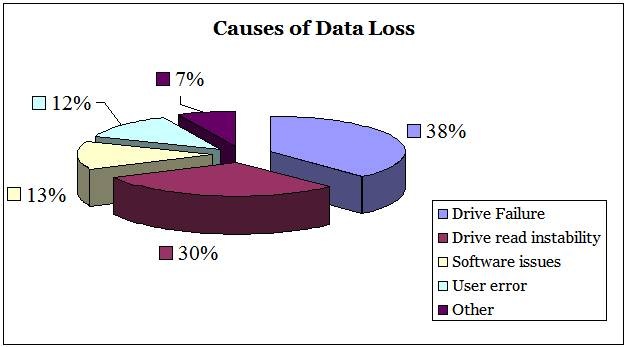
Survey data from companies that specialize in data recovery may be used to investigate the primary causes for how data actually gets lost.

Hard drive failure is the most common cause of data loss, accounting for 38 percent of data loss incidents.

Drive read instability includes occasions where media corruption or degradation prevents access to the data on a disk. This explains 30% of lost data.

Software corruption, which might include damages caused by system software or other program (e.g., a virus attack), accounts for 13 percent of data loss incidents.

User error accounts for 12 percent of data loss episodes. This includes the accidental deletion of data as well as incorrectly partitioning the hard drive.

The relative magnitudes of the different types of data loss are illustrated as bellow. (This analysis ignores data loss due to theft, an increasing problem given the growth in use of laptops).

Causes Of Data Loss

Causes of Data Loss: (Source: A survey of 50 data recovery firms across 14 countries.)

Causes Of Data Loss Read More »

Data Recovery Glossary (Letter W)

Winchester Disk
Former code name for an early IBM hard disk model, sometimes still used to refer to the technology and design of most traditional hard drives.

Windows
Microsoft’s series of operating systems for personal computers. Currently popular versions are Windows 95 and Windows 98.

Word
Two bytes that are processed together in a single operation.

Workstation
A personal computer with exceptional capacity and performance capabilities for use mainly in engineering, design and audiovisual applications demanding immediate access to data and the ability to manipulate it in technically sophisticated ways.

Write
The recording of flux reversals onto the magnetic surface of a disk.

Write Cache
High speed RAM used to buffer data transfer from the host to the hard drive.

Write Verify
Immediately after writing data to the disk, a drive with the Write Verify feature will verify that it can read the data it just wrote to the disk to ensure that it will be able to retrieve it later. If the drive is unable to read the data, it writes it to another area of the disk, where it attempts to write verify it again.

Data Recovery Glossary (Letter W) Read More »

Data Recovery Glossary (Letter V)

Virus Scanner
Software that is used to scan for and eradicate computer viruses, worms, and Trojan horses.

Viterbi Detection
An algorithm used in read channel technology that detects an entire sequence of data bits at a time and determines the most likely sequence of data bits by comparing actual sequence of data bit samples with sequences of possible data bit sample to accurately detect that data written to disk.

Voice Coil
An actuator motor; the force of the magnetic rotary voice coil produces a movement of the head that is proportionate to the force exerted by the coil.

Volume
A portion of a physical disk that functions as though it were a physically separate disk.

Data Recovery Glossary (Letter V) Read More »

Data Recovery Glossary (Letter U)

Ultra SCSI
Provides 20 MB/s transfers over an 8-bit bus or 40 MB/s transfers over a 16-bit Wide SCSI bus. Also known as Fast-20 SCSI, this feature is most commonly found in SCSI-3 drives.

Ultra DMA/33
A high-speed host data transfer feature that transfers data at 33.3 MB per second.

Un-correctable Error
An error that cannot be overcome using Error Detection and Correction.

Unformatted Capacity
The total number of usable bytes on a disk, including the space that is required to record location, boundary definitions, and servo data. (See also formatted capacity.)

Universal Serial Bus (USB)
A serial bus with a bandwidth of 1.5 megabits per second (Mbps) for connecting peripherals to a microcomputer. USB can connect up to 127 peripherals, such as external CD-ROM drives, printers, modems, mice, and keyboards, to the system through a single, general-purpose port. This is accomplished by daisy chaining peripherals together. USB supports hot plugging and multiple data streams.

Unrecoverable Error
A read error that cannot be overcome by an ECC scheme or by rereading the data when host retries are enabled.

Untagged Queuing
The ability of the drive to receive a maximum of one I/O process from each initiator.

Upgrade
In hard drives, the replacement of a hard drive with one offering greatercapacity or performance, or both.

Data Recovery Glossary (Letter U) Read More »

Scroll to Top