
Data recovery on vintage hard drives like the Toshiba MQ01ABD100 starts with identifying the failure type – electronic, firmware, or mechanical. Each requires a different approach, and misdiagnosis can make things worse. Here’s a quick guide to help you assess your situation and decide on the next step.
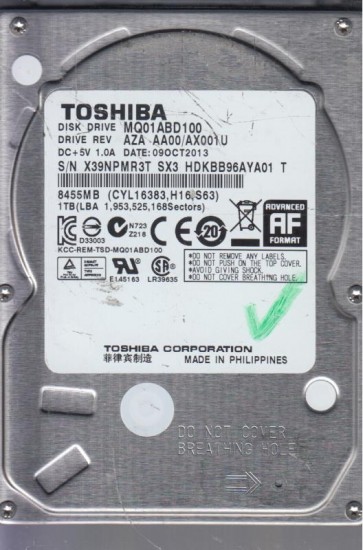
The Toshiba MQ01ABD100 is a 2.5-inch, 1TB, 5400 RPM SATA hard disk drive from the MQ01ABD series. It is a conventional magnetic recording (CMR) drive, not an SMR (shingled magnetic recording) drive, which makes it slightly more predictable in failure modes. It uses a fluid dynamic bearing (FDB) motor and typically has a single platter with two heads. This drive is commonly found in laptops and external enclosures due to its low power consumption and slim profile. Understanding that this is a mechanical device with moving heads and spinning platters is critical for recovery. Any unusual noise or slow performance indicates a physical problem.
Identifying Common Failure Types
1. Head Crash / Stiction (Physical Failure)
This is characterized by a repetitive clicking, grinding, or chirping sound (often described as a bird chirp) and the drive will not be recognized by the system. The drive may spin up but immediately stop, or it may make a loud scraping noise. A head crash occurs when the read/write head physically contacts the platter, damaging the magnetic coating. Stiction can cause the heads to stick to the platter surface, preventing the platters from spinning. This is irreversible without specialized equipment.
2. Bad Sectors / Degraded Surface (Progressive Failure)
The drive spins up normally and is detected, but the system freezes, crashes, or becomes extremely slow when accessing files. You may see “I/O Device Error” or “CRC Error” messages. The drive may produce a faint “tick” sound while reading. This indicates the media surface is deteriorating, the head is struggling to read data, or the drive’s firmware is reallocating sectors from a growing defect list. This is a sign of imminent total failure.
3. Spindle Motor Failure (Physical Failure)
The drive will not spin up at all. You may hear a short whine or a complete silence when power is applied. The system does not detect the drive. This is a mechanical seizure of the motor bearings or a failure in the motor driver circuit on the logic board. The platters are stuck in place. This requires professional intervention to transplant the platters into a donor drive.
4. Failed PCB / Electronics (Logical/Electrical Failure)
The drive is completely silent or makes a soft spin up but no data access. The system may detect it with a wrong capacity (e.g., 0GB) or a specific “Device Descriptor Request Failed” error. This is often caused by a damaged preamplifier (on the headstack), a burned controller chip, or a failed TVS diode. A common sign is a burnt smell or visible damage on the circuit board. PCB failure is sometimes repairable, but the HDD firmware is married to the specific head and media, so a simple board swap rarely works without transferring the ROM chip.
Potential Recovery Paths
Professional Service
For any physical failure (head crash, motor seizure, or clicking), professional service is the only viable path. Expect a cost between $300 and $1500+ depending on complexity. The lab will use a cleanroom environment (typically Class 10 or better) to open the drive, transplant heads or platters, and then image the data using specialized tools like PC-3000 or DeepSpar. For the MQ01ABD100, the headstack assembly is fragile and specific to the platter geometry. Do not attempt to open the drive yourself.
DIY Recovery Paths (Software Issues Only)
DIY recovery is ONLY safe if the drive is completely silent and functions normally but shows file system errors. Use a tool like ddrescue (Linux), R-Studio, or Clonezilla to create a sector-by-sector disk image to a healthy drive. This will skip over bad sectors instead of trying to read them repeatedly, preventing further damage. Never run CHKDSK, fsck, or any operating system repair tools on a failing drive as they can make data worse. For file system corruption, use a file recovery tool like Recuva or DMDE on the image, not the original drive.
What Not to Do
1. Do not open the drive. The MQ01ABD100 is not sealed against normal air. Opening it even slightly will let in dust particles that will scratch the platters and destroy data. The drive’s internal filter is not enough. 2. Do not apply power to a clicking drive. Each click is a head hitting the platter. Repeated power cycles will gouge the media. 3. Do not use software like Seatools or CrystalDiskInfo on a failing drive. These tools can trigger intensive head movements and finalize the failure. 4. Do not freeze the drive. This old myth causes condensation and warping, which permanently damages the platters and heads. 5. Do not try to replace the circuit board yourself. The MQ01ABD100 requires the original ROM chip to be moved to a donor PCB, and even then, alignment issues are common. A simple board swap from eBay will likely fail.
Summary
The Toshiba MQ01ABD100 is a robust but mechanical device. Its primary failure modes are head crashes, motor failure, and bad sectors. Listen for sounds: clicking means heads are damaged; silence means motor or electronics. Never attempt DIY recovery for any physical symptom. For software issues (no unusual sounds, drive detected but corrupt), create a disk image immediately using ddrescue before attempting any file recovery. Professional data recovery is expensive but is the only safe method for hardware failures. Do not experiment on valuable data.