
Data recovery on vintage hard drives like the Samsung HM080GI starts with identifying the failure type – electronic, firmware, or mechanical. Each requires a different approach, and misdiagnosis can make things worse. Here’s a quick guide to help you assess your situation and decide on the next step.
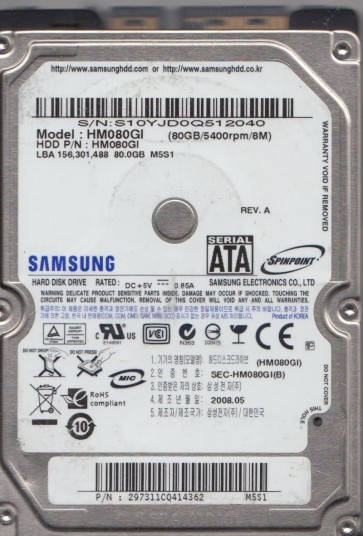
The Samsung HM080GI is a 2.5-inch, 80GB PATA (Parallel ATA) hard drive, commonly found in older laptops and external enclosures from the mid-2000s. It uses a single platter spinning at 5400 RPM and is known for its relatively low power consumption. As a product of its era, it relies on older technology such as a ceramic or metal slider for read/write heads and a standard voice coil actuator. Understanding its age is critical; these drives are prone to both mechanical wear and electronic component degradation, particularly the preamp on the flex circuit and the controller board’s power management ICs.
Identifying Common Failure Types
1. Mechanical Head Failure (Click of Death)
The most common failure for this model. The drive will spin up but emit a repeating clicking or tapping sound as the actuator tries to park and unpark the heads. This indicates the heads cannot read the servo patterns on the platter, often due to damaged heads, a seized pivot bearing, or a corrupted firmware module that controls head positioning. Data is usually intact on the platters but inaccessible without donor parts.
2. Stiction (Media Damage)
The drive powers on, you may hear a single spin attempt, then silence or a faint whirring sound followed by a high-pitched squeal. The read/write head has become physically stuck to the platter surface. This is common when the drive has been dropped or exposed to high humidity. Attempting to force the platter to spin can scratch the magnetic coating, permanently destroying data.
3. Firmware Corruption (Samsung T2/T3 Damage)
The HM080GI is sensitive to firmware issues, particularly damage to the System Area (SA) located on the platters. Symptoms include the drive being detected but showing a blank capacity (0GB), or reporting an “SMART Status BAD” error. The drive may spin up and even sound healthy, but the PC cannot access data. This is often a logical fault but can be caused by a failing preamplifier (preamp) on the flex cable.
4. PCB (Printed Circuit Board) Failure
The drive appears completely dead ¨C no spin, no sound, not detected at all. This is usually a failed TVS diode, a blown power driver IC, or a damaged connector. On the HM080GI, the power management chip (often an SMOOTH or similar) is a common failure point. While the PCB can be swapped, it requires transferring the unique ROM chip (8-pin serial EEPROM) to the donor board.
Potential Recovery Paths
Professional Service (Highly Recommended for Mechanical Issues)
For any click, stiction, or unknown failure, professional recovery is the safest route. A lab will use a Class 100 cleanroom to open the drive. For head failure, they will swap the head stack assembly (HSA) from a matching donor HM080GI. For stiction, they use a specialized tool to gently rock the spindle motor free. For firmware issues, they use tools like PC-3000 or MRT to repair SA modules or recover data directly from the platters. Costs typically range from $500 to $2500+ depending on damage complexity.
DIY Software Options (Only for Non-Physical Issues)
If the drive powers on, sounds healthy (no clicks), and is detected by the BIOS, you may attempt software recovery. Use a tool like R-Studio, DMDE, or TestDisk to create a disk image to a healthy drive. Never work directly on the failing drive. Scan for partitions and recover files. If the drive is detected but shows 0GB or has bad sectors, stop immediately ¨C this indicates physical damage that software cannot fix.
DIY PCB Swap (Advanced, Risk Involved)
If the drive is completely dead (no spin), try swapping the PCB. You must find a donor board with an exact match of the PCB number (e.g., REV 1.0 vs 1.1). The most critical step: you MUST remove the original 8-pin serial Flash ROM (small chip, often marked “25P40” or similar) from the damaged board and solder it onto the donor board. Without this, the drive will either not spin or will have incorrect head parameters and damage the platters. This is a precise soldering task requiring a hot air station.
What Not to Do
- Never open the drive outside a cleanroom. The platter gap is only 3-5 nanometers. One dust particle will cause catastrophic head crash.
- Never apply power to a clicking drive more than a few times. Each click can further damage the heads and platter surface.
- Do not use “freezer trick”. It temporarily masks issues but condensate will corrode the platters and heads.
- Do not run CHKDSK or any repair tool on a failing drive. This can fragment data and write corrupted files.
- Avoid strong magnets or tapping the drive to “unstick” it. This almost always leads to media damage.
Summary
The Samsung HM080GI is an aging drive with three primary failure modes: mechanical head crash (click), stiction (squeal), and PCB failure (dead). Firmware corruption often mimics software issues but is rooted in hardware. For any physical symptom (click, squeal, no spin), professional data recovery is the only viable option. DIY software recovery is possible only if the drive is fully recognized and sounds healthy. A PCB swap is a risky but possible DIY task if you can solder and locate an exact donor board. The golden rule: any attempt to power on a faulty drive can cause irreversible damage. Assess the sound and behavior first, then decide to seek expert help.