
Data recovery on vintage hard drives like the Samsung SP1604N starts with identifying the failure type – electronic, firmware, or mechanical. Each requires a different approach, and misdiagnosis can make things worse. Here’s a quick guide to help you assess your situation and decide on the next step.
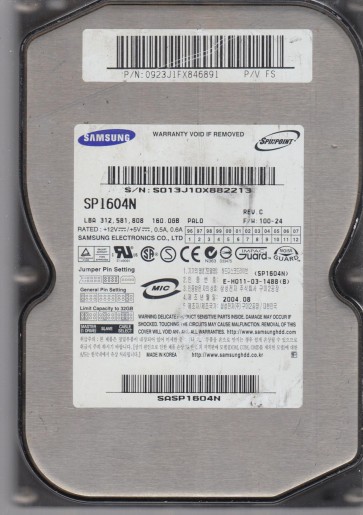
The Samsung SP1604N is a 160GB 3.5-inch Parallel ATA (PATA/IDE) hard drive from the early 2000s, utilizing glass platters and fluid dynamic bearing motors in later revisions, though earlier models may use ball bearings. It operates at 7200 RPM with a 2MB or 8MB cache buffer. As a drive of this era, its primary vulnerabilities stem from aging mechanical components, controller board degradation, and the inherent fragility of its internal platter coatings. Data recovery success heavily depends on the failure type and the promptness of your response.
Identifying Common Failure Types
1. Mechanical Failure (Head Crash / Stiction)
The most critical failure. Symptoms include a clicking, grinding, or scraping noise, or the drive failing to spin up at all (silent or a single weak spin attempt). Stiction is common in older drives where the read/write heads stick to the platter surface due to lubricant breakdown, combined with the drive being powered off for extended periods. A head crash physically damages the platter surface, destroying data at the contact point and generating debris that can spread. Do not attempt any DIY power cycles if you hear unusual noises.
2. Electronic Failure (PCB / Firmware Corruption)
If the drive is completely dead (no spin, no sound) when powered, the printed circuit board (PCB) may be faulty. Common culprits include a blown TVS diode (Transient Voltage Suppressor) from a power surge, failed motor controller chip, or corrupted firmware on the drive’s ROM. Another symptom is the drive spinning but not being recognized by the BIOS, often accompanied by a soft constant click or whirring. This is a software/firmware layer issue rather than a head crash.
3. Logical Failure (File System Corruption / Bad Sectors)
The drive spins up, is detected in BIOS, but Windows or macOS reports it as “unformatted,” “RAW,” or shows extremely slow access/corrupted directory structures. This can be caused by a sudden power loss, virus attack, or the development of a growing number of bad sectors (unreadable platter areas) beyond what the drive’s internal defect management can handle. While the data is logically inaccessible, the mechanical and electronic components are often still functioning.
Potential Recovery Paths
DIY Recovery Paths (For Logical Failures Only)
WARNING: DIY methods are only suitable for logical failures. Any attempt on a mechanical or electronic failure will cause permanent data loss.
- Data Recovery Software: For RAW file systems or accidentally deleted partitions, use read-only applications like TestDisk (free, open-source) or R-Studio. Create a full disk image first using a tool like DDRescue or HDDSuperClone onto a healthy drive. Never write anything back to the failing source drive.
- Bad Sector Cloning: If the drive has slow performance or bad sectors, use HDDSuperClone with the direct read mode and appropriate sector skipping strategies. This bypasses the operating system’s error handling and maximizes data extraction before the drive fails completely.
- PCB Swap (Advanced DIY): If the drive is dead but the platters are known to be intact (no clicks, no prior mechanical noise), you can attempt a PCB swap. You MUST find a donor PCB with the exact same model and firmware revision. After swapping, you must transfer the original drive’s ROM chip (usually an 8-pin SOIC) to the donor board using a hot air station. A simple board swap without ROM transfer will not work and can damage the drive.
Professional Recovery Paths
For any mechanical failure (clicks, grinding, stiction) or failed PCB swap attempts, immediate professional intervention is required.
- Clean Room Recovery: Mechanical failures require a Class 10 or better ISO 5 cleanroom. A technician will physically open the drive, replace the read/write heads with a matched set from a donor drive, and use specialized tools (e.g., PC-3000, DeepSpar) to extract the data from the raw platters. Stiction is handled by gentle platter rotation or platter transfer to a donor chassis.
- Firmware Repair: For firmware corruption, professional tools can access the drive’s service area to repair or rebuild firmware modules without opening the drive. This is a common solution for the “constant click” issue.
- Imaging Service: If the drive has a high number of bad sectors but is mechanically sound, a professional service will use hardware-imaging stabilizers (like the DeepSpar Disk Imager) to create a forensic clone, bypassing the drive’s own error correction for maximum data extraction.
What Not to Do
- Never power on a clicking drive. Each spin cycle grinds the heads into the platters, destroying more data.
- Do not open the hard drive enclosure. The platters are sensitive to microscopic dust. Any particle landing on a platter will act like sandpaper when the drive spins up.
- Do not use software like CHKDSK (fsck) on a failing drive. This tool modifies the file system and can erase traces of your data or trigger a head crash by forcing the drive to read failing areas aggressively.
- Do not shake or tap the drive. This is a desperate myth. It can dislodge read/write heads or break loose debris, worsening a mechanical failure.
- Avoid freezing the drive. This is an extremely old and risky method that can cause condensation, rust, and platter warping. It almost never helps and usually kills the drive permanently.
Summary
The Samsung SP1604N is a legacy PATA drive with a high failure rate due to age-related stiction, head crashes, and PCB component degradation. Correct diagnosis is the first and most critical step. If the drive is not recognized or makes a clicking noise, you have a mechanical failure requiring immediate professional clean-room recovery. If the drive is completely silent, a PCB failure may be present, but only attempt a ROM-transfer swap if you have the correct equipment. If the drive is recognized but shows errors, and you hear no unusual noises, you likely have a logical failure where software-based imaging can be performed as a DIY task. In all cases, stop using the drive immediately and prioritize creating a full sector-by-sector clone before any further attempts.