
SystemRescue, formerly known as SystemRescueCd, is a Linux system rescue toolkit designed to be booted from a CD/DVD drive or USB stick. It is a specialized tool for system administrators and advanced users to repair systems and recover data after a crash, or to perform routine administrative tasks such as creating and editing hard disk partitions. It supports both Linux and Windows systems and requires no installation on the host machine, as it runs entirely from the bootable medium.
Key Features and Philosophy
SystemRescue is built on a philosophy of providing a comprehensive, self-contained environment with a wide array of system utilities. It is not intended as a general-purpose operating system but as a powerful toolkit for system rescue and maintenance.
- Live Environment: SystemRescue runs from the boot media and can be optionally copied to RAM using a boot option. This frees the boot device and speeds up program execution. All changes are temporary and lost upon reboot unless saved using a backing store feature.
- Extensive Toolkit: It includes a vast collection of system utilities for partitioning, file system management, data recovery, and network administration. This includes both command-line tools and a graphical environment with tools like GParted.
- Broad File System Support: The kernel supports all major file systems, including ext4, xfs, btrfs, vfat, ntfs, and the newer bcachefs, as well as network file systems like Samba and NFS.
- Flexibility and Automation: It offers advanced features like an autorun system, allowing users to execute custom scripts automatically at startup. This is useful for automated backup or restoration tasks.
Core Capabilities
SystemRescue is designed to handle a wide range of system recovery and administration tasks.
- Data Recovery: It includes tools like ddrescue which can copy data from damaged or dying hard drives, skipping over bad sectors to salvage as much data as possible.
- Partition Management: The graphical tool GParted allows users to create, resize, move, and copy partitions. It also includes command-line tools like GNU Parted for more advanced operations.
- File System Repair: It provides tools for checking and repairing various file systems, including ntfs-3g for full read/write access to Windows NTFS partitions.
- Backup and Cloning: Utilities like fsarchiver and partimage can be used to create or restore disk and partition images. rsync is also included for efficient remote backups.
- Hardware Diagnostics: The system includes Memtest to test system memory, which is often the first step in troubleshooting system crashes.
- Network Services: It includes network tools like ping and nslookup for diagnostics, and supports Samba and NFS for accessing shared files across a network, making it possible to backup data over the network.
How to Use SystemRescue
Using SystemRescue is a straightforward, though technical, process.
1. Download and Boot
First, you need to download the ISO image from the official website. After verifying the checksum for integrity, you can write the ISO to a DVD or install it onto a USB stick, which is often easier and more practical. The website provides instructions for creating a bootable USB from both Linux and Windows.
2. Boot Options
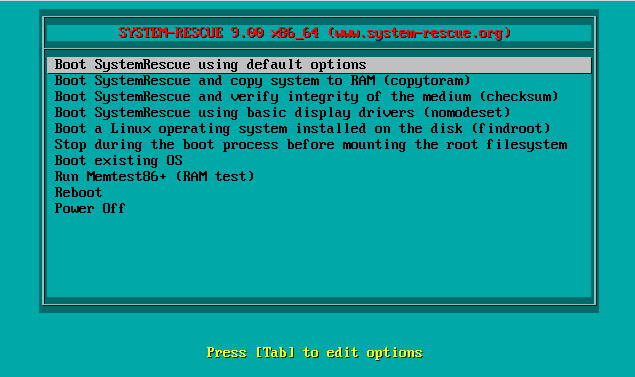
When booting, you can press certain keys to edit the boot command line. This allows you to add options like copying to RAM or changing the keyboard layout.
3. Working in the Environment
Once booted, you can work in a console mode using tools like Midnight Commander for file management, or vim and nano to edit files. For a graphical experience, you can type a command to launch the XFCE desktop environment, which provides access to GParted and other graphical tools. The network can be configured using the convenient Network-Manager graphical tool or manually via command line.
4. Automation
For advanced users, SystemRescue supports extensive automation through its autorun feature. You can place scripts in an autorun directory on the boot device or specify them via a YAML configuration file, enabling automatic execution of tasks like data restoration. You can also make persistent changes to the system by creating a backing store on a Linux file system, allowing you to save modifications across reboots.
Recent Updates and Modern Features
SystemRescue is actively maintained. Recent versions have updated the kernel to newer LTS versions for better hardware support and security, updated GParted to newer versions, and added new command-line tools for processing structured data. It also includes support for newer file systems like bcachefs.
Comparison with Finnix, Knoppix, and BartPE
While sharing a similar purpose with other rescue tools, SystemRescue has its own distinct characteristics.
| Feature | SystemRescue | Finnix | Knoppix | BartPE |
|---|---|---|---|---|
| Base System | Arch Linux | Debian Linux | Debian Linux | Windows XP / 2003 |
| User Interface | Command-line + optional XFCE GUI | Command-line only | Full graphical desktop (KDE/LXDE) | Graphical Windows shell |
| Primary Focus | System recovery, data rescue, administration | System administration, command-line tools | General-purpose live system, recovery | Windows recovery |
| Hardware Support | Excellent for modern hardware, actively updated | Good, but requires manual configuration | Excellent, includes proprietary drivers often | Poor for modern hardware |
| Development Status | Actively maintained | Actively maintained | Actively maintained | Discontinued |
| Size | Over 1 GB | Under 500 MB | Large (DVD or multiple CDs) | Small (CD size) |
SystemRescue is a powerful, up-to-date, and highly flexible solution for system recovery. It caters to advanced users who need a comprehensive set of tools and automation capabilities, combined with support for the latest hardware and file systems.
Official website: www.system-rescue.org