
Data recovery on vintage hard drives like the Toshiba MK3252GSX starts with identifying the failure type – electronic, firmware, or mechanical. Each requires a different approach, and misdiagnosis can make things worse. Here’s a quick guide to help you assess your situation and decide on the next step.
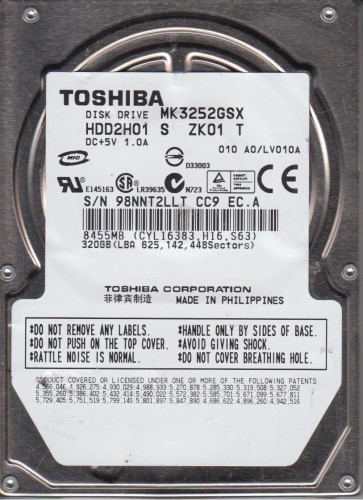
The Toshiba MK3252GSX is a 2.5-inch SATA hard disk drive with a 320GB storage capacity, typically found in older laptops and external enclosures. It spins at 5400 RPM and uses standard magnetic recording technology. As a mechanical drive, it is susceptible to physical shock, wear over time, and electronic failure. Common points of failure include the read/write heads, spindle motor, and the internal controller board. Understanding its physical construction is critical; the internal platters are sealed in a clean room environment, and any exposure to dust or contaminants will likely cause permanent data loss.
Identifying Common Failure Types
1. Mechanical Failure (Head Crash or Stiction)
This is the most critical failure. Symptoms include loud clicking, grinding, or repetitive ticking sounds. The drive may spin up and stop repeatedly (spindle stiction). This is caused by the read/write head physically contacting the platter surface or the head parking mechanism failing. No DIY recovery is possible without specialized clean room tools.
2. Logical / Firmware Corruption
The drive spins up normally but is not detected by the BIOS or operating system. It may show incorrect capacity (e.g., 0GB or 128GB) or prompt for initialization. This can result from corrupted firmware modules, a damaged partition table, or a bad boot sector. This failure is often recoverable with software tools, provided no physical damage exists.
3. Electronic Failure (PCB Issue)
The drive makes no sound at all (no spin-up) when powered. The circuit board may have visible burn marks, blown components, or a failed preamplifier. In some cases, replacing the PCB with an identical donor board (or transferring the firmware ROM chip) can restore functionality. However, the MK3252GSX often has a unique firmware adaptation that requires ROM swapping.
Potential Recovery Paths
Professional Service (Recommended for Hardware Failures)
For clicking, buzzing, or no-spin drives, immediate professional intervention is necessary. Specialized data recovery labs use clean rooms (Class 10 or better) to replace heads, repair spindle motors, or transplant platters to a donor drive. They also have equipment to handle firmware corruption at the hardware level. Expect costs to range from $300 to $2000+ depending on severity. Choose a reputable lab that offers free evaluation and no-data-no-fee policy.
DIY Software Methods (Only for Logical/No-Physical-Damage)
If the drive is detected and makes healthy, quiet spinning sounds, you can try software recovery. Use a tool like TestDisk to rebuild the partition table, or a data recovery suite like R-Studio or DMDE to scan for lost files. Important: Never run a surface scan (chkdsk /r or similar) on a drive you suspect has physical issues, as this can trigger a head crash. Always clone the drive first using ddrescue (Linux) or HDDSuperClone to a healthy target drive.
What Not to Do
- Do not open the drive cover. The internal space is dust-free; even a single speck can ruin the platters. Opening the drive voids any chance of affordable recovery.
- Do not apply power if the drive makes clicking or scratching noises. This can destroy the platter surface and make recovery impossible.
- Do not run disk repair utilities (like chkdsk or fsck) on a failing drive. These tools write to the disk aggressively, potentially overwriting your lost data.
- Do not use the drive after noticing symptoms. Continued operation can spread damage from logical to physical failure.
- Do not freeze the drive. This old myth can cause condensation, leading to permanent corrosion and platter damage.
Summary
The Toshiba MK3252GSX is a reliable but aging mechanical drive. Data recovery success depends on accurate diagnosis. If the drive clicks or is silent, stop immediately and contact a professional data recovery service. If the drive is detected but unreadable, use a cloning tool and then scan the clone with recovery software. Always prioritize backing up critical data to prevent future loss. Remember: for this model, physical damage is the most common cause of permanent loss, so early and correct action is everything.