
Data recovery on vintage hard drives like the Western Digital WD40EZRX starts with identifying the failure type – electronic, firmware, or mechanical. Each requires a different approach, and misdiagnosis can make things worse. Here’s a quick guide to help you assess your situation and decide on the next step.
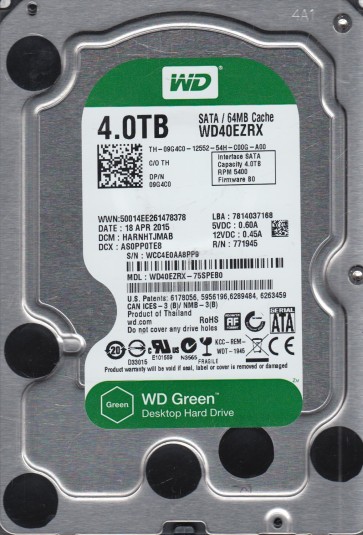
The Western Digital WD40EZRX is a 4TB 3.5-inch SATA hard drive from the WD Green series. It is designed for high-capacity, low-power consumption storage, making it suitable for archival, backup, and media files. This drive typically operates at 5400 to 5900 RPM, utilizes Advanced Format (4K sectors), and features IntelliPower and IntelliSeek technologies to reduce noise and vibration. The WD Green family, including this model, is not designed for heavy workloads or 24/7 operation in high-transaction environments. It is intended for occasional use where energy efficiency is a priority.
Common Failure Types
1. Head Crash / Mechanical Stiction: Failure of the read/write heads coming into contact with the platter surface, often resulting in a scratch. Due to the WD40EZRX’s lower RPM and lighter actuator arms, stiction is less common, but head crashes can occur from physical impact, shipping damage, or poorly handled thermal cycling. Symptoms: Clicking, ticking, or grinding noises. Linux/Windows may fail to detect the drive or report extremely slow reads.
2. PCB / Electronic Failure: Failure of the printed circuit board components, commonly the TVS diodes (transient voltage suppressors) or spindle motor controller chip. The WD40EZRX is particularly susceptible to power surges because the Green line often uses diodes with lower tolerance. Symptoms: The drive fails to spin up. LEDs do not light. The system may detect the USB/SATA bridge but not the drive itself.
3. Firmware Corruption / Translator Issues: The WD40EZRX, like other WD DL series drives, stores model and geometry data in firmware zones. Corruption from unexpected power loss or bad sector growth can render the drive unreadable. Symptoms: The drive identifies with incorrect capacity (e.g., MB instead of TB), makes no conventional noise but spins, and endlessly retries reading zones of servo data. It can appear as a “0GB” drive or “not initialized” in Disk Management.
4. Slow Drive / Weak Heads: A progressive weakening of the preamp or heads, leading to rising read error rates. The drive enters recovery modes repeatedly. Symptoms: Extended read times, frequent CRC errors in SMART (UltraDMA CRC Error Count), read retries (High Fly Writes), and finally timeouts.
5. Logical / File System Damage: Corruption of the NTFS file system, HFS+, or EXT4 due to file system errors (abnormal shutdowns), bad clusters, or partition table issues. This is software-level, not physical. Symptoms: The drive powers up and spins normally, is known to BIOS, but shows “RAW,” “unallocated,” or bad block errors. The system may prompt to format.
Potential Recovery Paths
DIY Methods:
- For PCB Failure: Identify the TVS diodes on the WD40EZRX PCB (model 2060-800024-002, rev A). If a short is detected, remove the faulty TVS. Then, inspect the spindle motor controller (Texas Instruments chip). If the controller is shorted, replace the PCB with an exact matched donor board, then swap the original firmware chip (25-series SPI flash) to the new PCB. Tools: Hot air station, FW dump tool.
- For Logical Damage: Use access to the logical drive with read-only methods in DDRescue, TestDisk, or R-Studio. Create a sector-by-sector image to a healthy drive using DDRescue (Linux) or HD Power Tools. Avoid writing to the source. Update the partition table using TestDisk or DMDE.
- For Slow Drive / Weak Heads: Immediately power off. If the head is weak, attempt a single cold boot in a deep freeze (-20¡ãC) for 2 hours, try once at full power-off. Read on a different SATA port without a hub. Do not run chkdsk or fsck.
Professional Services:
- Head Change / Internal Recovery: In a cleanroom (Class 10), open the drive and transfer the head stack from an exact matching donor (WD40EZRX, identical firmware version and head map). Professionals use PC-3000, DeepSpar, or Salvation Data and HRT to read platters and rebuild the translator.
- Firmware Fix / Thermal Calibration: Service centers can use the PC-3000 UDMA tool to rebuild translator load modules (Servo, User Data maps) from firmware backups. They can recover RAW data by accessing the P-List or overriding bad track maps.
- Logical Rebuild: Professional data recovery firms use Forensic Toolkit, FTK Imager, and create a read-only evidential image, then rebuild file systems using R-Studio or GetDataBack.
What Not to Do
- DO NOT attempt to open up a WD extension drive without a controlled air environment. Dust particles can destroy platter coatings and read surfaces.
- DO NOT run chkdsk /f, fsck, or Disk Utility Repair when the drive shows slowness or noise. These utilities write to pages with bad spots, making data inaccessible.
- DO NOT attempt to recover the spindle by poking the rotor with tools; this will strip the bearing damage and make spin restoration impossible.
- DO NOT freeze the drive more than once; freezing causes condensation, rusts platters, and damages the preamp. The cold boot trick rarely works on modern WD drives with aluminum platters or enclosed heads.
- DO NOT use recovery software to recover files by overwriting the same physical drive; always image to a different healthy hard disk.
Summary
The Western Digital WD40EZRX, a popular power-efficient 4TB drive, is known to fail due to electronic PCB issues, slow head wear, or firmware corruption. Mechanical head crashes are less common but possible. To begin, stop all drive access sessions, and log all SMART data on the affected drive. Never attempt to open or rewrite to it without professional tools, unless you are confident you can do the soldering or swap plastic covers with the right match. For genuine recovery, use either DIY phases (PCB swap with firmware transfer or a cold read) or hire a lab with a cleanroom facility, specializing in replacing heads instead of dealing with weak logical damage.