
Data recovery on vintage hard drives like the Western Digital WD50NDZW starts with identifying the failure type – electronic, firmware, or mechanical. Each requires a different approach, and misdiagnosis can make things worse. Here’s a quick guide to help you assess your situation and decide on the next step.
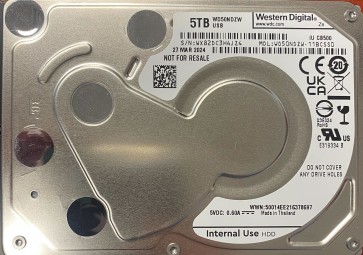
The Western Digital WD50NDZW is a 5TB 2.5-inch portable hard drive utilizing SMR (Shingled Magnetic Recording) technology. It is designed for high-capacity storage in a thin form factor, making it common for external backups and console gaming. Its SMR nature means write redistribution and TRIM operations are different from CMR drives, affecting both failure modes and recovery complexity.
Common Failure Types
1. Mechanical Failure (Head Crash / Stiction)
Symptoms: Clicking, grinding, or whirring noises; the drive is not detected; the drive spins up and then suddenly stops.
Cause: Physical impact, dropping, or manufacturing defect causing the read/write head to contact the platter surface.
2. Firmware Corruption
Symptoms: The drive powers on but is not recognized by the OS; shows incorrect capacity or 0 bytes; becomes stuck in a busy loop (BSY state).
Cause: Improper shutdown, power strikes during firmware update, or natural flash memory degradation within the firmware chip.
3. Logical Damage (File System Corruption)
Symptoms: The drive is detected but shows as unformatted or RAW; files are visible but cannot be opened; folders display as empty; bad blocks in certain areas only.
Cause: Unexpected disconnection, software crash, virus attack, or partial overwrite of critical file system metadata.
4. USB Bridge / PCB (Electronics) Failure
Symptoms: The drive is completely dead (no LED, no motor spin); no reaction when plugged in; Device Manager shows an unknown USB device.
Cause: Static discharge, USB port short, power fluctuation, or burnt USB bridge controller chip.
5. Bad Sectors / Media Degradation
Symptoms: The drive works but with frequent read/write errors; very long file transfer times; chkdsk reporting pending or reallocated sectors; SMART count Critical for Reallocated Sectors.
Cause: Aging, natural sector wear, head damage, or sustained overheating.
Potential Recovery Paths
Professional Service
For Mechanical / Firmware / Electronics: Required. Look for a lab with a Class 10 cleanroom for electronic and mechanical repair. Technicians must have WD-compatible hardware tools (e.g., PC-3000, DeepSpar) to handle the SMR-specific firmware and convert it to user data. Expect costs ranging from $400 to $3000 depending on the damage.
For Logical / Bad Sectors: Professional tools (e.g., R-Studio with disk imaging) in a clean environment can create a block-level clone, bypassing bad blocks and fragmentation caused by SMR write patterns.
DIY Methods (Only for Logical Failure or Bad Sectors)
1. Data Recovery Software: Use R-Studio, DMDE, or UFS Explorer. Image the drive to another healthy hard drive first using the software’s imaging mode. Do not work directly on the failed drive.
2. File System Repair: If the drive is RAW or the partition is missing, recover data before any repair with chkdsk. Use TestDisk for partition table fixes only on the image file, not the live drive.
3. SMART Monitoring: Use CrystalDiskInfo or GSmartControl to assess failure progress. If Reallocated or Pending Sectors increase, stop all DIY attempts and consult a professional.
What Not to Do
– Do not run chkdsk /f on a drive with unusual noises or pending bad blocks; this can push the head over failure zones and scratch the platter.
– Do not freeze drives with noise or clicking; this causes internal condensation and irreversible damage through corrosion.
– Do not attempt to open the drive enclosure (casing or HDA) in a regular environment; any one particle can cause an instant head crash.
– Do not use automatic repair tools (various uninstaller shredding software, or Windows Disk Cleanup) on a drive you still need data recovered from.
– Do not ignore clear signs of failure like slow transfer or clicking; continued use increases the difficulty and cost of professional recovery.
Summary
The WD50NDZW is an SMR-based portable HDD susceptible to mechanical, firmware, electrical, and logical failures. Noisy or clicking drives require professional cleanroom opening. Logical corruptions and bad blocks can be DIY-recovered via imaging, but hardware or firmware issues require proper laboratory tools and experience. Avoid all software or hardware indiscriminate repair steps; the first action is often the most critical for a successful recovery outcome.