
Data recovery on vintage hard drives like the Western Digital WD8000AARS starts with identifying the failure type – electronic, firmware, or mechanical. Each requires a different approach, and misdiagnosis can make things worse. Here’s a quick guide to help you assess your situation and decide on the next step.
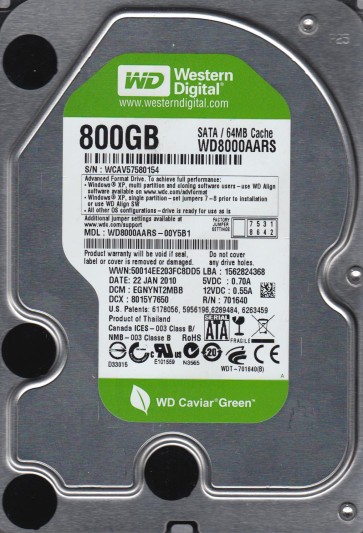
The Western Digital WD8000AARS is a 2TB 3.5-inch hard disk drive from the Caviar Green series, known for its 5400 RPM spindle speed, advanced format (4K sectors), and IntelliPower technology which prioritizes energy efficiency. Its high capacity and low power draw made it a popular choice for external storage and archival setups. However, the advanced format and power management features create specific failure signatures distinct from older drives.
Common Failure Types
1. Mechanical Head Crash
Symptoms: Loud clicking or grinding noises, repeated click of death, drive not spinning up, or being detected as an unknown device with zero capacity.
Cause: Physical contact between the read/write head and the platter surface, often triggered by physical shock, sudden power loss, or degradation of the head actuator arm.
2. Firmware Corruption (Module Issues)
Symptoms: Drive spins up but is not recognized by the BIOS or OS, shows incorrect capacity (e.g., 0GB or 2TB displayed as another size), or fails to load SMART data. Slow performance and bad sector remapping errors can also be firmware-related.
Cause: Corrupted SA (Service Area) modules due to unstable power, gradual degradation of flash memory storing firmware, or after an incomplete firmware update.
3. Stiction (Head Parking Failure)
Symptoms: Drive powers on but the platters do not spin, or a brief spin attempt is followed by an immediate stop. No clicking sound is present.
Cause: In Caviar Green drives, the head can stick to the platter surface due to a loss of lubricant or contamination. The drive’s low power ramp design may also contribute to this condition after long idle periods.
4. Bad Sectors / Pending Sector Count Increase
Symptoms: System freezes when accessing certain files, file copying errors, chkdsk or S.M.A.R.T. errors (e.g., Reallocated Sector Count, Current Pending Sector), and gradual performance degradation.
Cause: Deteriorating platter surface, aging magnetic media, or head weak spots. Advanced format drives often show their first bad sectors near the outer diameter or after extended periods of low workload.
5. Electronic Failure (PCB Board)
Symptoms: Drive is completely dead (no spin, no sound) when powered on. No detection in any system. The S.M.A.R.T. circuit may show a visible burnt component or smell.
Cause: Power surge, lightning strike, or a failed voltage regulator/controller chip on the printed circuit board. This is often catastrophic but can sometimes be resolved without opening the drive.
Potential Recovery Paths
DIY Methods
Bad Sector Mitigation (Logical Issues Only): If the drive clicks or is failing mechanically, do not attempt DIY. For pending sectors in a functioning drive, use a tool like HDD Regenerator or ddrescue (Linux) to create a sector-by-sector image to another healthy drive. This isolates errors without further stress. Do not run chkdsk /f on a failing drive as it can cause more heads to crash.
PCB Swap (For Electronic Failure Only): If the drive has no electronic damage and is completely dead, you may replace the PCB board. This requires finding an exact donor board (same model, same DCM number on the sticker) and transplanting the original drive’s 8-pin ROM chip (often a 25Pxx series) from the donor board. Without the ROM swap, the replacement board will interpret the head map incorrectly and cause damage. This is a high-risk procedure requiring a hot air station and fine-point soldering.
Frozen Technique (For Stiction): For stiction only (no clicking), placing the drive in a sealed antistatic bag and then inside a freezer for 1-2 hours can sometimes help loosen the parked head. Quickly power up the drive immediately after removal from the freezer. This is a last-resort method and may introduce moisture condensation. It should only be used for critical data recovery if professional help is unavailable.
Professional Services
Head Stack Replacement: For mechanical crashes or head stiction, a cleanroom (Class 100 or better) is required. The drive must be opened to replace the entire head assembly with a matched donor set. This is not a DIY task due to the risk of contamination and the need for precise alignment.
Firmware Repair: For module corruption, professional tools like PC-3000, MRT, or DeepSpar can directly access the Service Area, rebuild corrupted modules, and fix translator issues. This fixes capacity detection errors and restores access to data.
Platter Transfer: If the platter surface is damaged or the spindle motor is seized, the platters must be physically removed and installed into a donor chassis. This requires specialized tools and extreme precision. Only certified labs should perform this.
What Not to Do
1. Do not open the drive. Even a single speck of dust can cause a head crash on the platter surface. The internal environment is hermetically sealed and must remain clean. Any opening outside a cleanroom ruins the drive for professional recovery.
2. Do not apply power repeatedly. If the drive clicks or does not spin, repeatedly power cycling can break the head off the slider or damage the preamplifier on the head assembly, making recovery exponentially more expensive.
3. Do not use data recovery software on a clicking or grinding drive. Running tools like EaseUS, Recuva, or TestDisk on a mechanically failing drive will cause the head to scrape the platter, destroying data permanently. Only use imaging tools on drives that are fully detected and quiet.
4. Do not freeze a drive with clicking noises. Freezing is only applicable for stiction (no spin). For clicking heads, freezing will cause the lubricant to thicken and potentially shatter the fragile head sliders. You will permanently destroy the heads.
5. Do not perform a PCB swap without transferring the ROM chip. A donor board from the same model number but different microcode will misalign the head geometry, causing immediate head crash and permanent data loss. Always match the DCM number and swap the ROM chip.
Summary
The Western Digital WD8000AARS is vulnerable to thermal-induced stiction, firmware corruption from power instability, and long-term bad sector growth due to its power-efficient design. For logical or pending sector issues, a careful image via ddrescue or similar tool is the primary DIY path, but only if the drive remains silent and stable. Mechanical noises or complete failure to spin require immediate professional intervention. Do not open, power cycle, or expose the drive to freezing or software scanning without first diagnosing the failure type. Professional recovery for this model typically costs between $300 and $2000 depending on the complexity, with mechanical and platter transfers being the most expensive. Always power down the drive immediately upon hearing or detecting a failure to maximize your chance of full recovery.